5
ENGLISH
4.11 Starting and Shutting Down the TRIOS System
Please follow the steps below to start TRIOS system for the first time:
Step 1: Turn on the PC or MOVE+
Start the 3Shape software if it is not starting automatically.
Step 2: Follow the on-screen instructions to configure user settings.
Step 3: Follow the on-screen instructions for configuring TRIOS system settings,
such as connecting the TRIOS 5 scanner.
When using theTRIOS system, theuser is guided bymessages shown intheTRIOS software.
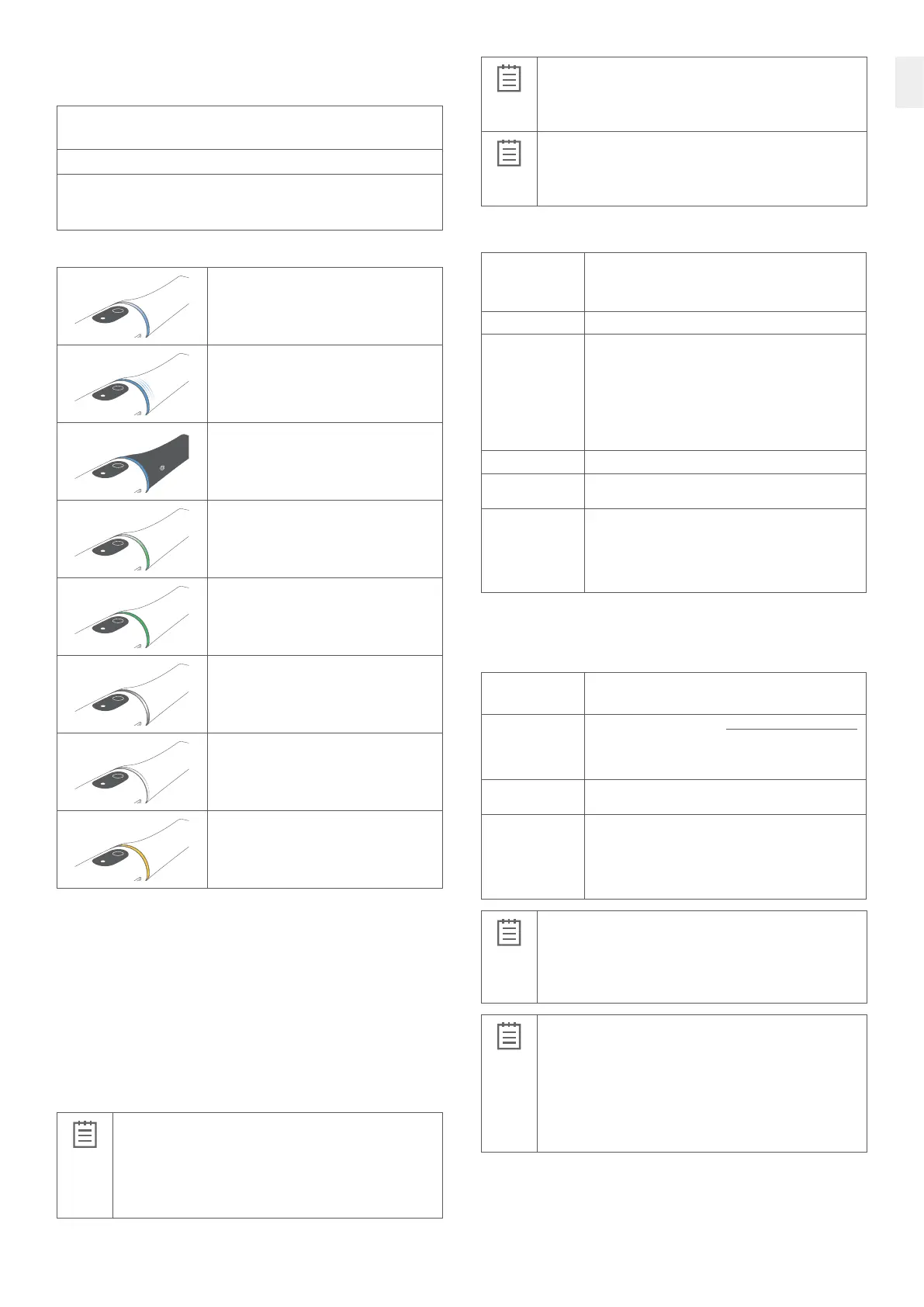
The TRIOS scanner has an LED ring which indicates the status of the scanner:
A rotating blue light indicates that the TRIOS scanner
is waiting for the TRIOS software to connect to it.
Three blue blinks indicate that the TRIOS scanner is
searching for a scanner application to connect to.
A constant blue light indicates that the TRIOS
scanner is connected to the system, but no
scanner tip is mounted.
A rotating green light indicates that the TRIOS
scanner is heating the TRIOS scanner tip.
A constant green light indicates that the TRIOS
scanner is ready to scan.
A rotating white light indicates that the TRIOS
scanner is waiting for scan data.
A constant white light indicates that the TRIOS
scanner is scanning. The light intensity decreases
if the TRIOS scanner loses scan focus.
Solid yellow indicates that the battery is low.
Scanner operation
The scanner has two buttons for operation; the button closests to the tip controls scanning
operation, the button farthest from the tip controls navigation.
Power saving
The TRIOS scanner has integrated power control, and will go into sleep mode when not used,
unless the software is on the Scan page.
4.12 Starting TRIOS Online Help
The TRIOS online help can be started from the TRIOS software by clicking on the Help
button and choosing User Manual.
4.13 Storage, Operating and Transport Conditions
Operating Conditions
Ambient temperature range: +15 – +26 °C (+59 – +78.8 °F)
Relative humidity: 10 – 85 % (non-condensing)
Atmospheric pressure: 800 – 1100 hPa
The TRIOS scanner should be used in an environment maintaining
a consistent room temperature.
Storage Conditions
Ambient temperature range: -10 – +50 °C (+14– +122 °F)
Relative humidity: 10 – 85 % (non-condensing)
Atmospheric pressure: 800 – 1100 hPa
Transport Conditions
Ambient temperature range: -10 – +50 °C (+14– +122 °F)
Relative humidity: 10 – 85 % (Non-condensing)
Atmospheric pressure: 620 – 1200 hPa
4.14 Technical Specifications
Light source
specifications
Donot view directly withoptical instruments, such asspectacle
microscopes. Theproduct complies withEN 62471
(Photobiological safety oflamps andlamp systems andUL-standard
US code offederal regulations, 21CF 1040.10 and1040.11.)
Sterilization Sterilize by autoclave (see section 7 for autoclave specifications)
Power input C2BP: Battery charger
Protection class: IP20
Insulation class: Class II
L1-2 scanner. Wireless, battery powered
3Shape TB-04 Battery:
3,6 V, 3300 mAh, 12 Wh
Wireless TheTRIOS scanner contains an IEEE 802.11ac module
Wireless
Transmit Power
Maximum 100 mW
Wireless
Frequency Band
5.15-5.25 GHz
5.745-5.805 GHz
Supported channels: 36, 40, 44, 48, 149, 153, 157, 161
(the actual frequencies are dependent on local regulations
and the configuration of the product.)
IT Network equipment
The TRIOS device can be connected to a IT Network for the purpose of internet connection,
data transmission between scanner and PC, and communication with other 3Shape products
on an IT Network.
Network
characteristics
IPv4 or IPv6
Static or dynamic address.
Network
configuration
Firewall open for ports found on https://help.3shape.com/enUS/
under Network Connections.
For further information on network configuration, contact
3Shape Support.
Security
specification
It is recommended to use password protection on wireless network.
Connectivity
specification
RJ45, IEEE 802.3 10/100 /1000BASE-T, CAT5
(When in combination with TRIOS MOVE+)
All RJ45 sockets provide galvanic isolation between the device
and IT Networks by a network isolator.
IEEE 802.11ac
IMPORTANT NOTICE
The device can be connected to an IT Network to transmit and receive
data via the network. Integration of the device into an IT Network may
lead to unknown IT security risks for users of the device or risk
of compromising the stability or ability to use the device.
Network security is the responsibility of the customer’s organization.
IMPORTANT NOTICE
If the TRIOS intraoral scanner system is connected to IT Network equipment,
it is strongly recommended to apply network security measures and to analyze,
evaluate, and control the IT network.
Analysis of IT Network security measures is recommended for:
• Changes to network configuration
• Addition of new devices
• Removal of devices
• Updates and Upgrades to devices
4.15 Electromagnetic Compability
The TRIOS system has been tested according Medical electrical equipment – Part 1-2:
General requirements for basic safety and essential performance– Collateral Standard:
Electromagnetic disturbances– Requirements and tests, EN 60601-1-2 ed. 4.0, 2015 and
EN 60601-1-2 ed. 4.1, 2020.



 To Next Page