9
ENGLISH
5.7 Safety when Scanning
CAUTION
The TRIOS scanner is a highly precise optical instrument and must be handled
carefully. Do not drop, shake or bump the TRIOS scanner, as these actions
could cause it to break or malfunction. Follow these guidelines:
• Always return the TRIOS scanner to its mount when not in use.
• Do not submerge the TRIOS scanner in any liquids.
• Do not place the TRIOS scanner on heated or wet surfaces.
• Grip the TRIOS scanner firmly during scanning and when removing/
returning it to its mount.
IMPORTANT NOTICE
The TRIOS scanner will get warm during use. This is normal but not part
of any patient treatment.
CAUTION
The TRIOS scanner tip is fragile and contains a delicate window.
To avoid damage to the tip and window, take care not to bump the tip
onto the patient’s teeth or restorations.
CAUTION
When the TRIOS system is used for pediatric patients, please pay extra
attention while scanning the patient.
5.8 Epileptic Seizure
WARNING
There is a risk of injuries if the scanner tip is bitten. As a direct effect of an
epileptic seizure, various degrees of involuntary biting can occur. Avoid any
patient biting on the scanner tip or bumping the scanner tip into the teeth.
5.9 Protection from Overheating
WARNING
The scanner may become uncomfortably warm and eventually shut down
if the ventilation is obstructed.
The ventilation openings in the rear of the handheld scanner must never
be blocked or obstructed.
5.10 EMC Safety
WARNING
Use of accessories, transducers, and cables other than those specified or
provided by the manufacturer of this equipment could result in increased
electromagnetic emissions or decreased electromagnetic immunity of this
equipment and result in improper operation.
WARNING
Use of the TRIOS system adjacent to or stacked with other equipment
should be avoided because it could result in improper operation. If such
use is necessary, the TRIOS system and the other equipment should be
observed to ensure normal operation in the used configuration.
Portable RF communications equipment
WARNING
Portable RF communications equipment (including peripherals such as
antenna cables and external antennas) should be used no closer than 30 cm
(12 inches) to any part of the TRIOS system, including cables specified by
the manufacturer. Otherwise degradation of the performance of system
may occur.
6. TRIOS System Accessories
6.1 Sleeve
The TRIOS Sleeve is a protective barrier to minimize the risk of microbial cross-contamination.
For mounting, please see the TRIOS Sleeve instructions for use.
CAUTION
It is recommended to use the TRIOS Sleeve to cover the TRIOS scanner
during patient examination.
WARNING
The TRIOS Sleeve must only be used once to avoid cross-contamination.
6.2 TRIOS MOVE+
The TRIOS MOVE+ is intended to be used for visualizing 3D digital images of the topographical
characteristics of teeth captured by an intraoral scanner. For information on TRIOS MOVE+,
please see the TRIOS MOVE+ instructions for use.
7. Cleaning, Disinfection, and Sterilization
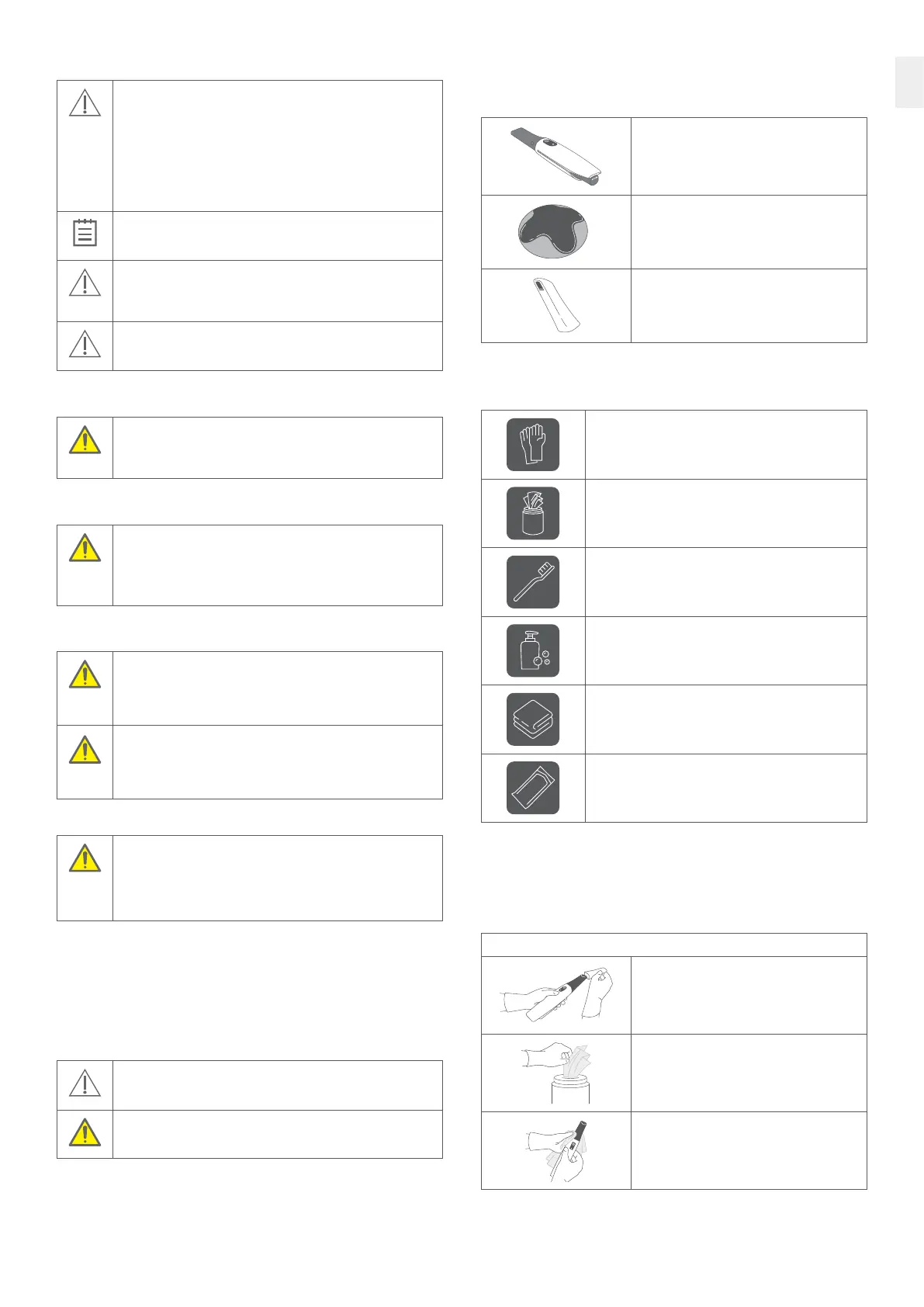
Thefollowing TRIOS system items shall be cleaned and disinfected or sterilized.
Instructions are described in the following sections: 7.1, 7.2 and 7.3.
TRIOS scanner body and mirror housing
Cleaning and disinfection.
See section 7.1
Pod
Cleaning and disinfection.
See section 7.2
TRIOS scanner tip
Cleaning and sterilization.
See section 7.3
Accessories and materials: Cleaning and disinfection
Thefollowing Accessories and materials are recommended to use
for cleaning and disinfection.
Examination gloves
Cleaning/disinfectant wipes containing Isopropanol (17.2%)
and Ammonium Chloride
E.g. CaviWipes.
Soft bristled brush
E.g. Curaprox ultra soft toothbrush.
A non-enzymatic pH neutral detergent
E.g. Intercept.
Non-woven swab
E.g. Abena non-woven swabs.
FDA-clearedsterilizationpouch
7.1 TRIOS Scanner Body and Mirror Housing:
Cleaning and Disinfection
Clean and disinfect the TRIOS scanner body and mirror housing after each patient treatment
(step 1-4). Also note that the scanner window is a delicate optical component and should be
handled with extra care during cleaning and disinfection (see below).
Step 1: Remove gross contaminants
Wearing gloves, remove TRIOS Sleeve and TRIOS
scanner tip from TRIOS scanner body.
Take a CaviWipe.
Wipe the surface of the TRIOS scanner body
and mirror housing with a CaviWipe to remove
any gross contaminants.



 To Next Page