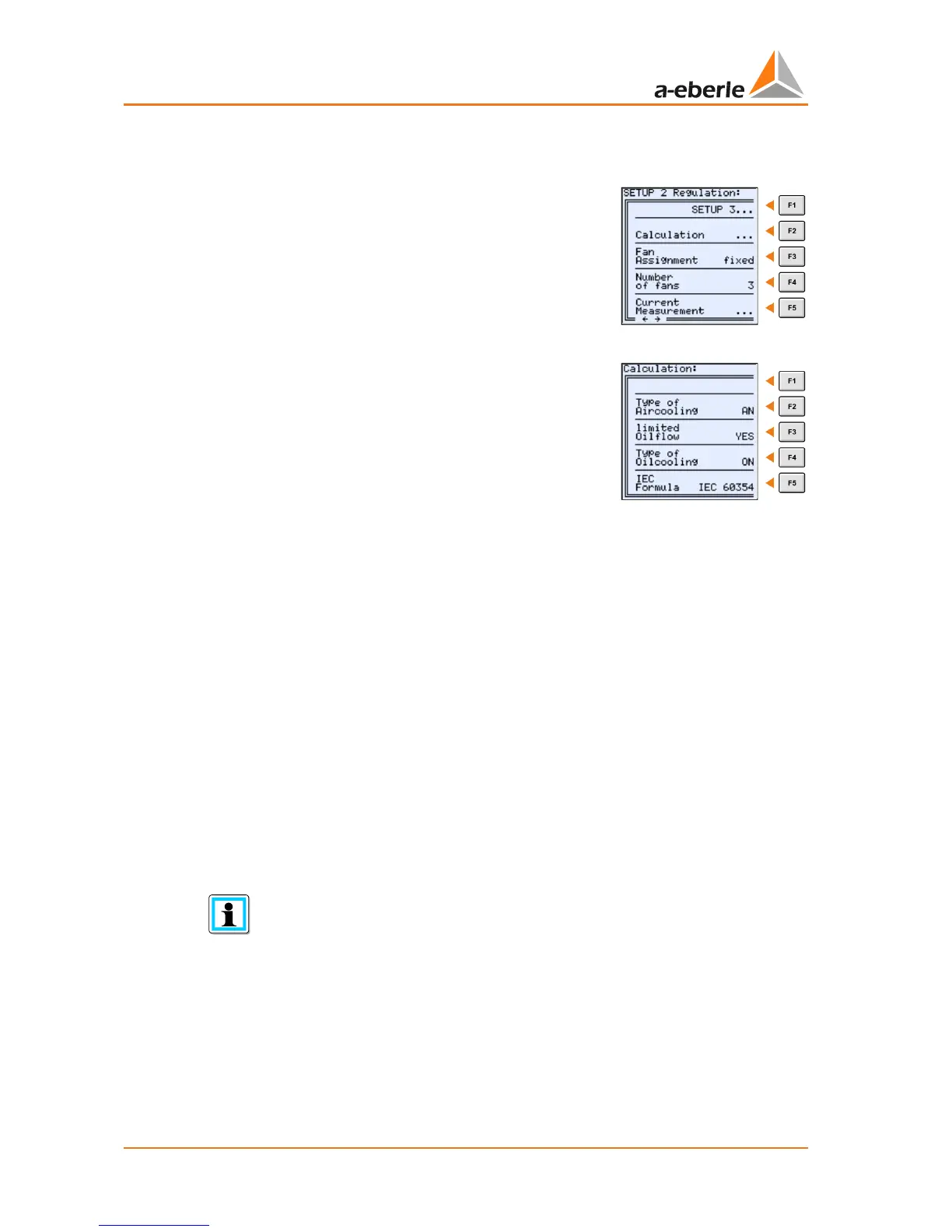
5.3 SETUP 2: Regulation
SETUP 2 is accessed by pressing the '→' arrow or <F1> in
‘SETUP 1’.
Calculation 5.3.1
By pressing the <F2> button the menu Calculation set-
tings are reached. Here you are able to set the type of
cooling and the IEC algorithm that is used for determin-
ing the Hot spot temperature.
Type of air cooling (outer cooling medium)
The following options are available:
0 AN: Stands for Air Natural, meaning that the transformer does not have any fans and
that air is moved by convection.
0 AF: Stands for Air Forced, meaning that the transformer has fans
Limited oil flow
The following options are available:
0 Yes
0 No
This parameter is used in accordance with IEC 60076. It takes into account that the trans-
former has a limited oil flow by design (see also chapter 5.1.1.5). The manufacturer can tell
you if the transformer has a limited oil flow as described in the IEC standard.
Setup the parameter „Limited oil flow“ without knowing the winding design
If now information about the winding design is available the setting „YES“ for the “limited
oil flow” parameter is recommended. This setting will lead during a load increase to a high-
er estimated Hot-Spot Temperature which is the saver variant.


 To Next Page