HW © 2015 Aaronia AG, DE-54597 Strickscheid, www.aaronia.com, mail@aaronia.de
14
Manual RF Signal-
Generator
o Styles
> Selects the design of the user interface
• ?
o Help
> Displays the user manual
o About
> Displays information about the software
(2) Device Information
• Device
> Displays a drop-down menu with available generators (connected and powered on
via USB)
• Name
> Displays the name of the currently selected generator
• Serial
> Displays the serial number of the currently selected generator
(3) RF On/Off Button
> Switches the RF output of the currently selected generator on or off
(4) Tabs for Switching Mode
• Manual Mode
> Generates the appointed frequency with the appointed level
• Program Mode
> Run or create batch programs
• Advanced Mode
> This mode is only intended for advanced users
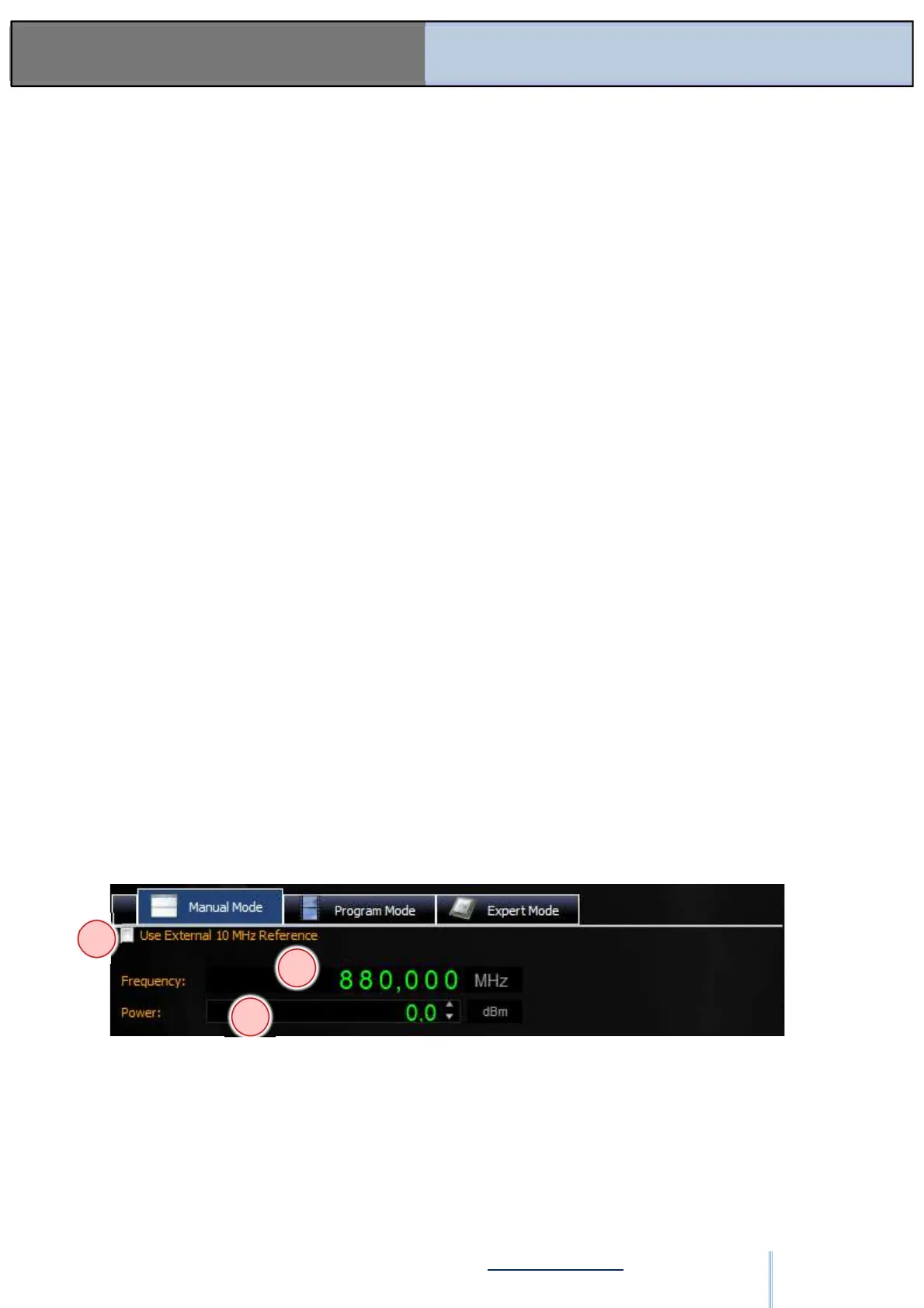
6.3. Manual Mode
Figure: SW-03
(1) An external reference of 10 MHz may be selected here.
(2) Entry of the frequency of the output signal (dependent on generator type).
(3) Signal level.
The signal can be switched on and off at the output using the RF on/off button – refer to
Figure: SW-02 (3).
1
2
3
ООО "Техэнком" Контрольно-измерительные приборы и оборудование www.tehencom.com


 To Next Page