HW © 2015 Aaronia AG, DE-54597 Strickscheid, www.aaronia.com, mail@aaronia.de
20
Manual RF Signal-
Generator
6.5. Advanced Mode
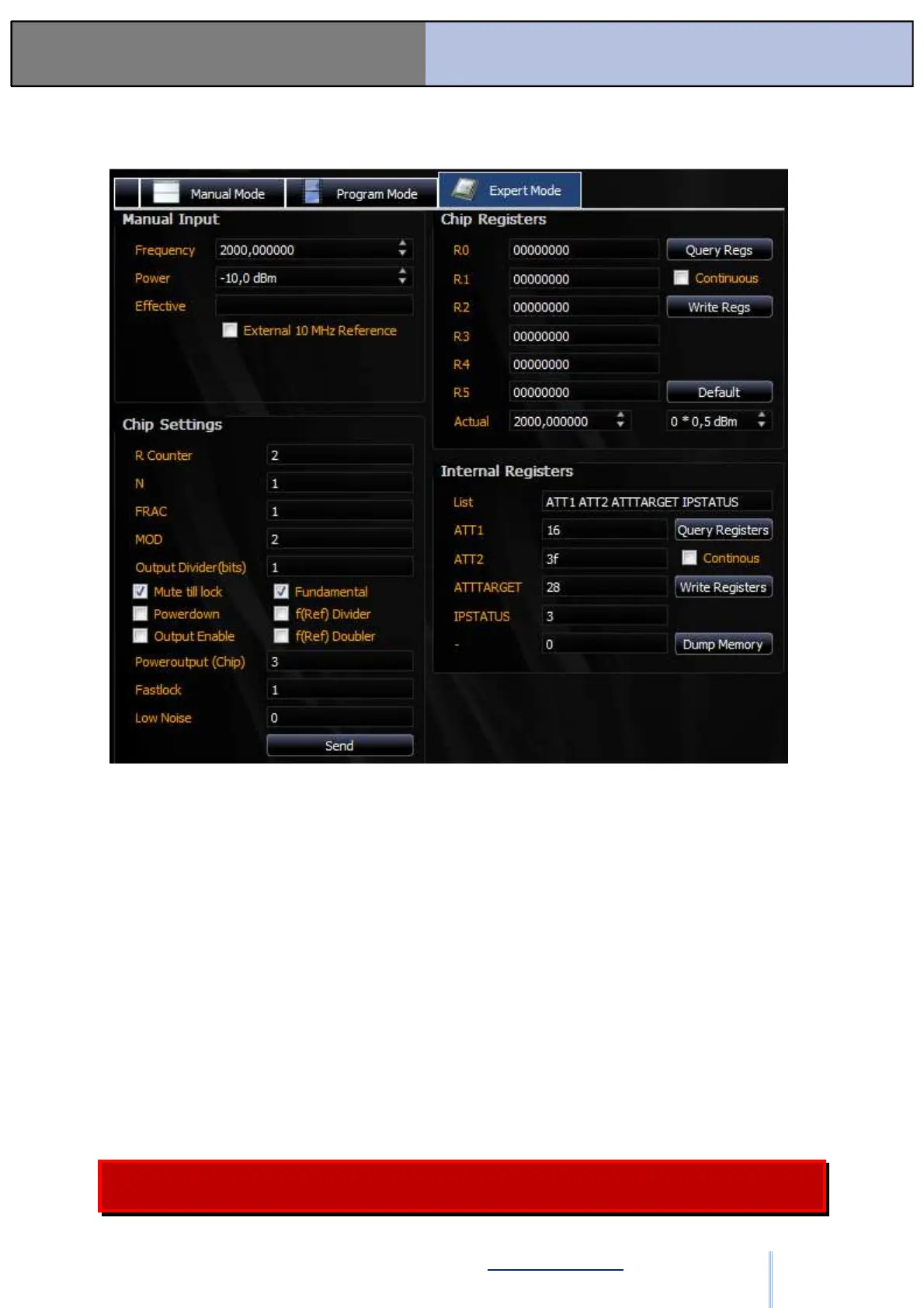
Figure: SW-12
This mode is only intended for advanced users.
With “Manual Input,” you can specify the current frequency and the current level. Pressing
enter sends the data. The actual frequency is displayed under “Effective.”
Under “Chip Settings,” various settings for the chip can be manipulated. The “Poweroutput”
is possibly of interest here. If this is reduced, the overall level of the device can be set
even lower. However, it will lose its calibration in the process. If settings are changed,
then they are transferred by pressing “Send.”
Under “Chip Registers,” you can directly manipulate the register values. With “Continuous,”
you can continuously scan them to see the latest chip settings. The “Chip Settings” are
synchronized with the Register Settings. By pressing Default, all registers are reset to the
default settings.
Under “Internal Registers,” you can observe individual registers of the program sequence
control. With “Dump Memory,” the flash content can be read and saved in a file.
We recommend that only advanced users use this window and only if they are
familiar with the hardware! Aaronia offers no support for the Advanced Mode.
ООО "Техэнком" Контрольно-измерительные приборы и оборудование www.tehencom.com


 To Next Page