HW © 2015 Aaronia AG, DE-54597 Strickscheid, www.aaronia.com, mail@aaronia.de
21
Manual RF Signal-
Generator
6.6. Device Information
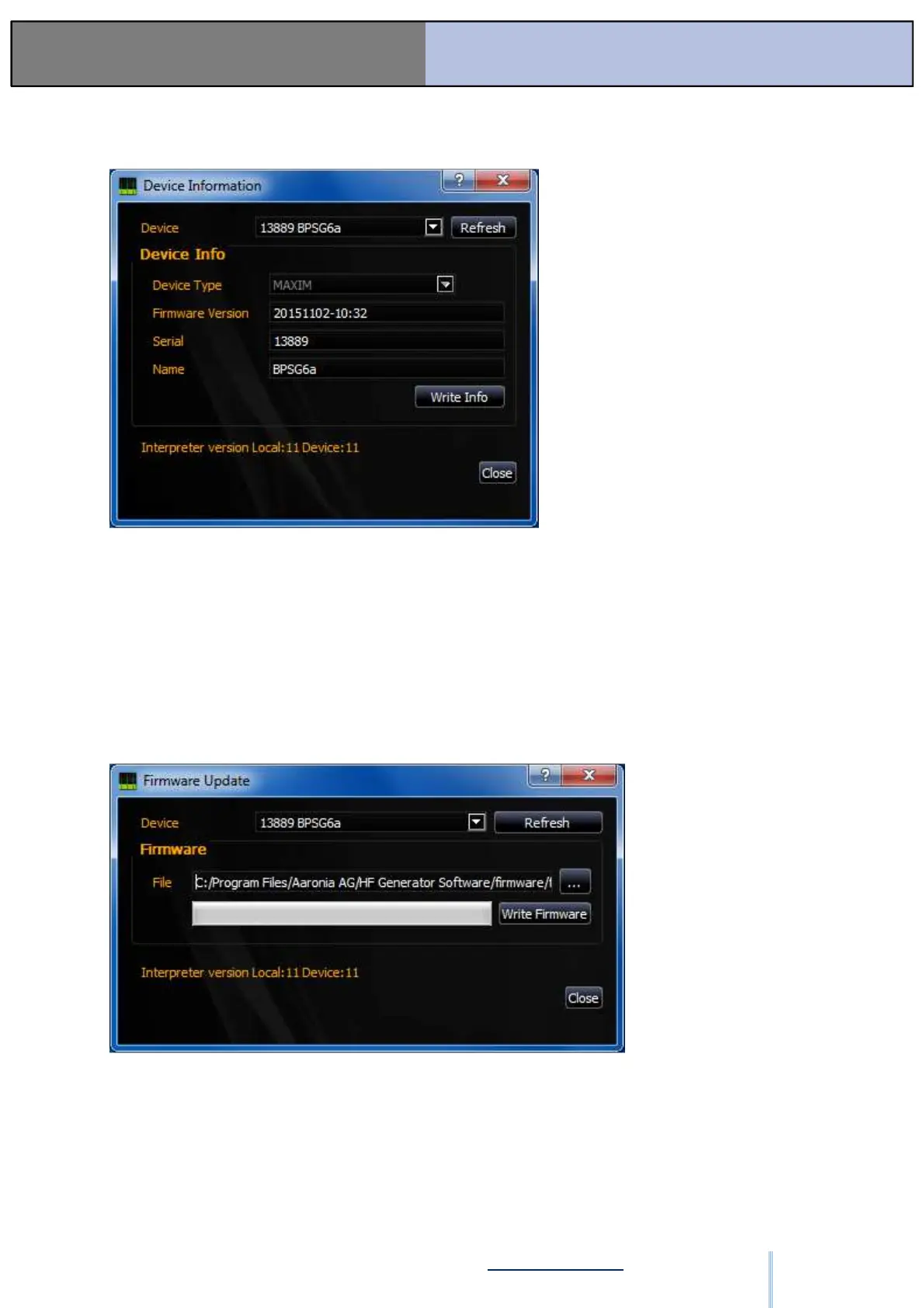
Figure: SW-13
With “Device,” a generator can be selected from the list of available generators. “Refresh”
updates this list.
“Firmware Version,” “Serial,” and “Name” displays the corresponding data of the generator.
The name of the generator can be changed and written with “Write Info.”
In order to guarantee proper functioning, the interpreter version of the software and the
connected generator must be identical.
6.7. Firmware Update
Figure: SW-14
First, close the software. Disconnect the USB connection from all connected generators. Put
the generator to be updated into bootloader mode. Turn on and immediately shut off the
device 3 times consecutively. The generator’s Power LED indicator now lights up solid green.
Connect the USB cable to the generator, and open the software. Open “Firmware Update” in
the “Tools” menu. “Bootloader” should be selected in the “Device” drop-down menu.
ООО "Техэнком" Контрольно-измерительные приборы и оборудование www.tehencom.com


 To Next Page