P. 52 - Chap. 7 Start-up and operation
G
B
ESC
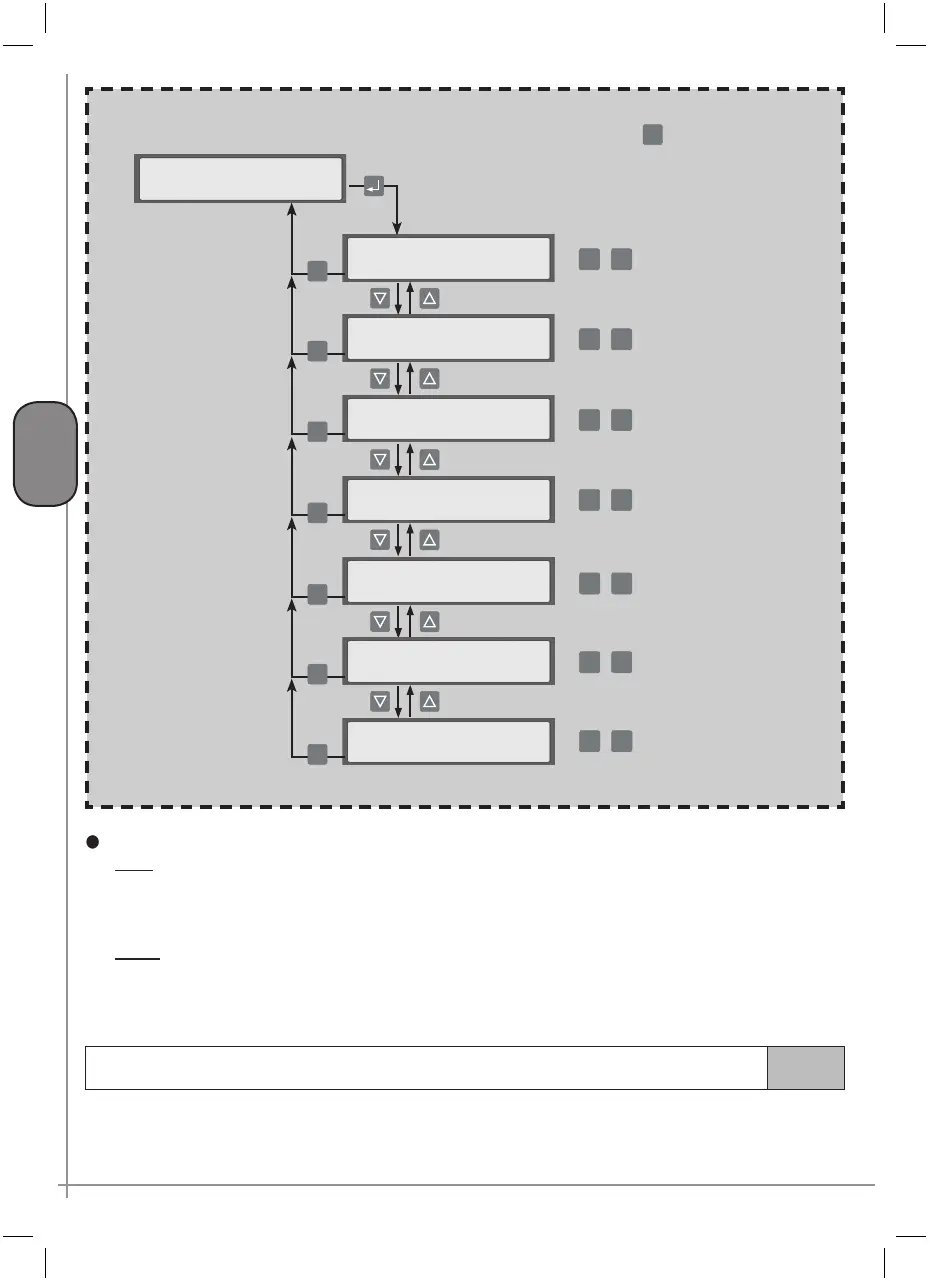
>NETWORK SETTINGS <
compressor ID
n. of service points: X
ESC
Prefill
n. compr. X
ESC
Prefill time
Val.: 5 min
ESC
Max n. compr. ON
n. compr. 4
ESC
Press the K4 key to return to the NETWORK SETTINGS
menu from the submenus
Rotation time
sequence 24 hrs
ESC
Reaction time
delay ON xxx sec
ESC
+
-
+
-
Menu F
+
-
+
-
Reaction times
T ON
When the control system activates a compressor following a reduction in network pressure, timer T
ON is started: at the end of this count, the system checks network pressure to establish whether another
compressor must be started
T OFF When the control system deactivates a compressor following an increase in network pressure, the
T OFF timer is started: at the end of this count, the system checks network pressure to establish whether
another compressor is to be deactivated
7.4.2.5
OPERAT. PARAMETERS menu
This menu is used to make the configuration settings referring to the timings and operating pressure and
timings that regulate unload run and drainage of condensate.
visible only if the
CAN-BUS interface has
been installed
+
-
+
-
Reaction time
delay OFF xxx sec
+
-
ESC



 To Next Page