61
12. Appendix: Permanent magnet synchronous motors (PMSMs)
With PMSMs special attention must be paid on setting the motor nominal values correctly in parameter group 99 START-UP DATA. It is important
that the nominal back-emf of the motor is available, further to ensure good performance a MOTOR PARAMETER AUTO-TUNE (9910=1) must be
performed.
The following table lists the basic parameter settings needed for permanent magnet synchronous motors.
12.1.1. PMSM Motor nameplate data entry.
Enable PMSM
motor control
Enter motor back-
EMF voltage value
Enter Back EMF value into 9905
The phase to phase value (at motor rated Speed) should be obtained from the
motor nameplate or datasheet. If the voltage is given as a proportional value,
such as 103V/1000 rpm in a 3000rpm motor, set 309V here. Sometimes the
value is given as the peak value. In this case divide the value by the square
root of 2 (1.41).
Note: Incorrect value can result in abnormal motor operation (motor vibration)
Enter Motor
Rated Current
Obtained from Motor nameplate (Amps).
Enter Motor
Rated Frequency
Note : The drive uses 9907 to calculate the number of motor pole pairs.
Frequency (Hz) = speed (rpm) x (number of pole pairs) / 60
Enter Motor
Rated Speed
Obtained from Motor nameplate (rpm)
Speed (rpm) = frequency (Hz) x 60 / (number of pole pairs)
Set Motor
Switching Frequency
16kHz provides optimum motor control.
12.1.2. PMSM Motor Auto-tune.
A Motor Auto-tune must be carried out in order to measure the motor electrical characteristics, during the Auto-tune test brakes will be
applied by the drive (unless controlled by other means).
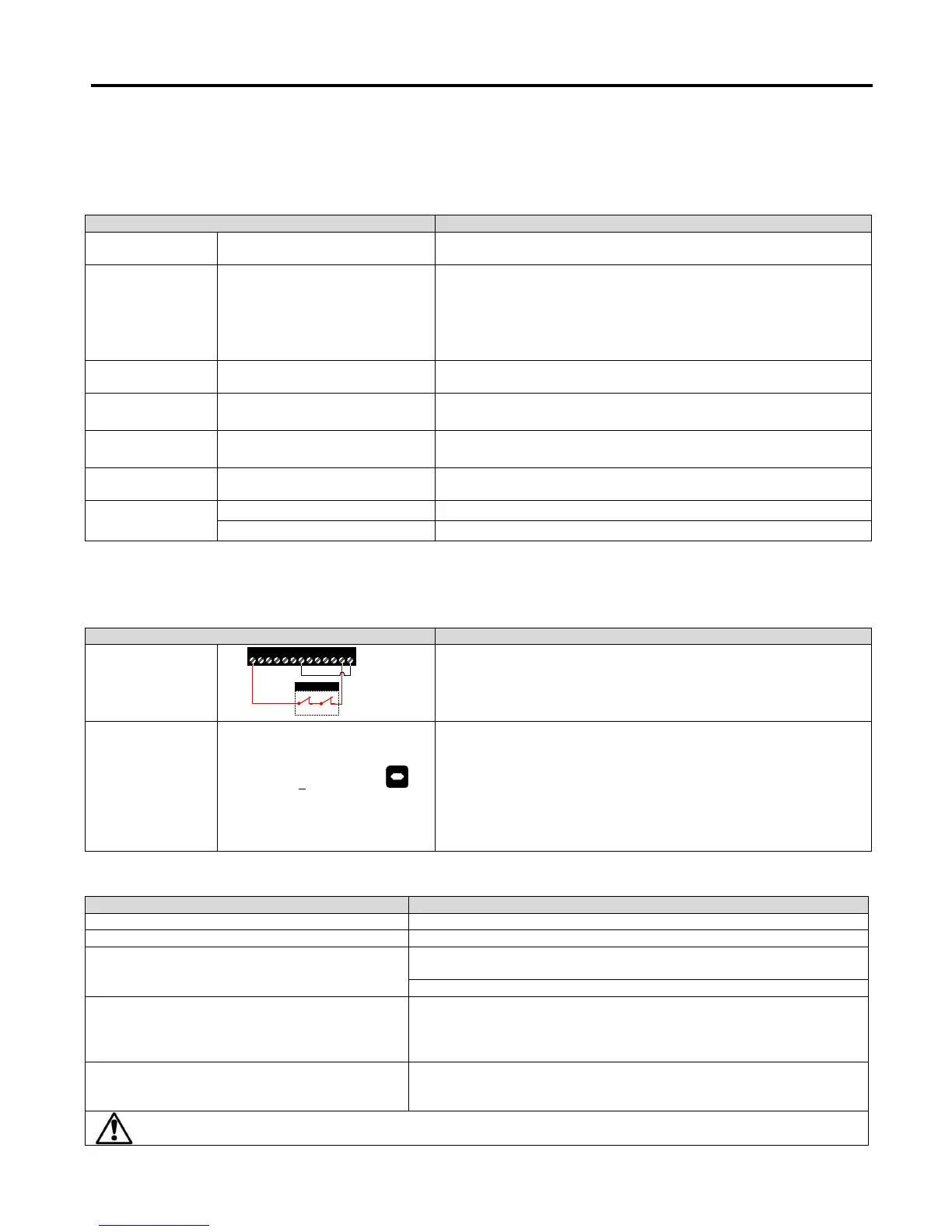
Close Safe Torque
off input connections
1 2 3 4 5 6 7 8 9 10 11 12 13
Safety relay
Drive should now show
Set 9910 to a 1 and press the
button.
The display will show . (Test procedure may take several minutes to
complete).
Once the Auto-tune is completed 9910 will return to 0 and the display will
show .
Note: Motor Auto-tune will need to be repeated if the motor, motor cables,
motor parameters or drive control mode is changed in 9903.
Rotor not orientating on start up
Increase 2103 (Current Magnetising time)
Long delay following Rotor orientation on start up
Decrease 2103 (Current Magnetising time)
Poor torque performance at low speed
Increase value in 2110 (Boost current level) and 2111 (Torque boost frequency
limit)
Suitable starting values are 25% (2110) and 10% (2111)
Motor Vibration/trips/Cogging at low speed
Check correct settings of motor nameplate data.
Check correct value of 9905 (Motor Back EMF voltage).
Reduce value of 2301 (Vector Speed Gain)(As much as 50% reduction in some
instances)
Check correct settings of motor nameplate data.
Check correct value of 9905 (Motor Back EMF voltage).
Check Correct setting of 2110 and 2111.
Care should be taken not to apply to high of a value in 2110 and 2111 as excess motor heating may result.


 To Next Page