36
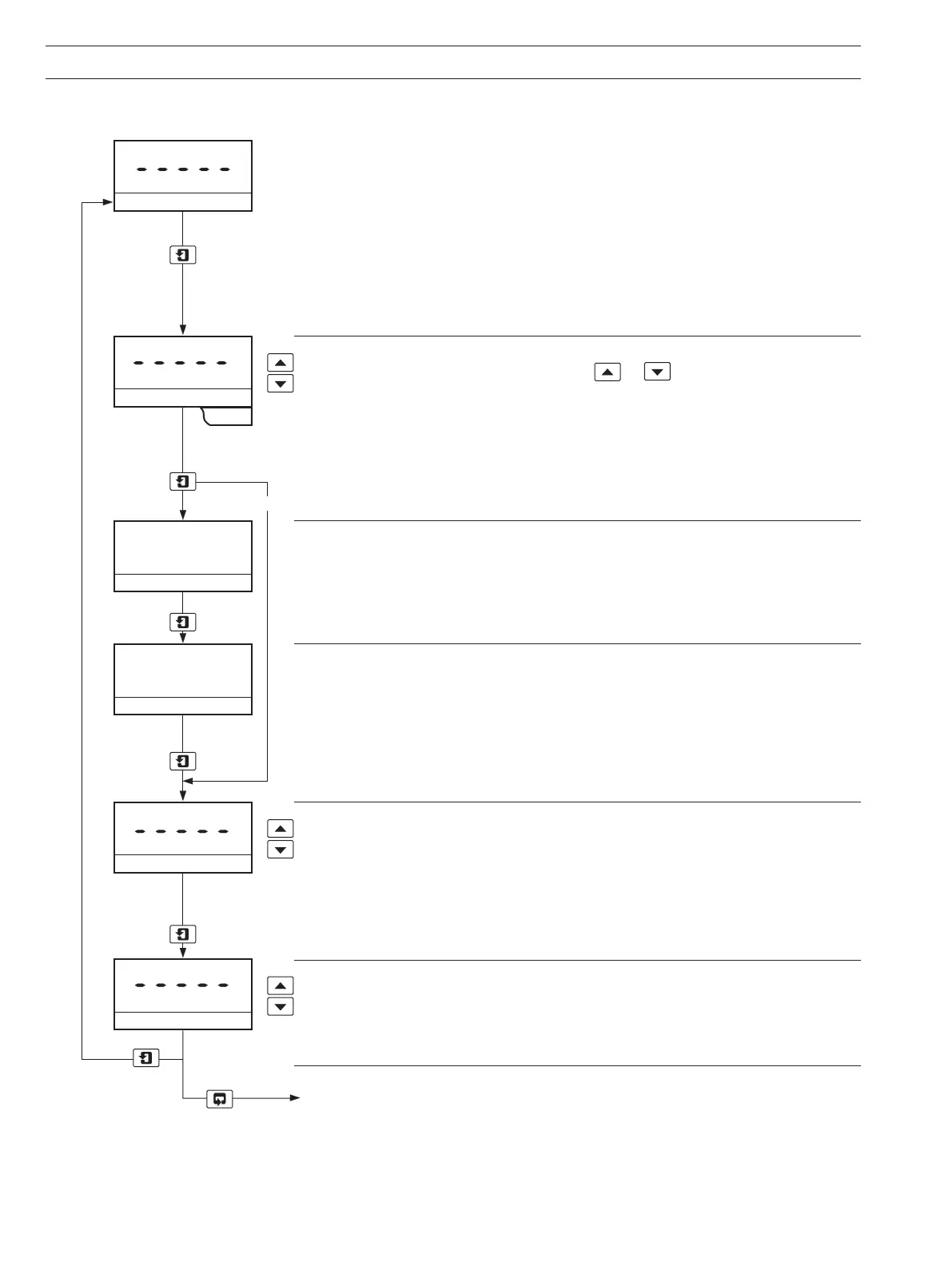
ELECTRICAL CAL
Calibrate No
xxx.x
mV Zero (0.00mV)
xxx.x
mV Span (10.00mV)
Adjust RTX Zero
Adjust RTX Span
Yes No
Yes
Notes.
1) The 4689 instruments incorporate a two-point calibration sequence requiring both
zero and span inputs for a calibration. It is not possible to adjust the range zero or the
range span scale points independently.
2) The instruments are fully calibrated before despatch and should not normally require
further calibration.
Select Calibration
Select the calibration requirement using the
or keys.
Calibrate No (default) skips to Adjust RTX Zero frame.
Calibrate Yes enables zero and span electrical calibrations to be carried out.
Advance to next parameter
Calibration Range Zero (80 or 85% H2 in Air)
Apply a signal input equivalent to %H2 IN AIR range zero (0.00mV).
Allow the instrument to stabilize.
.
Advance to next parameter
Calibration Range Span (100% H2 in Air)
Apply a signal input equivalent to %H2 IN AIR range span (+10.00mV).
Allow the instrument display to stabilize.
Advance to next parameter
Adjust Retransmission Zero
Adjust the retransmission zero (e.g. 4.00mA) to the appropriate zero value.
The retransmission zero signal is either 85% or 80% H2 in Air as selected in Set Up
Outputs Page.
Allow the output signal to stabilize.
Advance to next parameter
Adjust Retransmission Span
Adjust the retransmission span (e.g. 20.00mA) to the appropriate maximum value.
The retransmission span signal corresponds to 100% H2 in Air.
Allow the output signal to stabilize.
Return to Operating Page.
10.1.4 Electrical Calibration Page (UPPER DISPLAY)
...10 PROGRAMMING


 To Next Page