GUID-0F99AFF8-EEF0-4D81-80DD-72CF8104F053 V2 EN
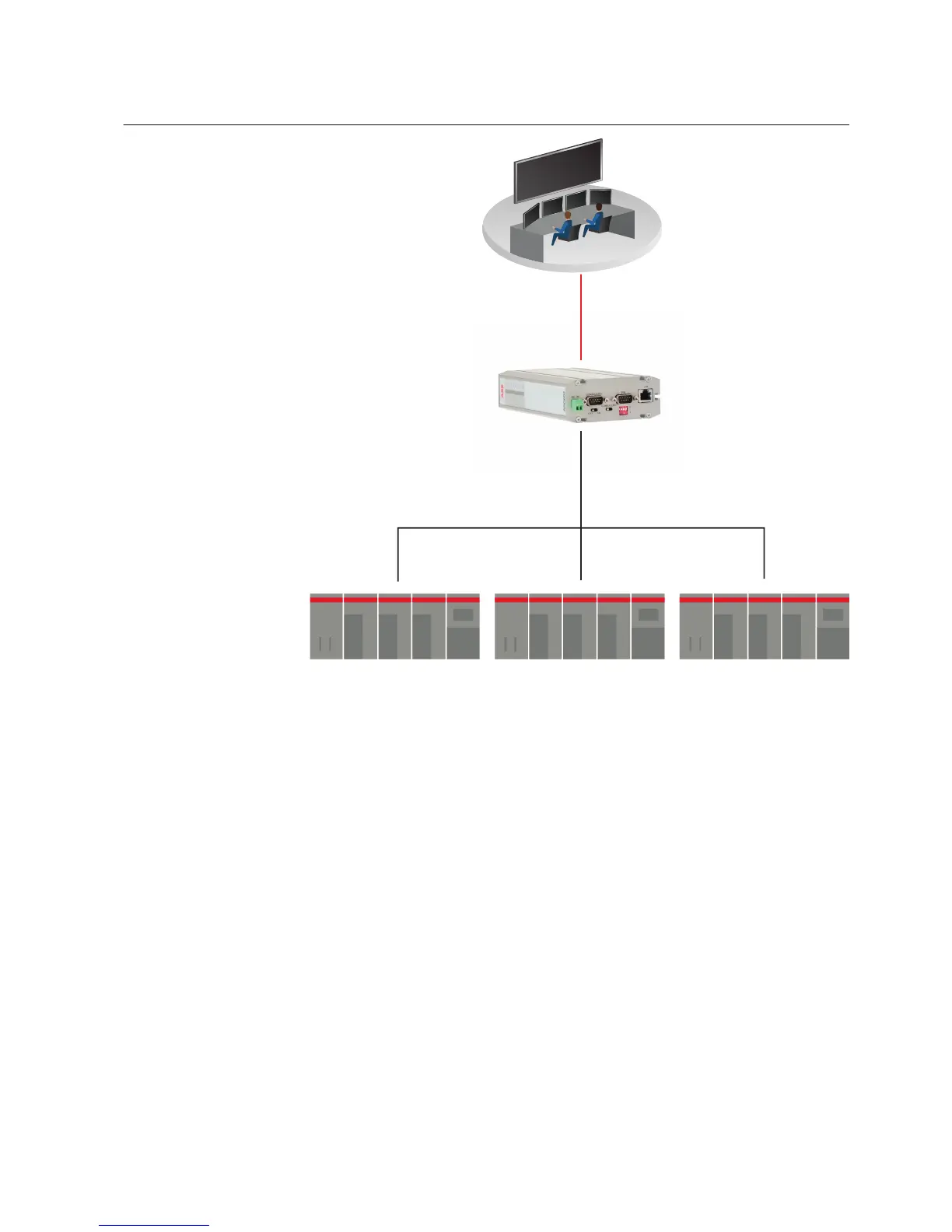
Figure 6: Network master to serial slaves mode
In that mode, the device acts like network server where masters (clients) can connect
(the default port being 502) and transmit Modbus requests. The device makes
conversions between network and serial protocols. If the slave does not reply during
defined timeout or if the reply is corrupted, the device sends “gateway exception
message” back to the master if the exception generation is enabled. Otherwise, the
reply is returned. Multiple masters can connect simultaneously to the Gateway, which
handles the multiplexing between masters.
9.3 Configuring Modbus modes
9.3.1 Configuring the serial master to network slaves mode
1. In the left pane, under Serial Port and I/O, click Modbus Gateway (RSx).
2. Set Enable Modbus gateway to Yes.
3. Set Gateway mode to Serial master to network slaves.
1MRS758460 B Section 9
Modbus application settings
ARG600 Dual SIM Variant 35
User Manual



 To Next Page