• Column sort
• Find
3.2.5 Blocking Display
The Blocking Display summarizes the present blocking situation of signals in the
supervised process. Each signal is presented as a signal row, which describes the signal
in the process. The signal text row normally consists of a signal text and a group of check
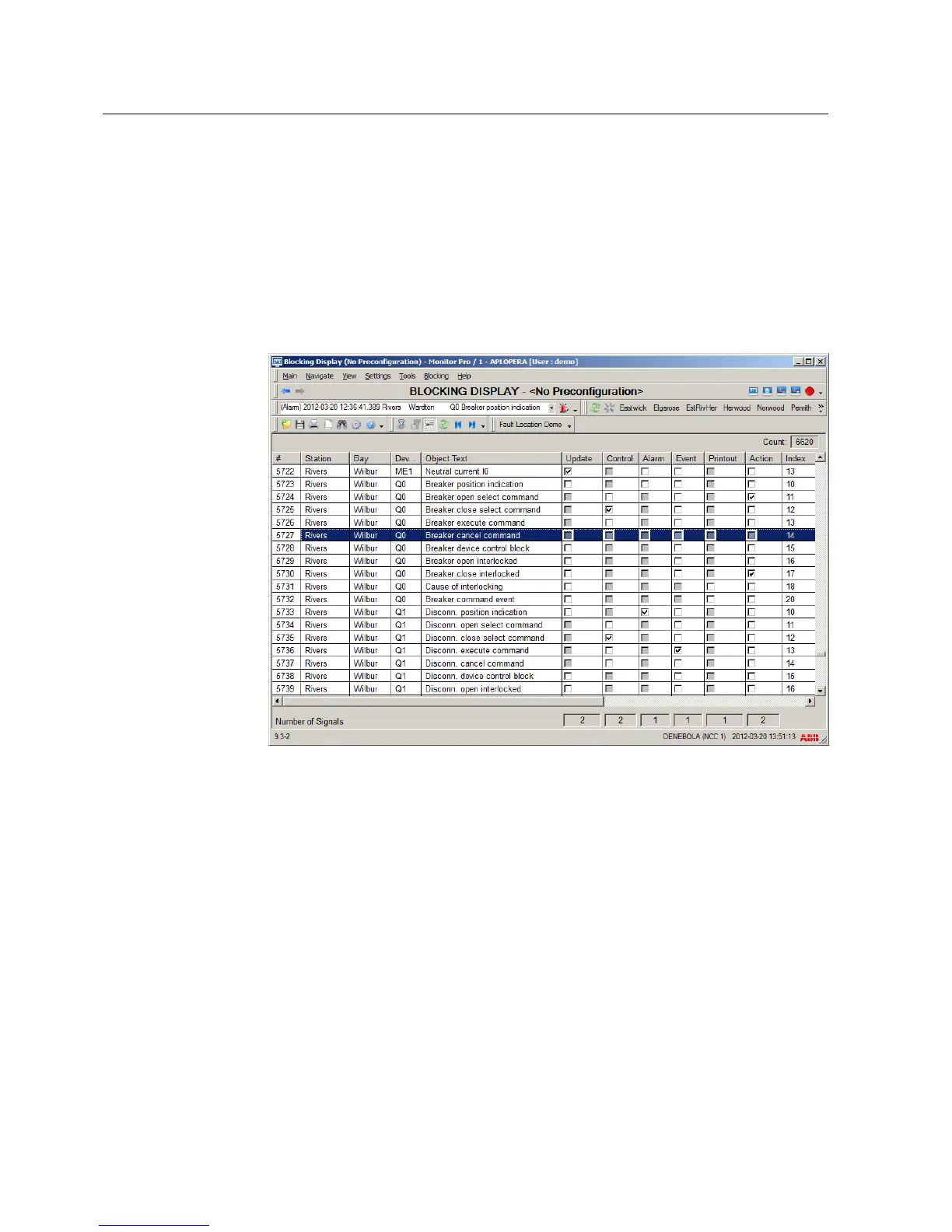
boxes indicating the blocking state. Figure 3.6 shows the Blocking Display main view.
Figure 3.6: The Blocking Display main view
The Blocking Display contains of the following features and options:
• Selection of signal(s) for blocking/deblocking
• Blocking Display setting tool for the view layout
• Printout of blocking situation
• Event and printout enabling/disabling
• Authorization support
• Possibility to copy contents on the clipboard of the operating system
• Help in all dialogs (the complete Operation Manual will be opened)
• Locate object in DMS
• Locate object in Monitor Pro
• Column sort
• Find
14
1MRS757729
MicroSCADA Pro
SYS 600C 2.93
Product Guide


 To Next Page