3.3 Historian
Historian is a subsystem dedicated for fast and efficient data logging, data refinement
and information visualisation. The flexible Historian can store all process data for long
periods and refine the data into meaningful information. This gives a clear view of the
situation in the primary process, allow for optimized utilization of energy and equipment
as well as produce reports and statistics. The information is visualized in the form of
various graphs, trends, and numerical reports. The numerical reports can utilize embedded
Microsoft Excel which provides commonly known tools for further data refinement.
3.3.1 System configurations
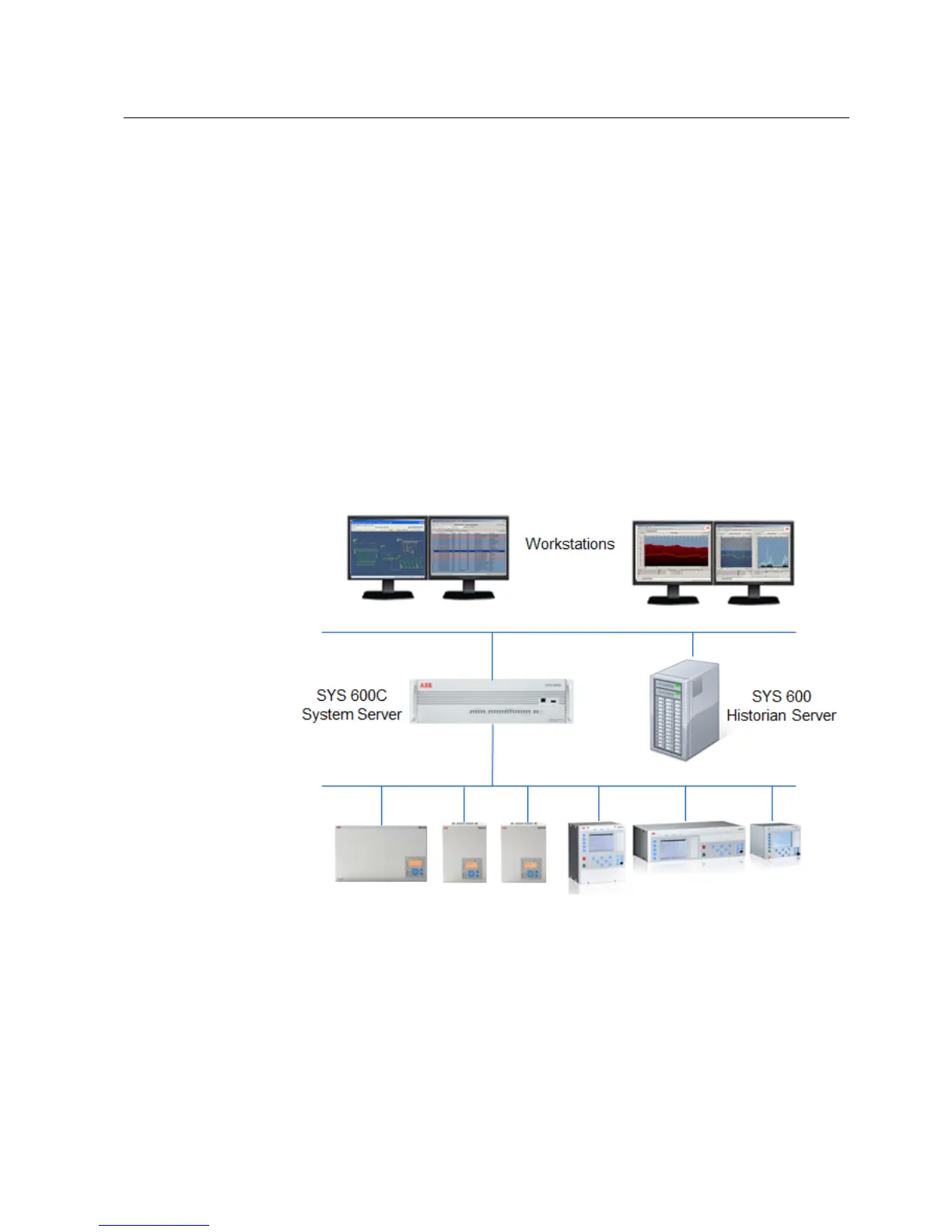
Historian should primarily be used on a dedicated server. The data sources for Historian
are Process Objects or Data Objects of SYS 600C. The data is transfer from SYS 600C
to the Historian over a TCP/IP LAN. One SYS 600C application can log data into one
or several Historian instances and one Historian instance can receive data from one or
several SYS 600C devices.
Figure 3.9: Historian System Configuration
3.3.2 Data logging
Historian logs data from the SYS 600 Application and more precisely from Process
Objects or Data Objects. The data logging is triggered by the update of the Process Object
17
SYS 600C 2.93
MicroSCADA Pro
Product Guide
1MRS757729
16.11.2012Issued:
A/16.11.2012Version:


 To Next Page