Preparations
Action
Check the FlexPendant for errors and warnings.1
Power the controller off. Wait one minute, power the controller on.2
Wait 30-60 seconds after power-on.3
Make sure that the control system power is in run-time mode.
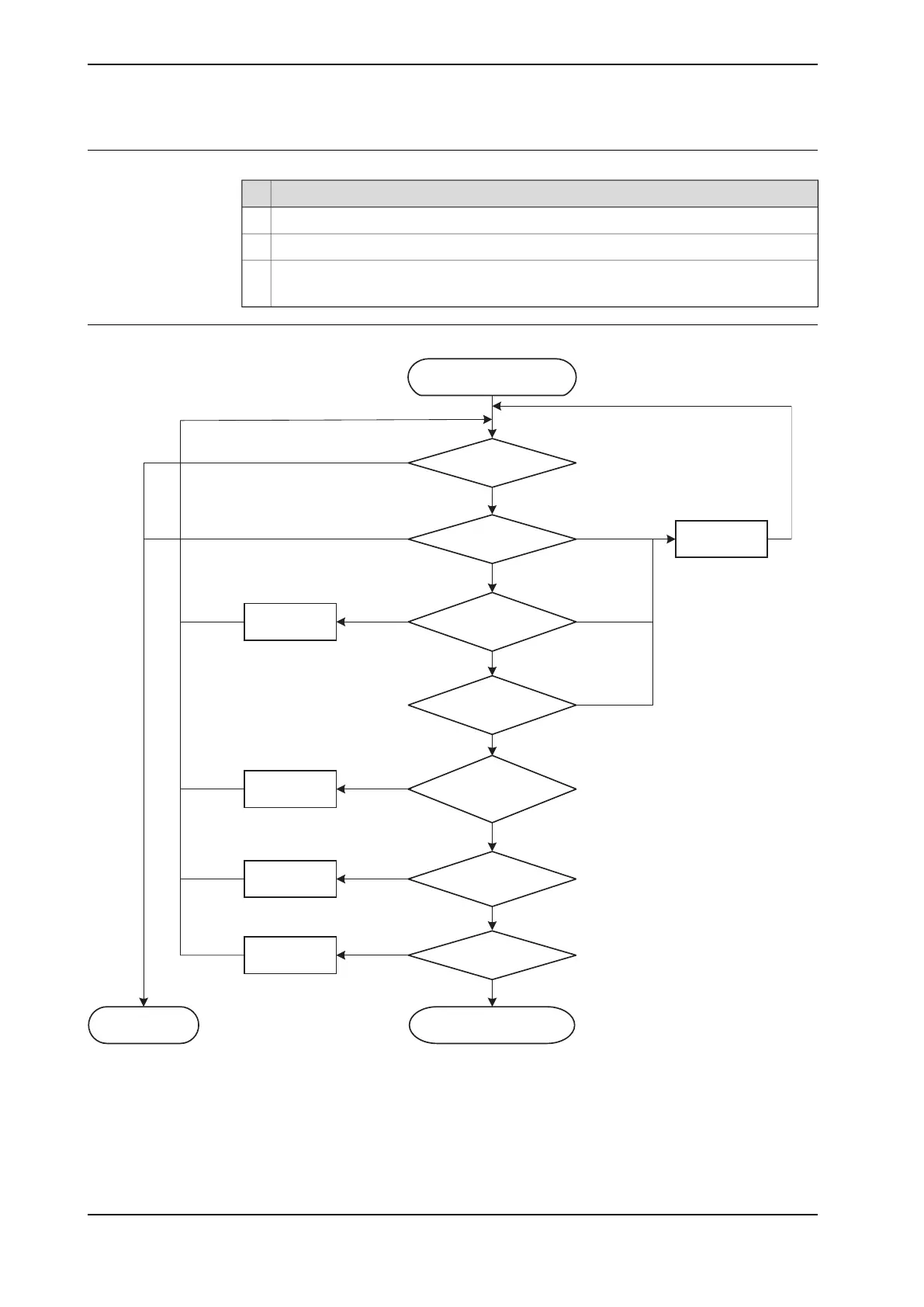
Troubleshooting flowchart
Troubleshooting the
power supply
Check DC LED
Power supply is ok
Green
Off
Repair short
circuit
Measure DC output
Check for short circuit
on output
Measure power
supply AC input
Check AC connection
between power supply
and A1
Measure AC to
controller
Check cabling
Repair AC
connection
Repair AC input
Repair cabling
24V < DC < 27V
DC < 24V
DC > 27V
Short circuit on
power supply
Short circuit
on A1
No short circuit
AC ok
AC not ok
Connection ok
AC ok
AC not ok
Connection
not ok
Faulty cable
Cable ok
Troubleshoot the
p
ower unit
Replace power
supply
xx1800001823
Continues on next page
438 Product manual - OmniCore C30 Type A
3HAC089064-001 Revision: A
© Copyright 2024 ABB. All rights reserved.
6 Troubleshooting
6.3.9 Troubleshooting the power supply
Continued



 To Next Page