TERR A DC WA LLBOX
2023 -06-20 22/39
Checking the Shock Watch and Tilt Watch PLUS sensors:
If the Shock Watch indicator is red, or the Tilt Watch PLUS indicator is tilted over 30°:
1. Do not refuse the delivery / receipt.
2. Make a notation on the delivery receipt and inspect cabinet for damage.
3. If damage is discovered, leave cabinet in original package and request immediate inspec-
tion from carrier within 3 days of delivery.
4. Contact your local ABB office.
5.2 Unpacking the charging and mounting preparations
5.2.1 Unpacking
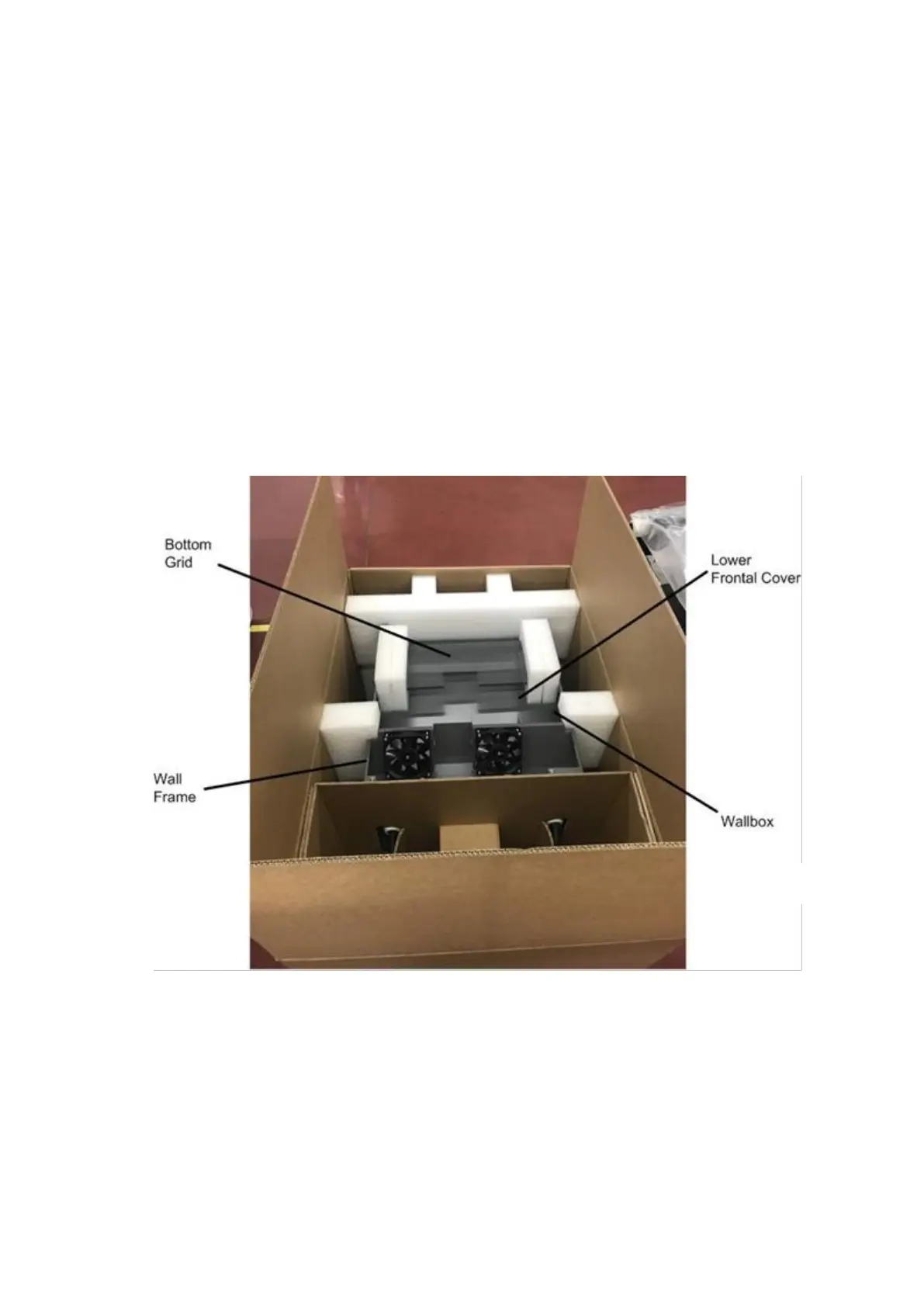
The packaging of the Terra DC Wallbox can be removed without the use of tools. Follow local regu-
lations on disposal of packaging material.
1. Remove the plastic protection profiles.
2. Remove the bottom air grate grill and the lower frontal cover.
3. Remove the wall frame.
4. Remove the Terra DC Wallbox. (USE CAUTION TO NOT DAMAGE THE E-STOP BUTTON
ON THE SIDE OF THE ENCLOSURE)
5. Remove the AC ferrite core link to the outlet gun cable (assembly position shown at para-
graph 5.4.2)
6. For all components above, remove the shrink wrap.









 To Next Page