TERR A DC WA LLBOX
2023 -06-20 23/39
5.2.2 Mounting preparations
Unpack the IP BOX and verify all the following items are present:
• Wall frame
• Frontal cover
• Bottom grid cover
5.3 Move cabinet to position
5.3.1 Options
A properly rated lifting devices should be used to move the Terra DC Wallbox from the delivery truck
to the installation location.
DANGER
Hazardous voltage
Ensure the product’s power supply group main switch is set to the
OFF position. Perform a voltage check to verify there is no electrical
power on the cables or on the system. Secure the product from
resetting.
NOTICE
Warranty
Damage due to moving the cabinet to its position is not considered
a warranty issue.
5.4 Mounting the Terra DC Wallbox
Preconditions:
• Tools: Spanner/Wrench size 17.
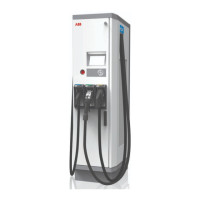
• Guide the power cable through the central cable gland, and the Ethernet cable if required,
through the smaller gland. Install the power wiring in the conduit/raceway that is connected
to the unit. See below image for a typical conduit install make ready for installation of the
Wallbox.









 To Next Page