40
TruONE® ATS, INSTALLATION AND OPERATING INSTRUCTION
1
—
3.7 Using Level 3 (LCD) control interface HMI
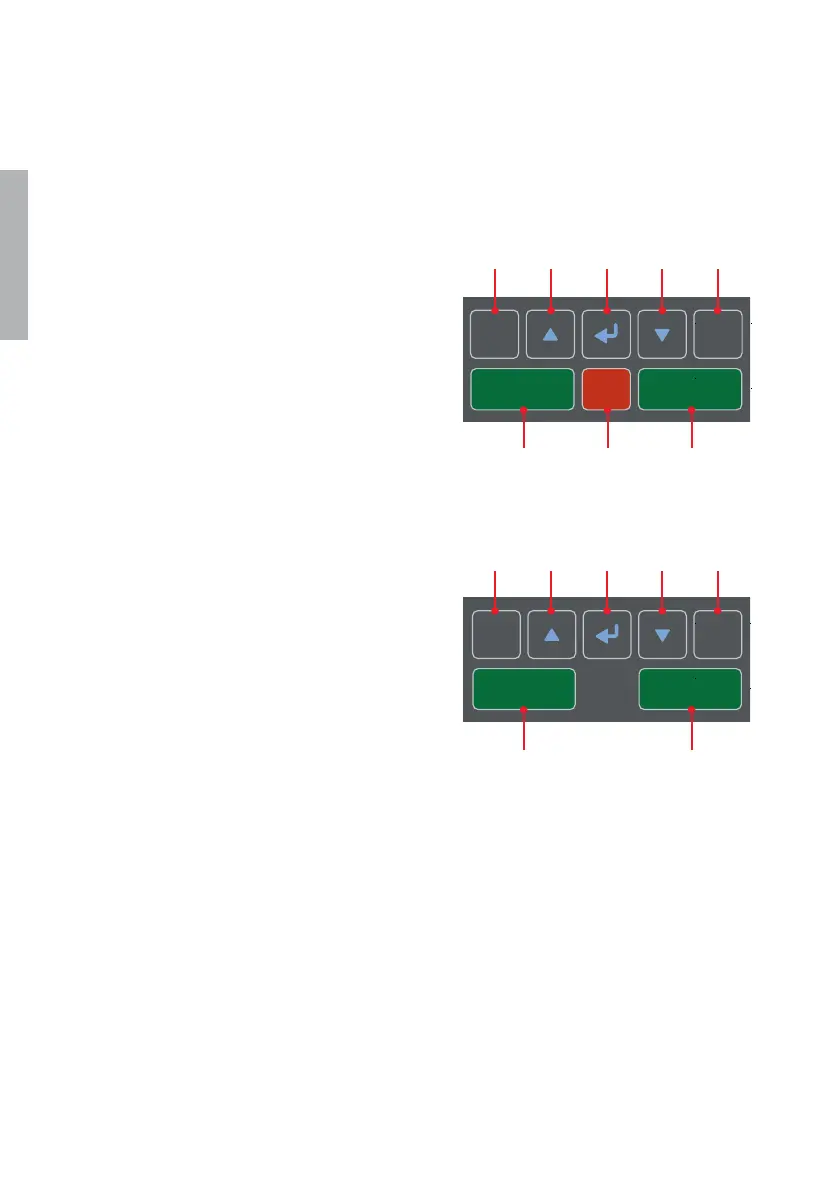
3.7.1 Keypad
1 Esc: Go back in menu. When pressed in
root page, the alarm list is shown.
2 Up, Down: Move in menu or choose
parameter values.
3 Enter: Opens menu in root page. Enter
a new menu page and accept function.
4 Auto (Alarm reset): In the event of
active switch control alarm (open I
failure, close I failure, open II failure,
close II failure), resets to no alarm
state. If no active alarms, toggle
between automatic/HMI control
modes.
6 II ON: Operate switch to II position.
7 O OFF: Operate switch to O position
and disable automatic control mode
(only in delayed transition I-O-II type).
3.7.2 Navigating in menu
See the menu tree in Chapter 4.
—
Fig. 3.10 Keypad in Level 3 HMI with LCD screen
l
ON
ll
ON
Auto
Alarm reset
O
OFF
Esc
l
ON
ll
ON
Auto
Alarm reset
Esc
1
5
2
3 2 4
7 6
1
5
2
3 2 4
6
OXB_, delayed transition, I - O - II
OXA_, open transition, I - II
LCD



 To Next Page