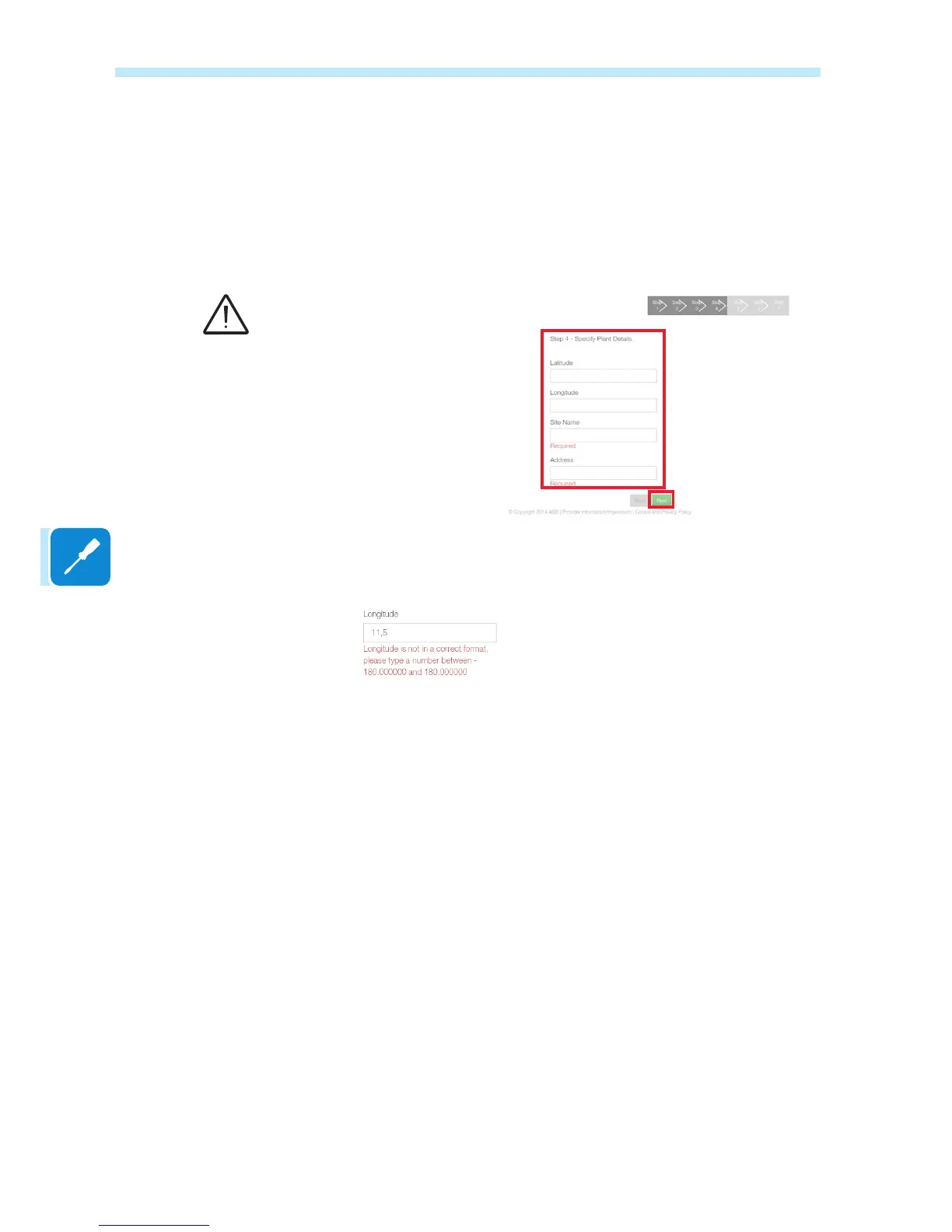
The next stage of the guided setup procedure will open.
In the rst screen, enter all the data of the plant to be monitored
(mandatory) and click on Next to continue.
Check that the longitude and latitude of the installation place are both
correct and enter if missing.
These values are the same for all the boards installed in the installation
place and are shared with Aurora Vision. These values can be updated
from Aurora Vision even at a later date.
If the Latitude or Longitude is entered in an incorrect format, an error
message will suggest the correct form of the data to be entered.
As in the example shown, one of the most common cases is the incorrect
use of the “,” as a separator for the decimal point rather than the “.”
Latitude and Longitude are
essential parameters:
Incorrect values could affect the
correct operation of the board!
If the Internet connection is made
using a server proxy or a VPN
tunnel, it is quite likely that the
suggested coordinates will be
incorrect. Correct them manually
to prevent malfunctions.


 To Next Page