resolved («CLOSED») or if it is still present («OPEN»)
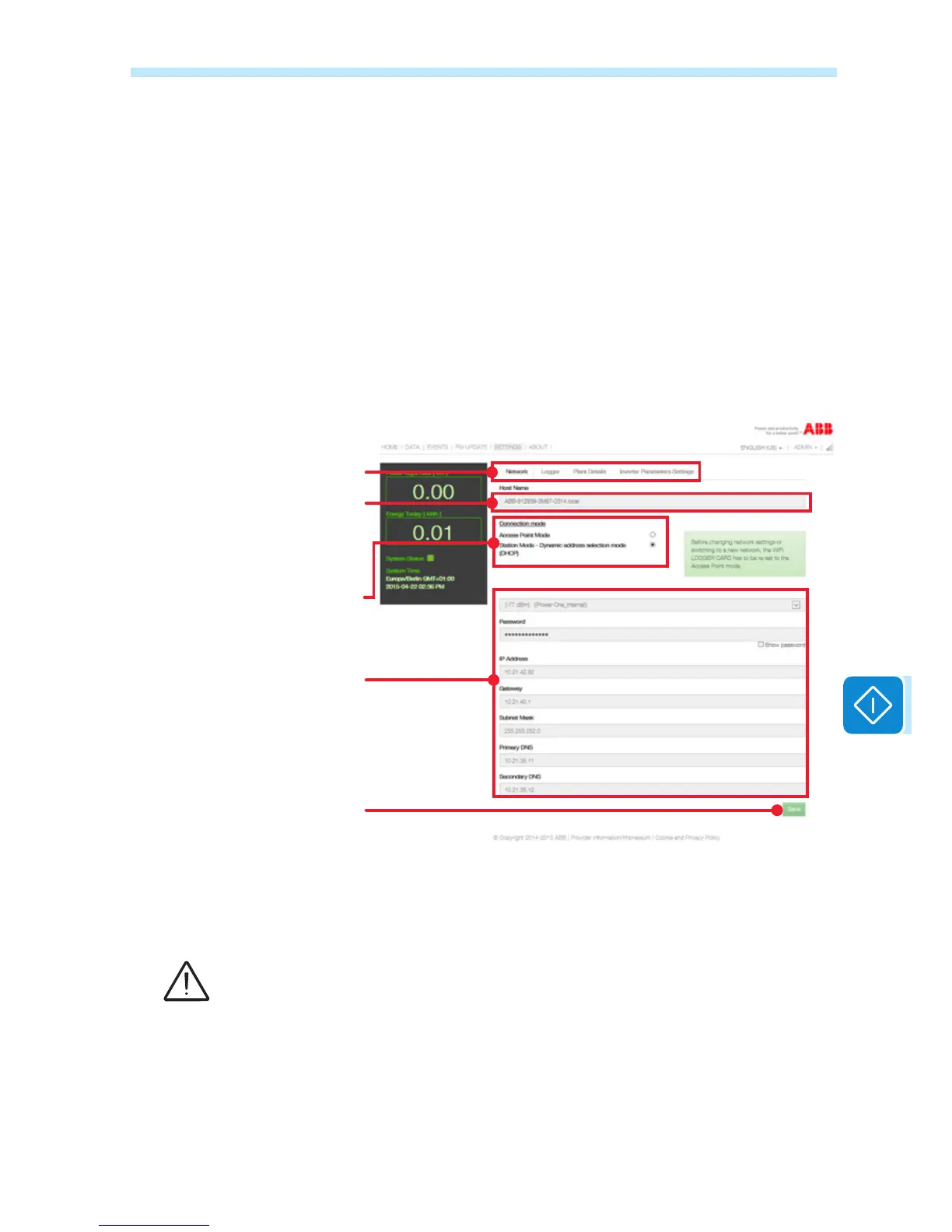
The SETTINGS page displays the settings of the board divided into four
sections: Network (network settings), Logger (log-in settings), Plant De-
tails (plant data) and Inverter Parameters Setting.
Unlike the User access (read only), Admin login allows the settings pre-
sent to be modied.
As described in the Installation chapter, the VSN300 board can operate
in two different operating modes: «Station Mode», with the IP address
assigned in static or dynamic mode, and «AP Mode».
In the Network board, the current operating mode can be modied and
therefore manage the change from «Station Mode» to «AP Mode» and
vice versa.
Selection of «Station Mode» or
«AP Mode»
«Host Name» of the board to be
used as an alternative to the IP
address
Table which displays the network
settings (modiable) in «Station
Mode» or the Access point data
generated by the board in «AP
Mode».
Saves the modications made
Selection of the network, logger,
plant data settings or the inverter
parameter settings
Once the required values have been modied, conrm the setting by
clicking on Save.
If the board is operating in «Station Mode», before carrying out any modication of the net-
work parameters and in particular if the user wishes to change the Wi-Fi network to which the
board is connected, it is recommended to:
- enable the «AP Mode» beforehand;
- access to the WUI by using the static IP address 192.168.117.1;
- move to “Station Mode” operation mode by setting new network parameters.


 To Next Page