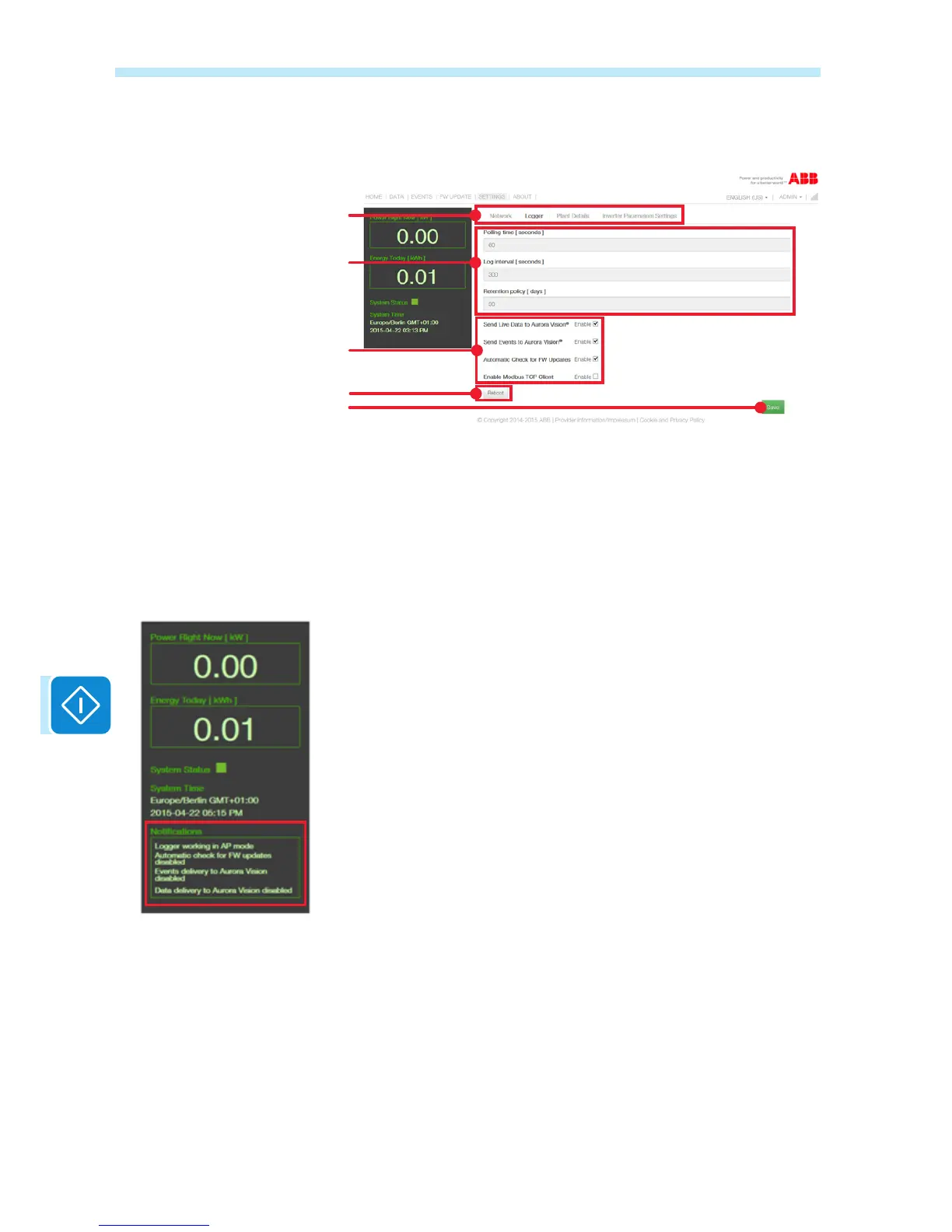
In the Logger board, the settings relating to data collection, storage and
transmission can be viewed and modied.
Parameters which cannot be
modied
Parameters which can be modied
Restores the board
Saves the modications made
Selection of the network, logger,
plant data settings or the inverter
parameter settings
The rst group of parameters cannot be modied:
Polling time: Inverter data sample period (more specically, the VSN300
board reads the inverter parameters every 60 seconds)
Log Interval: Transfer interval of the data read by the VSN300 board to
the Aurora Vision® internet cloud platform (more specically, the VSN300
board collects and sends the data every 300 seconds = 5 minutes)
Retention policy: Storage period of the data obtained from the inverter
in the internal memory of the VSN300 board In this specic case, 30 days
worth of data is archived with a "sliding window" type storage manage-
ment, i.e. the oldest data is deleted in favour of new data.
The second group of parameters can be customised:
Send Live Data to Aurora Vision: Enable/Disable the sending of data to
the Aurora Vision® cloud platform
Send Events to Aurora Vision: Enable/Disable the sending of errors to
the Aurora Vision® cloud platform
Automatic Check for FW Updates: Enable/Disable the automatic veri-
cation of the availability of a new Firmware for the VSN300 board or for
the inverter (internet connection is required).
If this function is enabled, automatic verication takes place every hour.
Enable Modbus TCP Client: Enable/Disable the «Modbus TCP Client»
function (refer to the specic section in the manual).
A specic message appears in the
notications if the following selec-
tions are made:
- Logger operation in «AP Mode»
- Automatic verication function of
the availability of a new Firmware
disabled
- Transmission of data to the Au-
rora Vision® cloud platform disa-
bled (function
- Transmission of events (anoma-
lies and errors) to the Aurora Vi-
sion® cloud platform disabled


 To Next Page