9
Pair
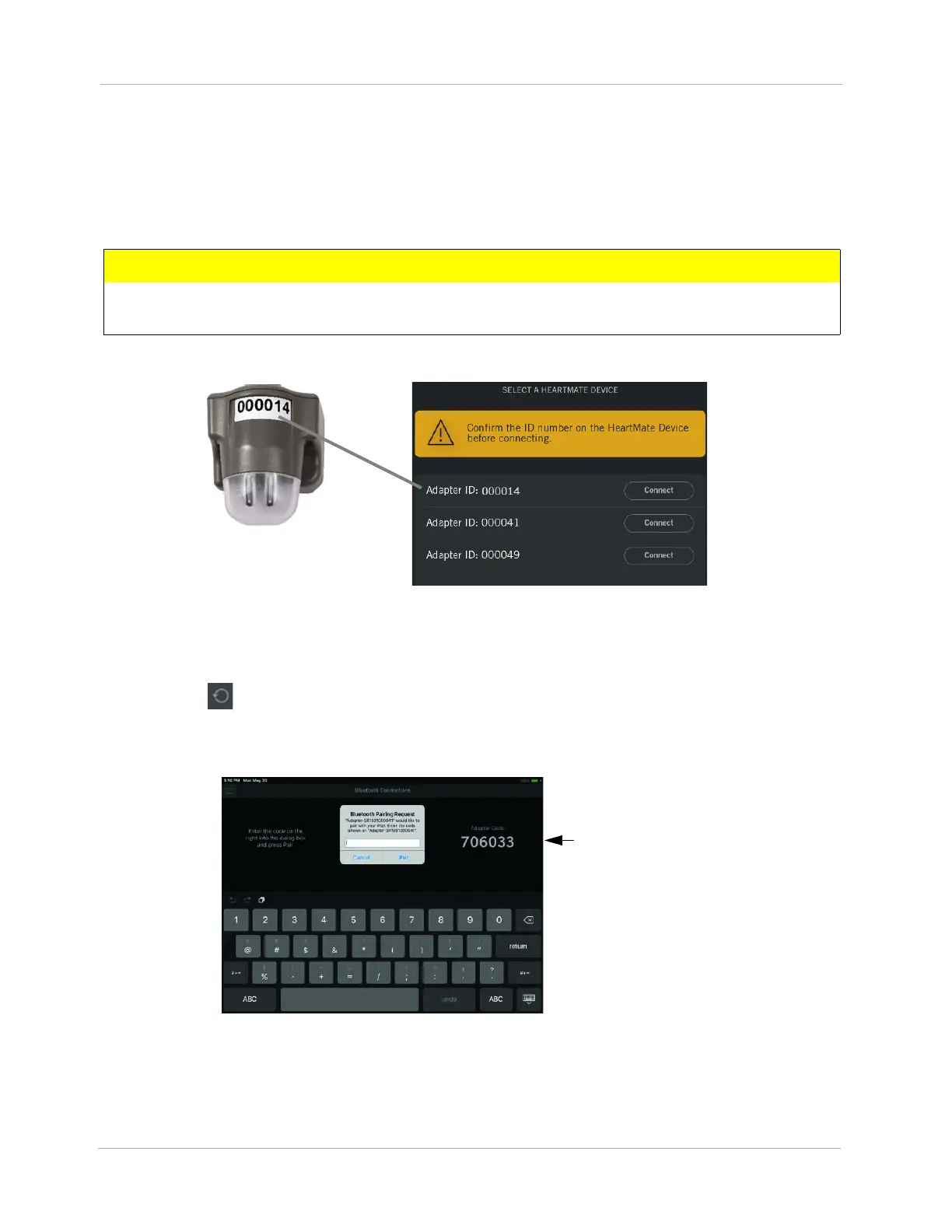
The HeartMate Touch App displays the available HeartMate Touch Wireless Adapters(s) in the order
in which they are detected (top to bottom).
1. Select the Adapter ID number and tap Connect.
Figure 6 Select Adapter ID Number
Note: If the HeartMate Touch Wireless Adapter that you intend to connect to is not listed, check that
the HeartMate Touch Wireless Adapter is ready to connect (e.g., displays a blinking blue light) and
tap Refresh ().
2. A Bluetooth® Connections window appears. Enter the HeartMate Touch Wireless Adapter code
in the Bluetooth Pairing Request box.
Figure 7 Enter HeartMate Touch™ Wireless Adapter Code
3. Tap Pair.
CAUTION !
Select the Adapter ID number that matches the number on the HeartMate Touch Wireless
Adapter label.
HeartMate Touch Wireless
Adapter Code












 To Next Page