ID NOW Instrument User Manual 19
QWERTYUI
#ZXCVBNM
ASDFGH JKL
123
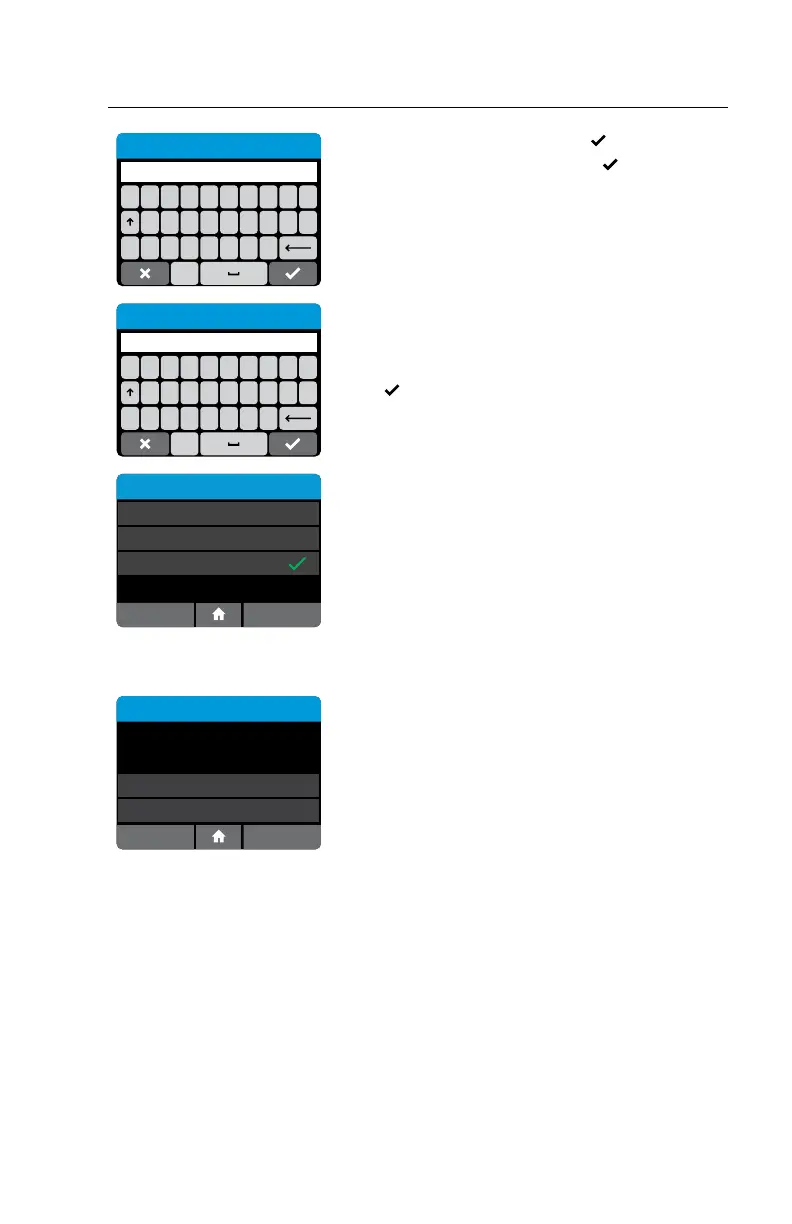
Enter Existing Password
Enter existing password and press .
Then enter new password and press
.
Passwords are case-sensitive and must be
alphanumeric. The password cannot contain spaces.
QWERTYUI
#ZXCVBNM
ASDFGH JKL
123
Enter New Password
Note: If the Admin user has been selected, neither the
password nor the delete button will be displayed on this
screen.
Press
to return to the previous screen.
Edit User
password
Change Password
Certifications
Rescue Password
OK
Certifications are managed by the POCT system
and indicate which assays the user is certified to
run. Users can use the Edit User Screen to change
their password and view current Certifications.
Admin will also have option to set Rescue Password.
Note: Users not managed by POCT system will not
see certifications.
Deleting a User: Home>Setup>Users (Admin Access Only)
User Details
User Name: James
Password: 123password
Edit User
Delete
OK
To delete a current User, press delete.
A warning will be displayed confirming to delete
user.
Press OK to delete User and return to the Setup
Users screen.
Press Cancel to return to the Users screen without
deleting the user.
Note: Deleting a User is permanent. Once deleted, the User profile
will be lost.
Test results already stored in the instrument performed by this User will not be affected.


 To Next Page