34 ID NOW Instrument User Manual
6 RUNNING a TEST
Caution: ID NOW assays may have varying CLIA Complexity levels.
Please ensure the CLIA Complexity of the assay you are using is
appropriate for your Laboratory.
If the instrument is being used for the first time, it must be set up by the Admin
before a test can be run. For further details refer to Section 3 for Admin setup.
• Refer to Section 4.2 to add Users.
• Refer to Section 5.1 to select language preferences.
6. User Login
QWERTYUI
#ZXCVBNM
ASDFGH JKL
123
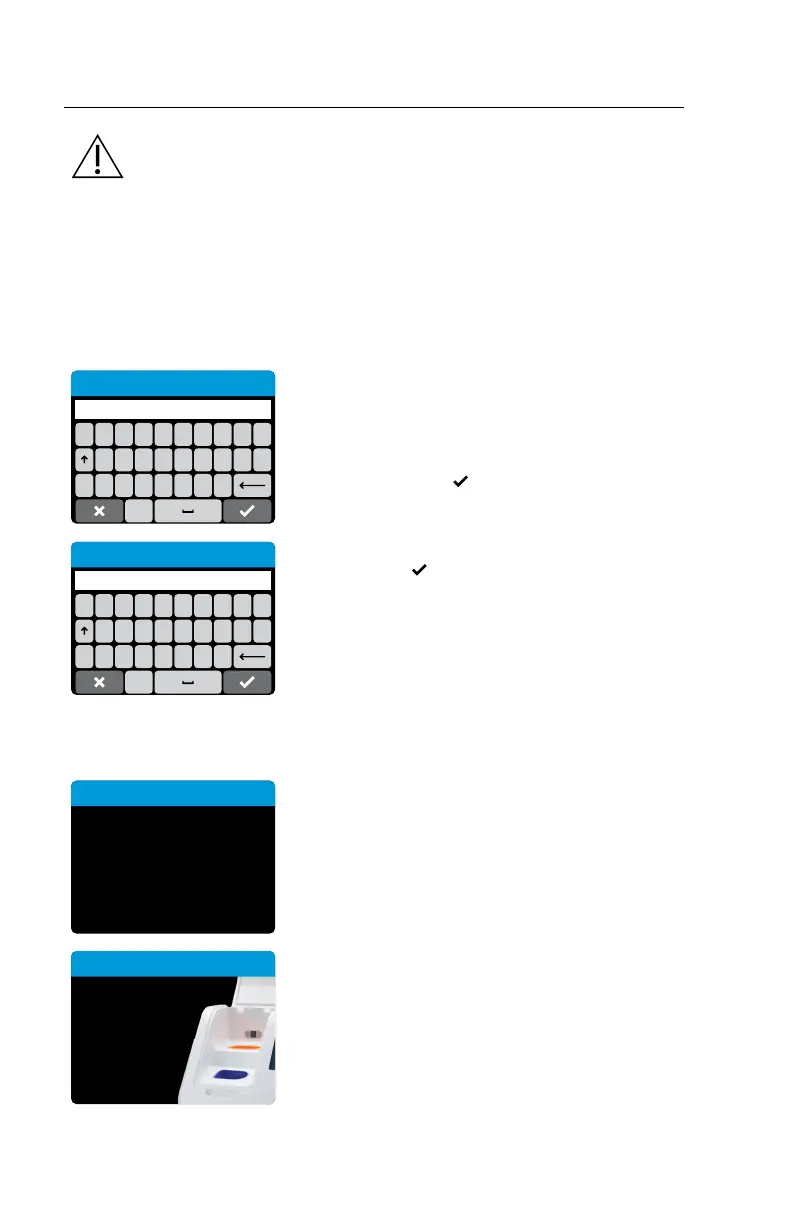
Enter User ID or Scan
When the instrument is switched on, or after
another User has logged out, the Enter User ID or
Scan screen will be displayed.
Enter the User ID, or scan using an electronic
barcode reader, press
to advance.
If a password is required (as specified by the Admin
during Setup), a prompt will appear to enter the
password. Press
to advance.
QWERTYUI
#ZXCVBNM
ASDFGH JKL
123
Enter Password
The instrument will automatically perform a Self Test.
Self Test:
Self Test
Running self test,
please wait ...
The instrument will run a Self Test before
proceeding to the Home screen.
Close lid to
proceed.
Self Test
If the instrument lid is open, the instrument will
prompt to close the lid before running the Self Test.
The Self Test will not proceed until the lid is closed.



 To Next Page