ID NOW Instrument User Manual 29
Lot Management
View All Lots
Search Lots
Import QC Results
Export QC Results
Lot List
0123456
0246810
0369121
0451548
ID NOW Assay 1
ID NOW Assay 2
ID NOW Assay 3
ID NOW Assay 2
Lot Management allows Admin to:
• View All Lots on the instrument
• Search for specific lots using assay,
date range, or status
• Import QC Results onto the instrument from
USB Drive
• Export QC Results on instrument to USB Drive
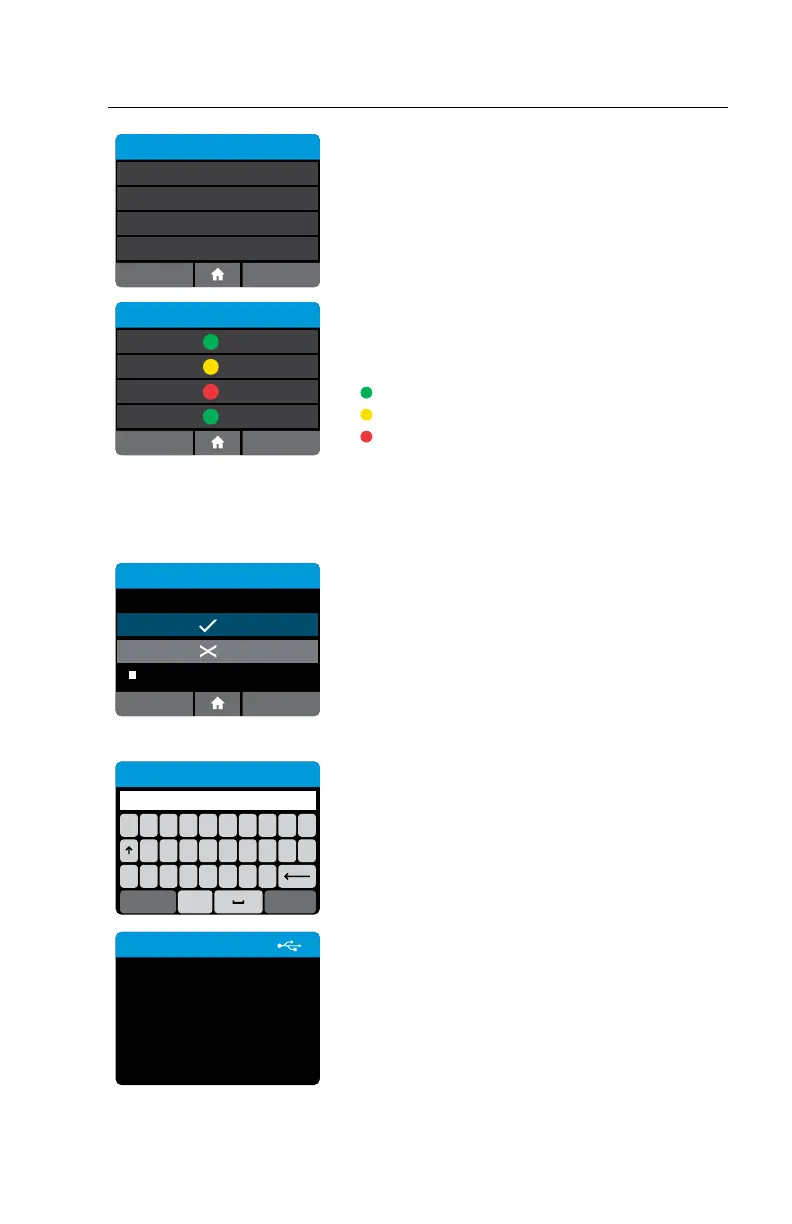
Select View All lots to view a list of all lots currently on
the instrument. The Lot Status and Assay will be visible.
Pos and Neg QC results passed
Incomplete Pos or Neg QC results
Pos or Neg or both QC results failed
Lots will be listed chronologically from newest
qualification to oldest.
Select Search Lots to search for a specific Lot or all
Lots run for a specific assay.
Lot - 0123456
Test Type: Influenza A & B
Lockout
Positive QC
Negative QC
13/JAN/2018
SN: A2ED6618
OKCancel
N/A
Select a lot to see its details. In this example, the
Assay name as well as instrument serial number and
the Date and Time of its QC runs will be displayed.
The Admin has the option to Lockout the chosen
Lot here, regardless of current status. Press Cancel
to return or OK to continue.
Note: If the lot is transmitted from POCT server,
instrument serial number and date will not be present.
QWERTYUI
#ZXCVBNM
ASDFGH JKL
Search Lots
123Cancel OK
Enter Lot number or Assay name. Press OK to
continue.
Export QC Results
Exporting lot QC Results
to USB device...
Chose Export QC Results to export all lots
on instrument.
1. Enter USB drive
2. Select Export QC Results
This screen will appear to confirm export is in
process.



 To Next Page