2-10 Chapter 2
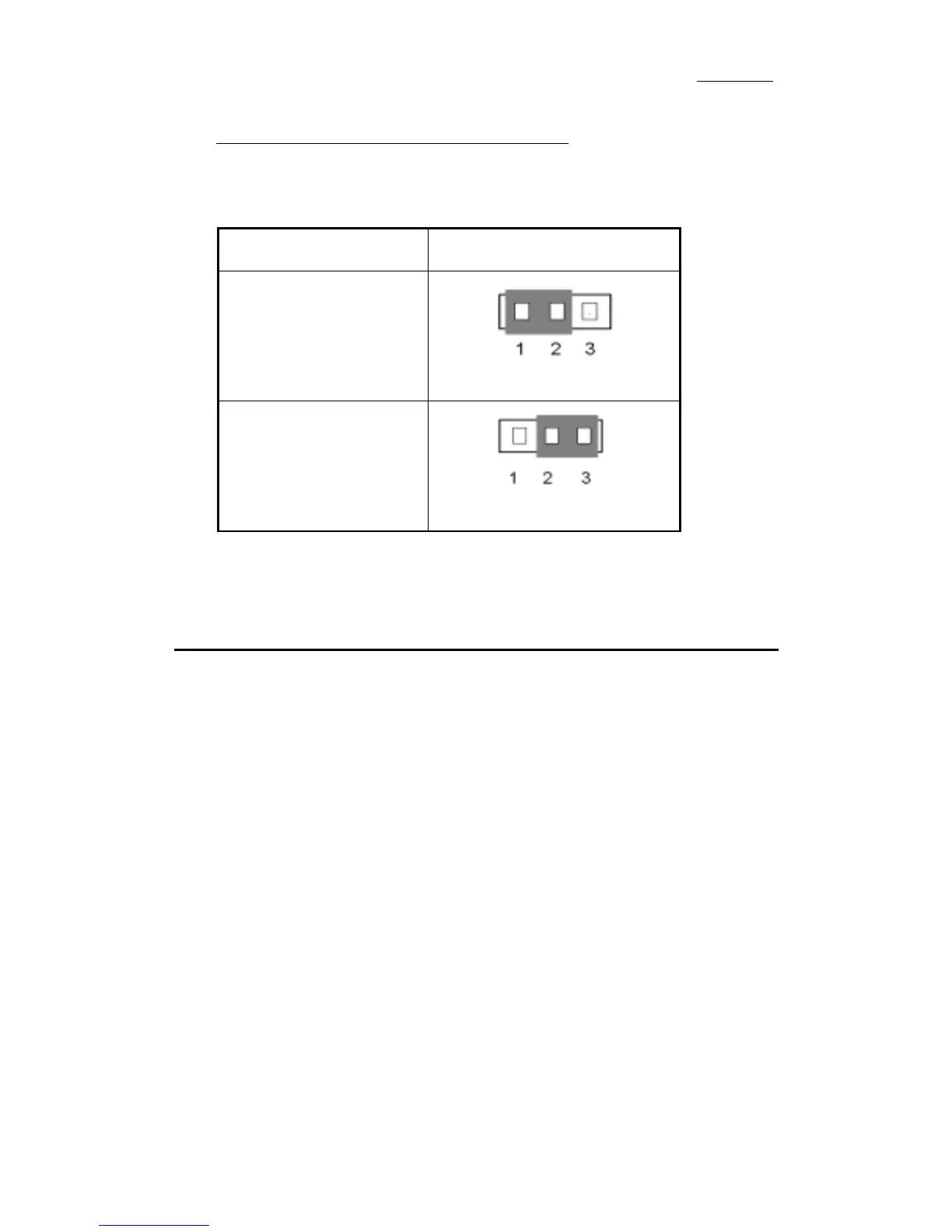
CCMOS 1: CMOS Discharge Jumper
Jumper CCMOS discharge CMOS memory. When you install the
motherboard, make sure this jumper is set for Normal Operation(1-2). See
the jumper below.
Setting CCMOS
Normal Operation
(Default)
Discharge CMOS
(4) Installation of the Pentium
II/III, Celeron
™
CPU
The installation method for the CPU is printed on the package of the retention
mechanism that comes with the motherboard. You can refer to it while you
install the CPU. This motherboard also supports the Celeron
™
PPGA processor.
If you want to install the Celeron
™
PPGA processor, you have to use an
additional adapter that allows you to use a Celeron
™
PPGA processor in a slot 1
board. For this ABIT makes the SlotKET
adapter.
Note:
! Installing a heat sink and cooling fan is necessary for proper heat dissipation
from your CPU. Failing to install these items may result in overheating and
damage of your CPU.
! Please refer to your boxed processor installation or other documentation
attached with your CPU for detailed installing instructions.



 To Next Page