Installation and Operation Manual Chapter 6 Diagnostics and Troubleshooting
ASMi-54 Ver. 1.0 Displaying Interface Statistics 6-11
ASMi-54
Main Menu > Monitoring > Physical Ports > SHDSL > Statistics
PCS Number (1)
RX Total Frames (0)
RX Total Errors (0)
TX Total Frames (0)
1. PME Statistics >
2. Clear All SHDSL Statistics
F-Forwards ; B-backwards; C – Clear PCS Statistics
ESC-Previous menu; !-Main Menu; &-Exit
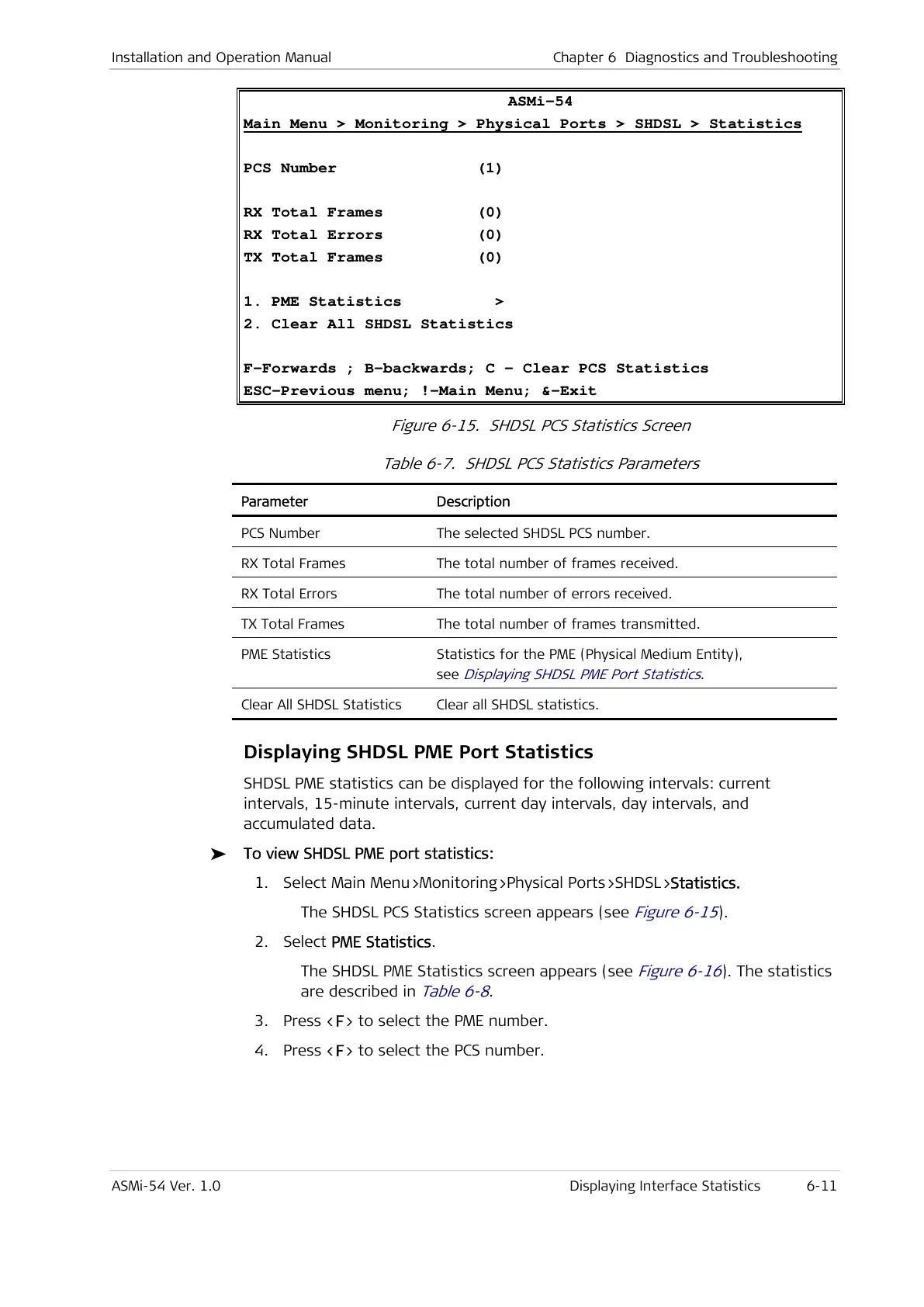
Figure 6-15. SHDSL PCS Statistics Screen
Table 6-7. SHDSL PCS Statistics Parameters
Parameter Description
PCS Number The selected SHDSL PCS number.
RX Total Frames The total number of frames received.
RX Total Errors The total number of errors received.
TX Total Frames The total number of frames transmitted.
PME Statistics Statistics for the PME (Physical Medium Entity),
see
Displaying SHDSL PME Port Statistics
.
Clear All SHDSL Statistics Clear all SHDSL statistics.
Displaying SHDSL PME Port Statistics
SHDSL PME statistics can be displayed for the following intervals: current
intervals, 15-minute intervals, current day intervals, day intervals, and
accumulated data.
To view SHDSL PME port statistics:
1. Select Main Menu>Monitoring>Physical Ports>SHDSL>Statistics.
The SHDSL PCS Statistics screen appears (see
Figure 6-15
).
2. Select PME Statistics.
The SHDSL PME Statistics screen appears (see
Figure 6-16
). The statistics
are described in
Table 6-8
.
3. Press <F> to select the PME number.
4. Press <F> to select the PCS number.



 To Next Page