SwitchSpeed™ Controller Manual V1.3 © 2009 AccuAir Control Systems, L.L.C.
- Page 12 -
Tank Pressure Mode: (If Optional Electronic Tank Pressure
Sensor is Connected)
Your system was shipped with the Tank Pressure
Mode set at 150 PSI. If you have High Pressure
Compressor(s) you can change the Tank Pressure
Mode to 175 PSI or 200 PSI using the following
Procedure:
To Change The Tank Pressure Mode:
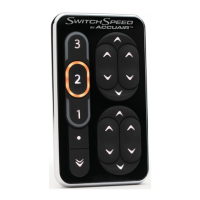
With the Ignition ON, press the Program “ ”
Button. Next press the #3 DOWN “ ” Button to
set Tank Pressure Mode to 150 PSI, the
#4 DOWN “ ” Button once to set the Tank
Pressure Mode to 175 PSI and the
#4 DOWN “ ” Button again to set the Tank
Pressure Mode to 200 PSI.
When the #3 DOWN “ ” Arrow
is White:
Tank Pressure Mode is at
150 PSI.
When the #3 DOWN “ ” Arrow
and the #4 DOWN “ ” Arrow
are alternating ON & OFF:
Tank Pressure Mode is at
175 PSI.
When the #4 DOWN “ ” Arrow is Red:
Tank Pressure Mode is at
200 PSI.
NOTE: If the Electronic Tank Pressure Sensor is
NOT in use the #3 DOWN “ ” & #4 DOWN “ ”
Arrows are OFF.
NOTE: Program Mode will exit after 5 seconds
or can be exited by pressing the Program Button
again and your changes will be saved.
Setup Programming:
200
175
150 Mode:
• 110 psi ON /
150 psi OFF
175 Mode:
• 135 psi ON /
175 psi OFF
200 Mode:
• 160 psi ON /
200 psi OFF


 To Next Page