8
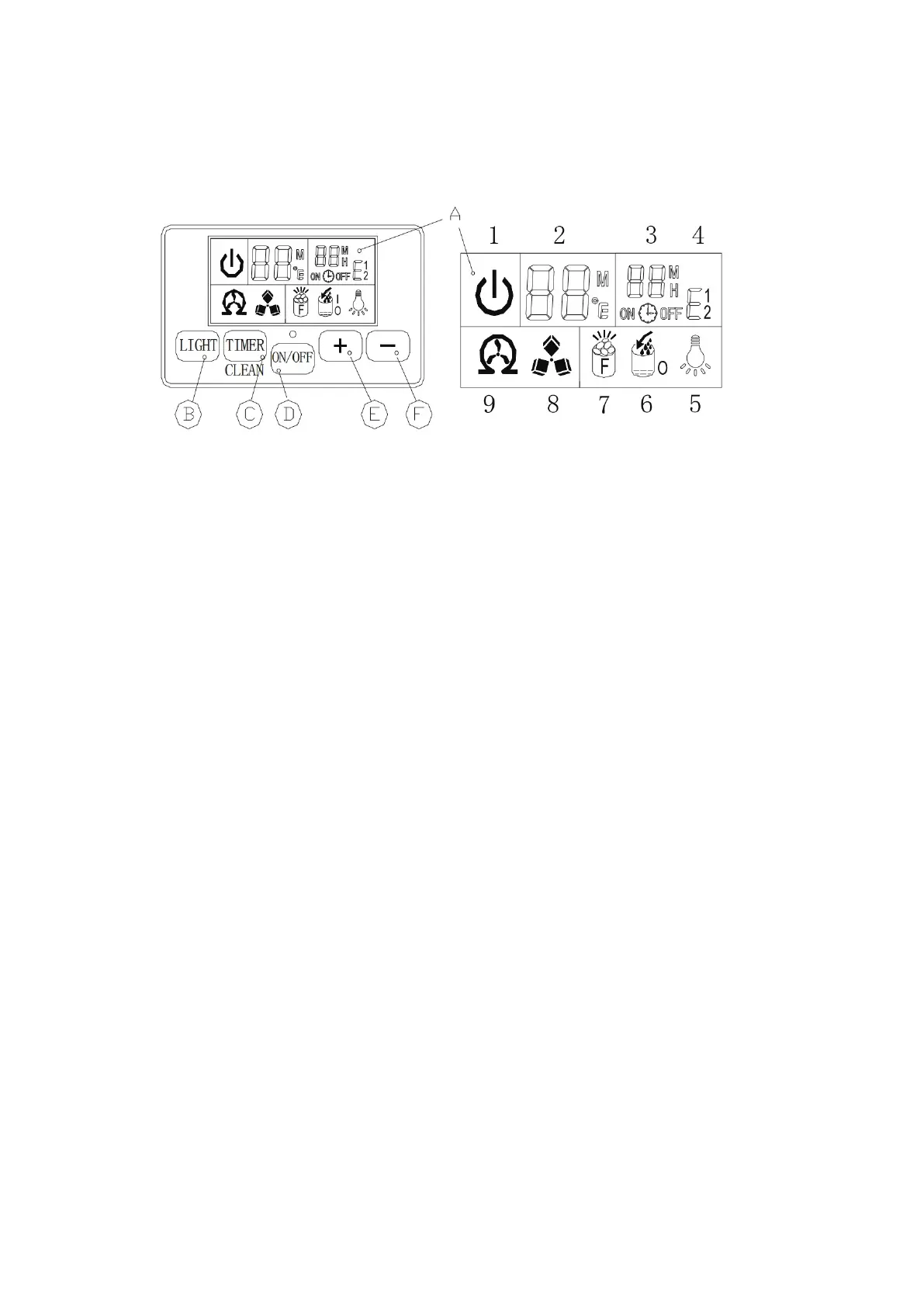
Operation Panel
A. LCD display window
1. The machine’s on/off status symbol: When the machine is turned off (standby mode), the
symbol flashes, when the machine is operating, the symbol will remain on.
2. Ambient temperature and ice making countdown time display
3. Ice making setting and timer setting display
4. Error code: E1 means the ambient temperature sensor is faulty, E2 means the ice making
process is abnormal
5. Light symbol: When the symbol is displayed, the LED light in the cabinet turns on
6. Water flow and water shortage symbol: If the arrow of the symbol is flashing, it means that
water is flowing in from the main water supply system; if the entire symbol remains on, it
means that there is no water in the main water supply system
7. Full ice display: When the freezer is full of ice, this symbol will turn on and the device will
stop the ice making process
8. Ice making and collecting ice display: When the ice cube symbol keeps rotating, it means the
device is making ice; if the symbol flashes, it means the device is in the process of collecting
ice
9. Self-cleaning display
B. “LED Light” button: Turns the internal LED light on or off.
NOTE: Press and hold this button for more than 5 seconds to convert ambient temperature units
between Fahrenheit and Celsius.
Figure 4



 To Next Page