EasyManua.ls Logo

Acer AT2010 - Connecting External Audio;Video Devices; Connecting a DVD, VCR, STB or Audio;Video Equipment

Acer AT2010
27 pages
Print Icon
To Next Page IconTo Next Page
To Previous Page IconTo Previous Page
Loading...
English
14
Connecting external audio/video devices
Connecting a DVD, VCR, STB or audio/video equipment
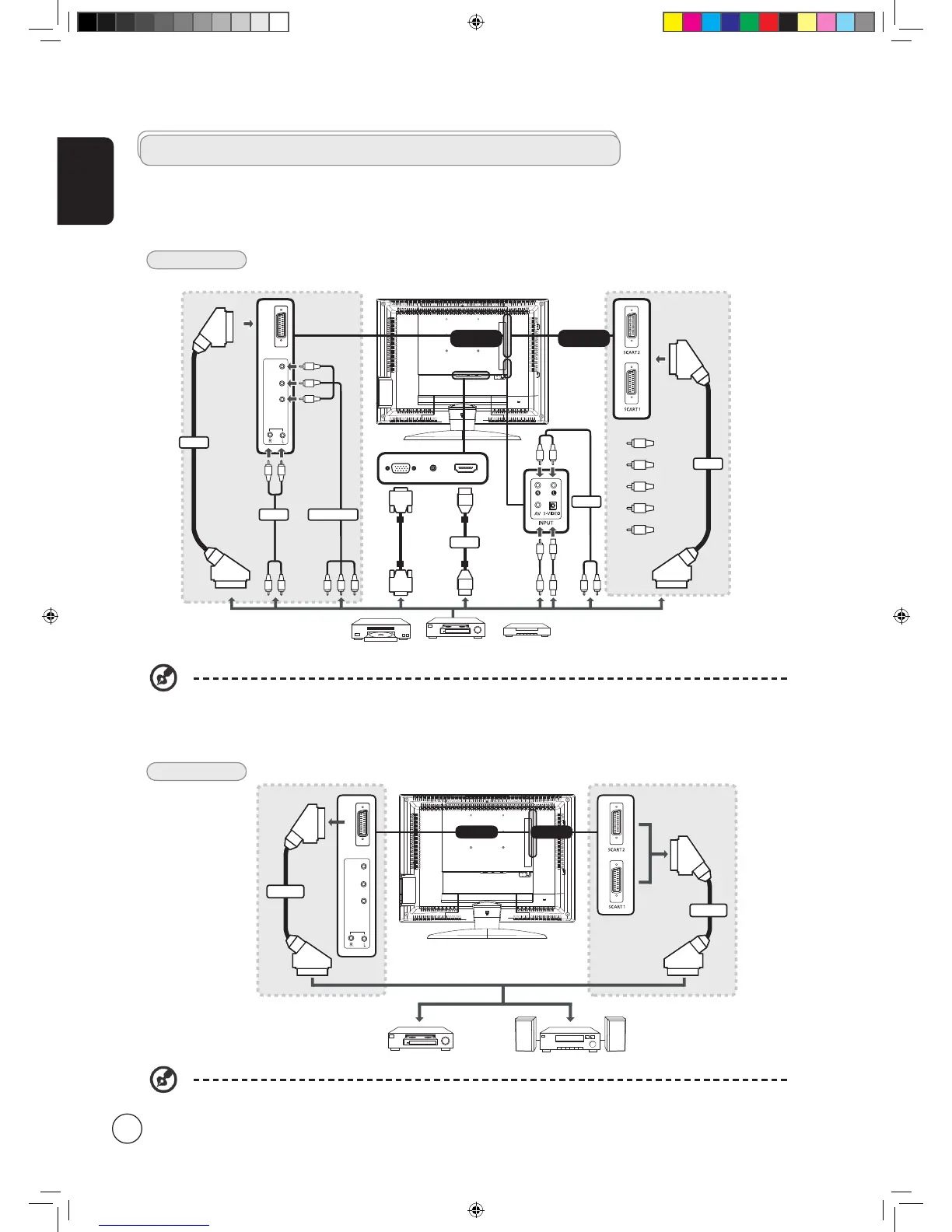
Connect your DVD player, VCR or audio/video equipment using the SCART port located at the rear of your LCD TV as shown
below.
Source-IN
* HDMI only for AT2011
** Acer recommends the following priority for connection types:
HDMI* -> Component -> SCART -> S-Video - > Composite.
TV-OUT
*SCART-out only works with analog broadcasts.

or
DVD
VCR
STB
or
D-Sub
D-Sub
SCART
Audio
Y
Pb
Pr
COMPO N E N T
w
R
S
w
R
SCART
SCART
G
R B
R
G
B
w
R
AUDIO
Y
Y
S
w
R
AUDIO
COMPONENT
*HDMI
AT2011
AT2010
Y
Yellow
Red
White
Blue
Green
R
W
B
G
AV
Recorder
SCART
SCART
SCART
Audio
Y
Pb
Pr
COM P O N E NT
AT2011
AT2010
AT201X.EU.UK.indb 14 3/21/2006 8:07:36 PM