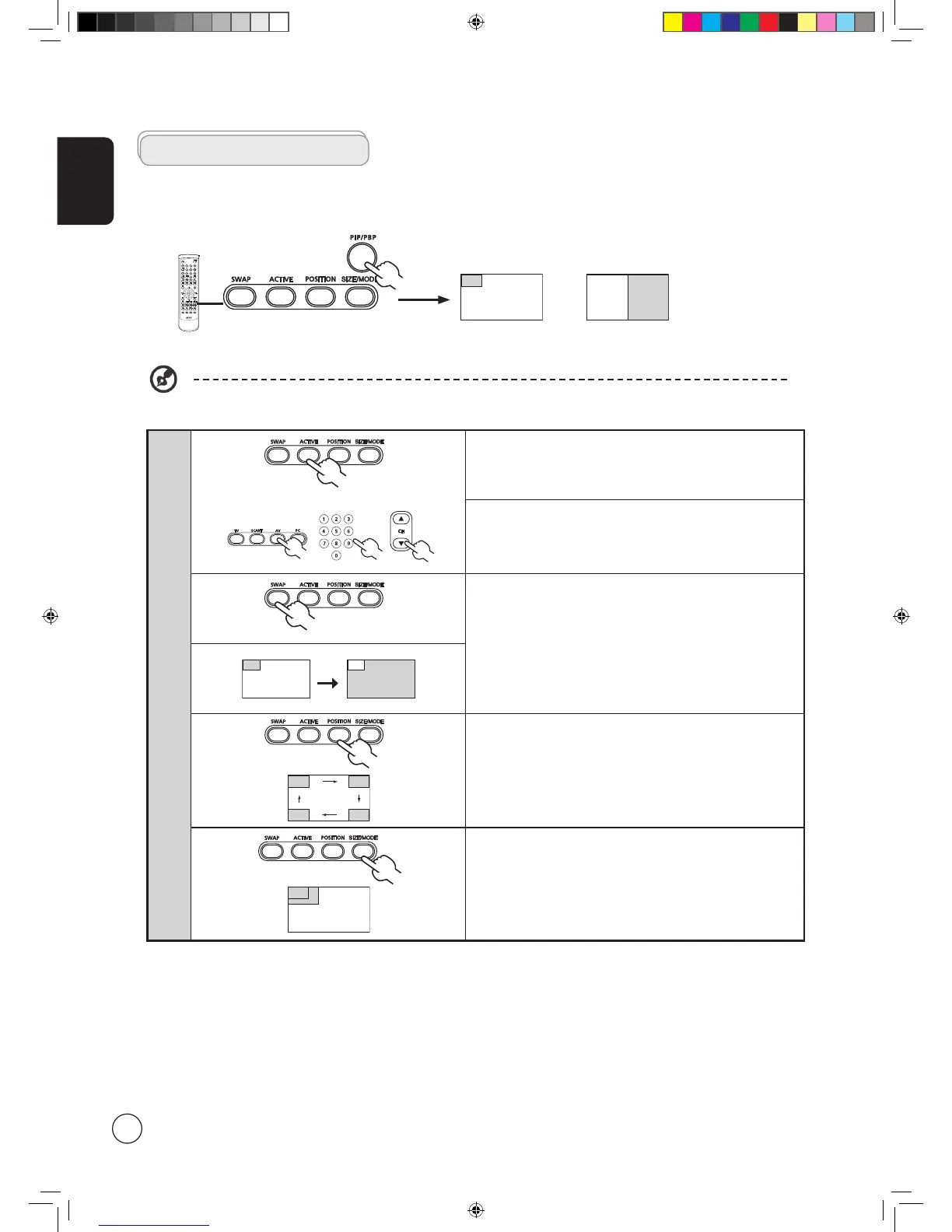
• Press the PIP/PBP button once to display activate picture-in-
picture (PIP).
• Press twice to activate picture-by-picture (PBP).
PIP
1a. Press the
ACTIVE key to toggle between PIP screens.
1b. Press the TV, SCART, AV or PC keys, number keys or CH up or
down to change the content of the active screen.
2. Press the SWAP key to change the content between the
primary and the subscreen.
Swap
3. Press the POSITION key to select the location of the
subscreens, from upper left -> upper right -> lower right ->
lower left, as shown in the image.
4. Press the SIZE/MODE key to select the size of the subscreen,
from 37.5% -> 50%, as shown in the image.
PIP/PBP
Advanced features
PBP (Picture-by-Picture)
PIP (Picture-in-Picture)
1. For a list of the available sources for this feature, please refer to the appendix at the end of this manual.
AT201X.EU.UK.indb 20 3/21/2006 8:07:43 PM



 To Next Page