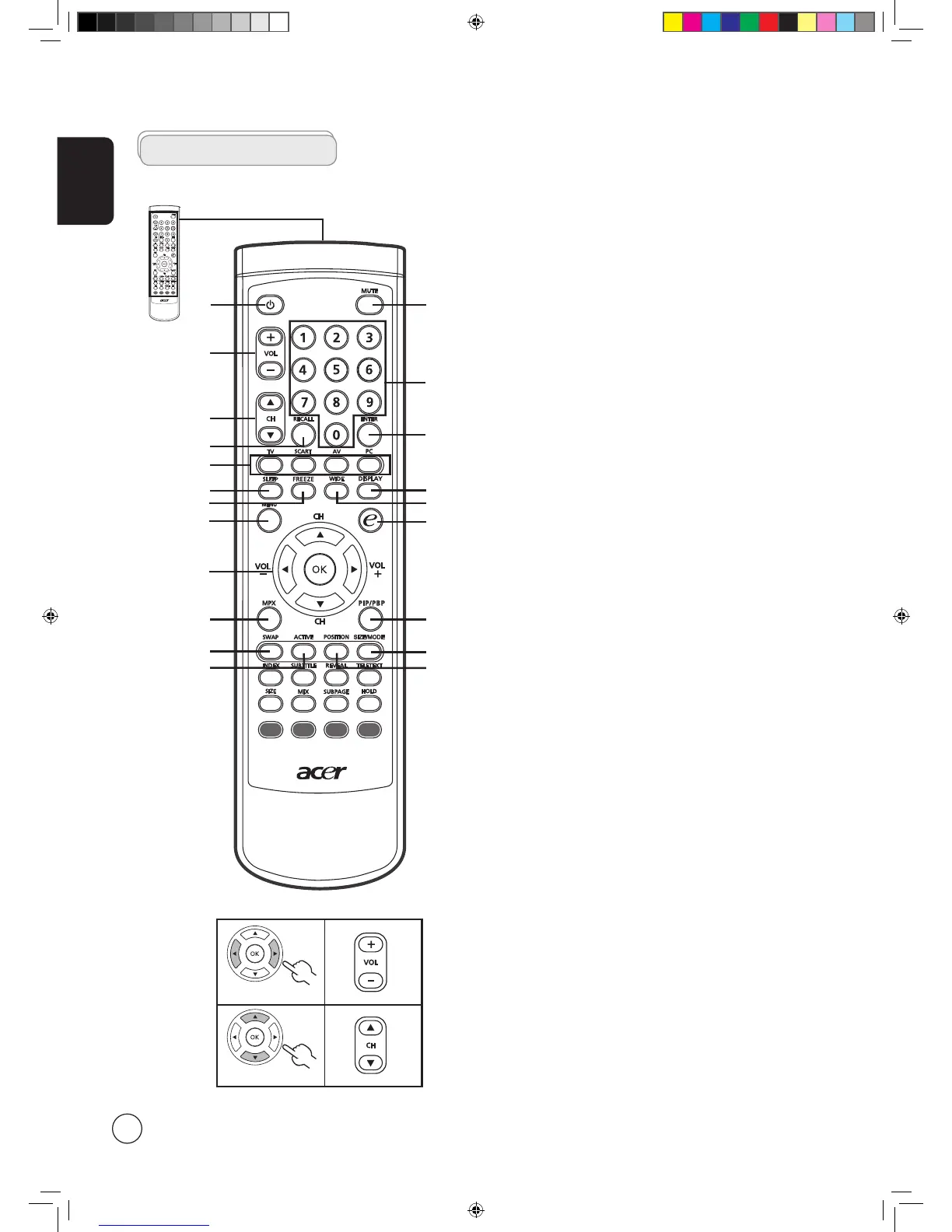
General keys
Remote control
1
12
9
15
20
18
3
17
14
6
7
5
16
8
2
1 POWER
Press to turn your TV on/off.
2 MUTE
Press to toggle audio on and off.
3 VOL ( + / - )
Press to increase or decrease the volume.
4 CH ( up / down )
Press to sequentially select the TV channel.
5 Number keys
.
6 RECALL
Press to return to the previous channel.
7 ENTER
Press to confirm channel number selection.
8 Input buttons ( TV / SCART / AV / PC )
Press to select correct input mode.
9 SLEEP
Press to set a time period after which the TV will switch
itself to standby ( 15, 30, 45, 60, 90 or 120 minutes ).
10 FREEZE
Press to freeze the displayed picture.
11 DISPLAY
Press to display input/channel information
(dependent on input/source type).
12 WIDE
Press to toggle scaling mode between 4:3, 16:9, Panorama
and Letterbox 1, 2, 3 modes.
13 MENU
Press to open or close the Menu.
14 e ( Empowering Technology )
Press to activate Acer Empowering Technology.
See page 18.
15 Directional keys/OK
VOL ( + / - ), CH ( up / down )
16 MPX
Press to select the sound input, displayed in the top right-
hand corner ( mono, stereo, bilingual ).
17 PIP/PBP
Switch between PIP / PBP modes. See page 20.
18 SWAP
For PIP/PBP mode: Toggle between the primary and
subscreens.
19 ACTIVE
Toggle between primary and subscreens.
20 SIZE/MODE
When in PIP mode: Change subscreen size.
See page 25.
21 POSITION
When in PIP mode: Change subscreen position.
21
13
4
19
10
11



 To Next Page