OMNIVERSA
®
ULTRASOUND / ELECTROTHERAPY SYSTEM - 13 -
COPYRIGHT © 2017-2020, ACCELERATED CARE PLUS CORP., ALL RIGHTS RESERVED
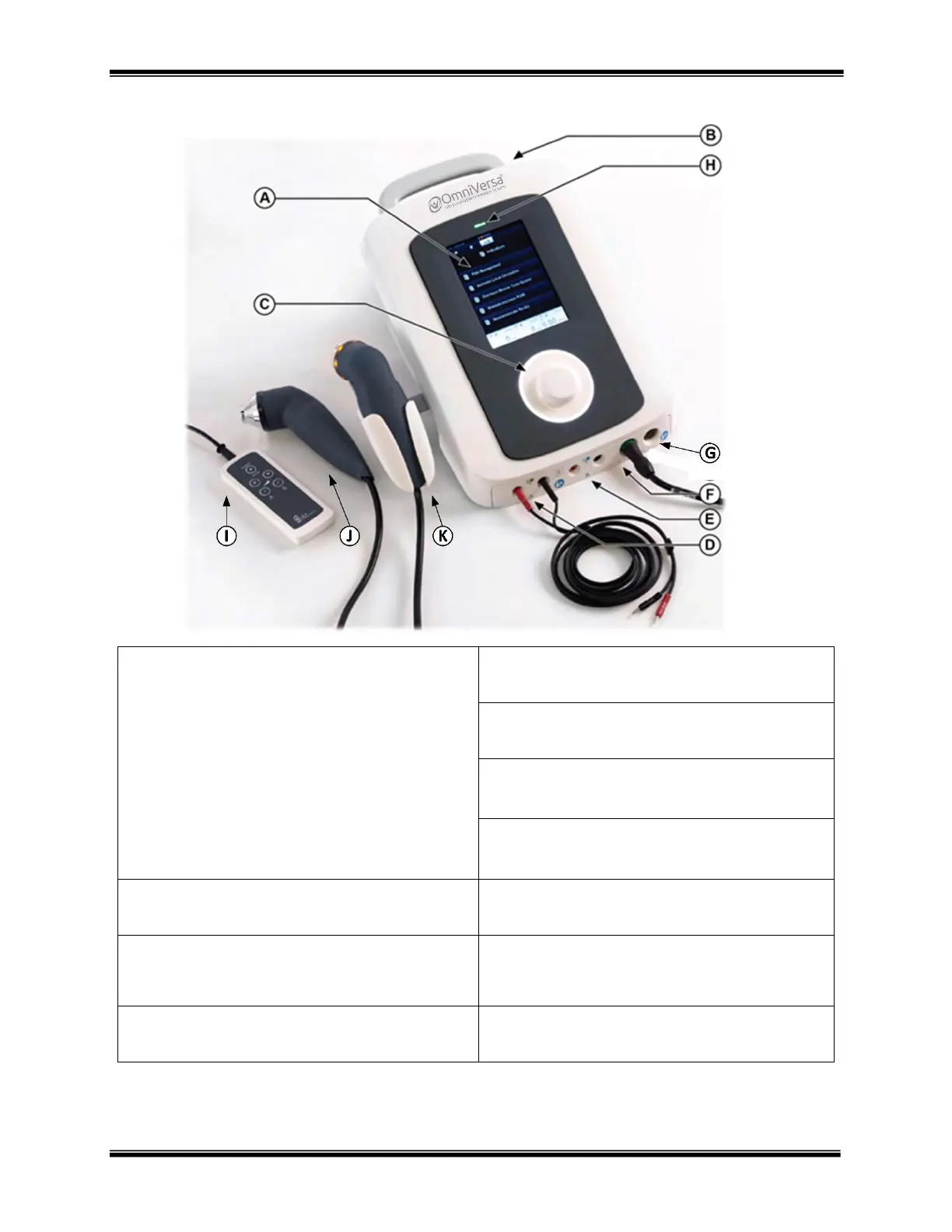
OmniVersa Controls and Functions
A - MAIN TOUCHSCREEN DISPLAY:
Choose between Electrotherapy, Ultrasound Therapy, or
Combination Therapy
The Electrotherapy menu provides access to ways to
navigate. Options include Indications, Manual mode
or Favorites.
The Indications menu provides a listing of Clinical
Indications and grouping of protocols to select from.
The Manual Mode menu provides a listing of all the
clinical waveforms found within the OmniVersa.
The Favorites menu is a provides access to custom protocols
programmed by the therapist
E - OUTPUT CHANNEL B:
Electrotherapy channel
F - OUTPUT CHANNEL C:
Multifunction connection used for Ultrasound Applicators
G - OUTPUT CHANNEL D:
Multifunction connection used for Ultrasound Applicators
H - POWER LED INDICATOR:
Green: Device plugged in and battery is charging
Orange: Device is operating on battery
B - MAIN POWER SWITCH: (backside of unit)
Mains power supply ON and OFF switch.
I - Therapist Remote Control
Multifunction remote for use in hand control protocols
C - ROTARY SELECTOR DIAL:
This is used to increase or decrease outputs, move between
selection menus, and maneuver within the graphic user
interface.
J - 0.8cm
2
Transducer
Optional transducer for use with the OmniVersa systems
D - OUTPUT CHANNEL A:
Electrotherapy channel
K - 5cm
2
Transducer
Standard transducer for use with the OmniVersa systems



 To Next Page