AR-B1479 User’s Guide
14
3. SETTING UP THE SYSTEM
This section describes pin assignments of on board connector and jumper settings.
l Overview
l System Setting
3.1 OVERVIEW
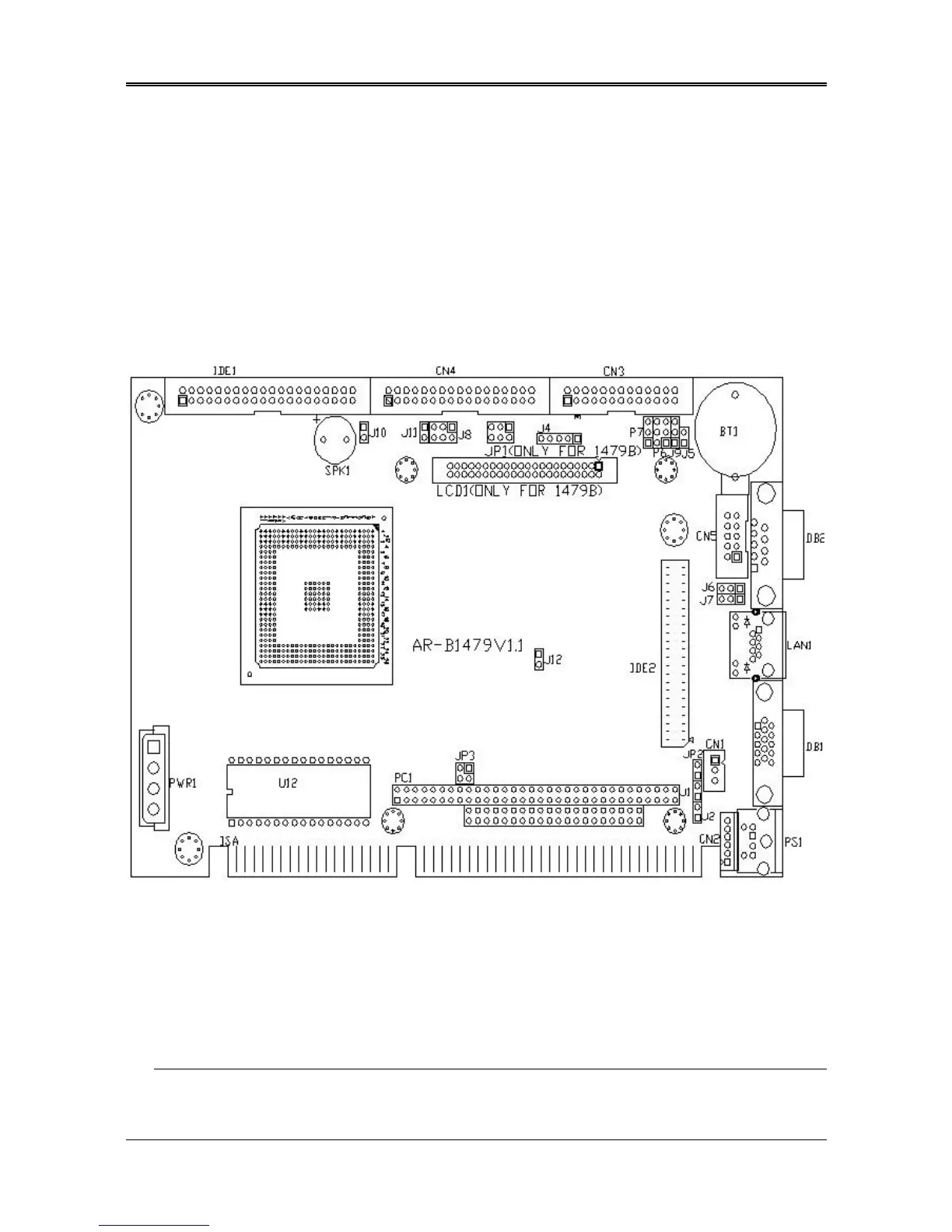
AR-B1479 is a Pentium Grade CPU Board, which supports Ethernet, DOC, SSD, and Compact Flash (AR-B9462A)
functions. This section provides the hardware’s jumper settings, the connectors’ locations, and the pin assignments.
External System Location
3.2 SYSTEM SETTING
Jumper pins allow you to set specific system parameters. Set them by changing the pin location of jumper blocks.
(A jumper block is a small plastic-encased conductor that slips over the pins.) To change a jumper setting, remove
the jumper from its current location with your fingers or small needle-nosed pliers. Place the jumper over the two
pins designated for the desired setting. Press the jumper evenly onto the pins. Be careful not to bend the pins.
CAUTION: Do not touch any electronic components unless you are safely grounded. Wear a grounded wrist strap
or touch an exposed metal part of the system unit chassis. The static discharges from your fingers can
permanently damage electronic components.



 To Next Page