EasyManua.ls Logo

Actron CP9580 - Language Setup

Actron CP9580
118 pages
Print Icon
To Next Page IconTo Next Page
To Previous Page IconTo Previous Page
Loading...
Using The Scan Tool
3 – 12 • • • • • • • • • • • • • • • • • • • • • • • • • • • • • • • • • • • • • • • • • • • • • • • • • • • • • • •
3
Language Setup
Language Setup selection allows the user to change the language
used by the Tool.
English is the default language.
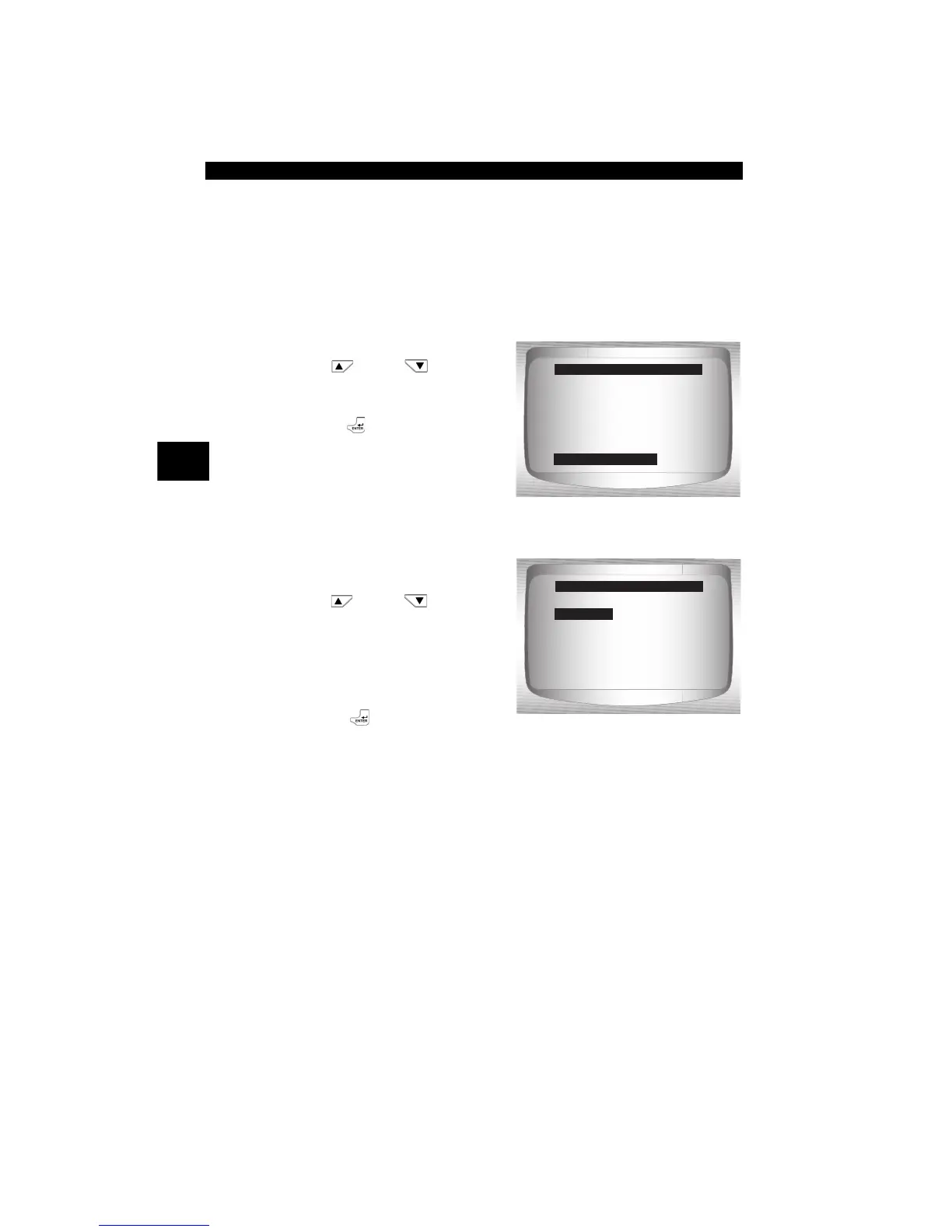
From System Setup menu:
1.Select Language Setup.
•Use
UP
or
DOWN
arrow key until Language
Setup is highlighted.
•Press
ENTER.
2.Select desired Language
Setup choice.
•Use
UP
or
DOWN
arrow key until desired choice
is highlighted.
3.Save Language Setup
setting.
• Press
ENTER.
=====================
English/Metric
Adjust Contrast
Auto-Power Off
Quick Test
Print Header
Language Setup
System Setup
Language Setup
=====================
English
Espanol
Francais
Language Setup
English

Related product manuals