Using The Scan Tool
3 – 8 • • • • • • • • • • • • • • • • • • • • • • • • • • • • • • • • • • • • • • • • • • • • • • • • • • • • • • • •
Changing Display Contrast
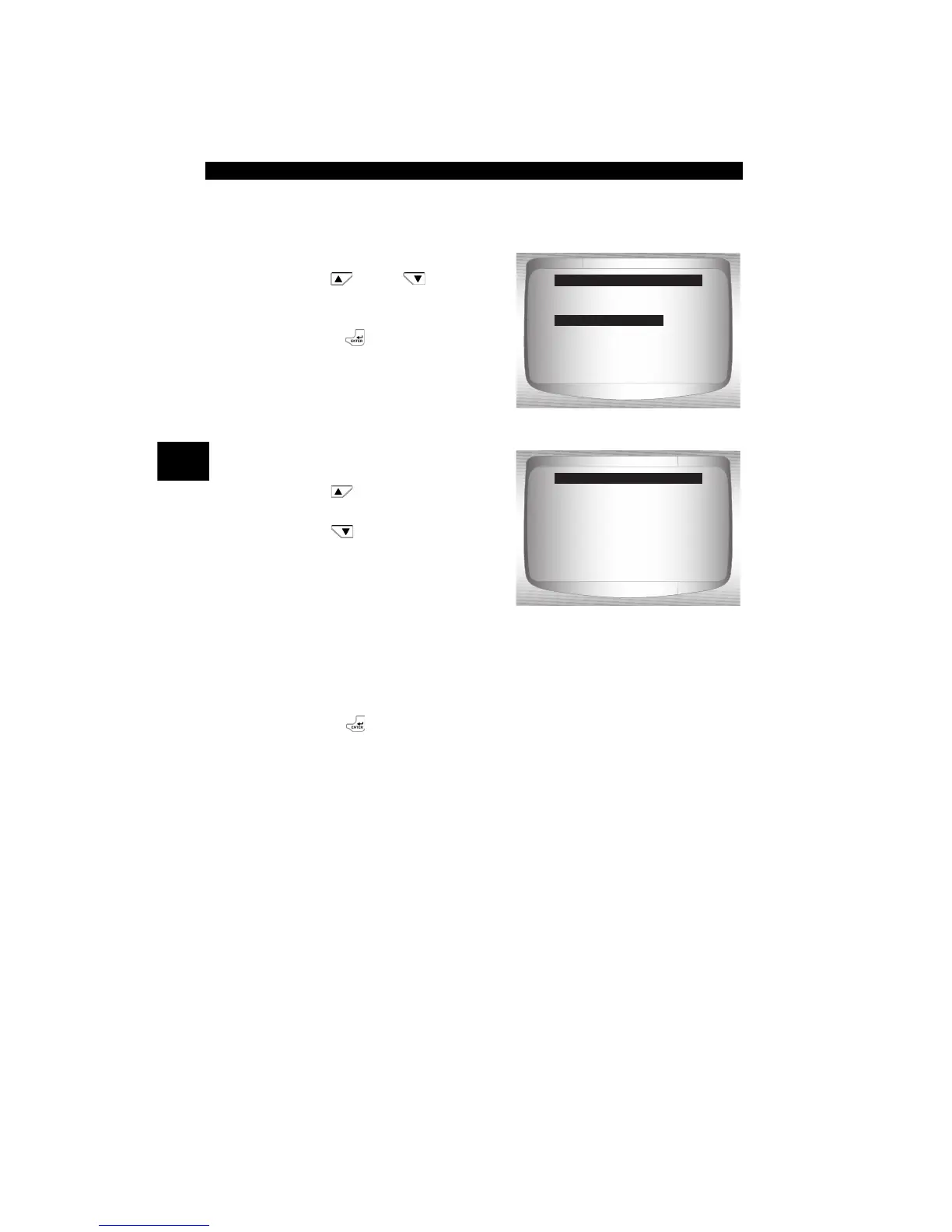
From System Setup screen:
1.Select Adjust Contrast.
•Use
UP
or
DOWN
arrow key until Adjust
Contrast is highlighted.
•Press
ENTER.
2.Increase or Decrease
Display Contrast.
•Use
UP
a
rrow key to
increase Contrast.
•Use
DOWN
arrow key to
decrease Contrast.
3.Save Contrast Setting
and return to the System
Setup menu.
•Press
ENTER.
Changing Auto-Power Off
The Auto-Power Off feature allows the tool to turn off automatically after
a selected amount of time when tool is not being used. The Auto-Power
Off feature will only turn the tool off when it is operating on battery
power.
=====================
English/Metric
Adjust Contrast
Auto-Power Off
Quick Test
Print Header
Language Setup
System Setup
Adjust Contrast
Press ENTER When
Done
=====================
SDarken
TLighten
50%
Adjust Contrast


 To Next Page