Using The Scan Tool
3 – 16 • • • • • • • • • • • • • • • • • • • • • • • • • • • • • • • • • • • • • • • • • • • • • • • • • • • • • • •
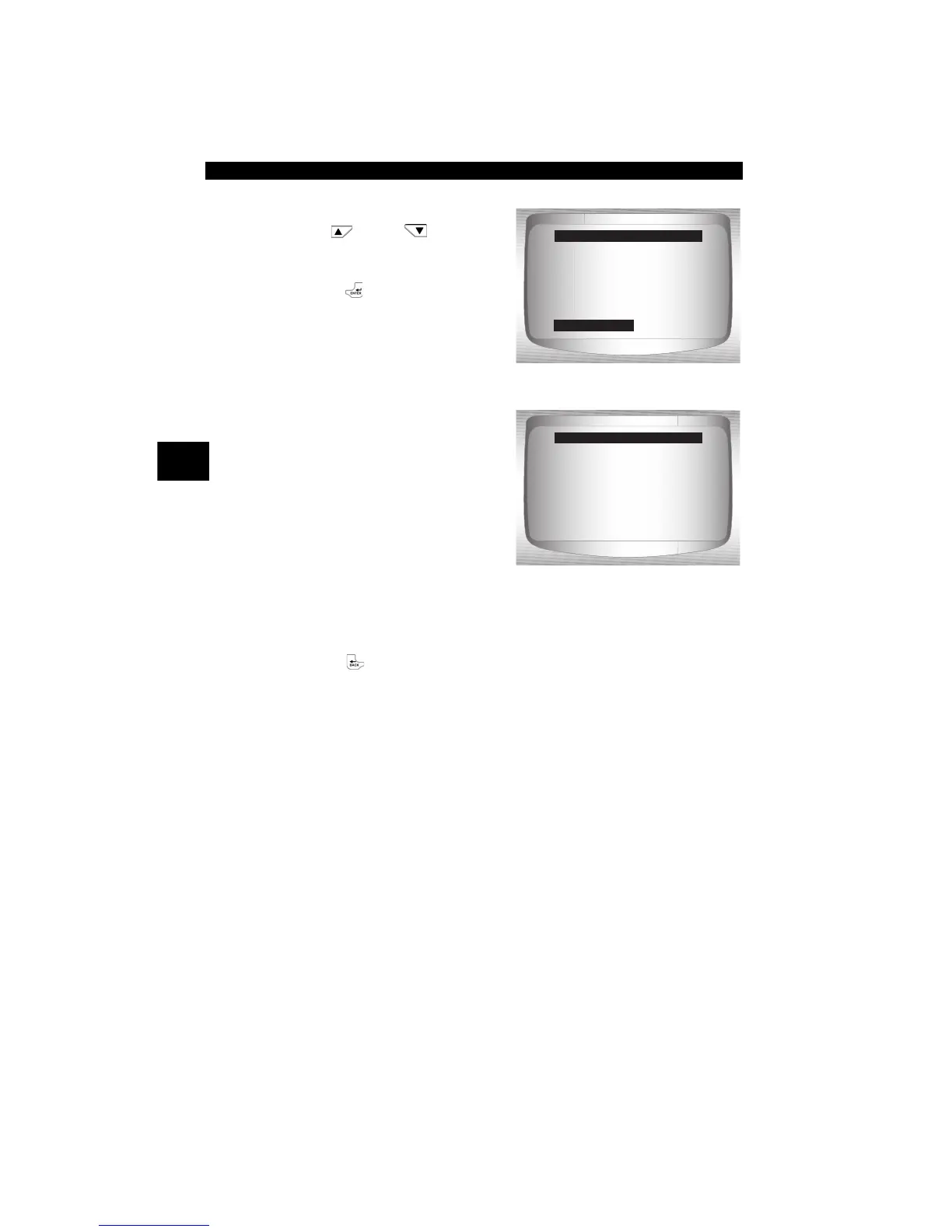
From System Setup menu:
1.Select Memory Test.
•Use
UP
or
DOWN
arrow key until Memory Test
is highlighted.
•Press
ENTER.
❒ Memory Test may take
several minutes to complete.
❒ Memory Test results display.
❒ If no problems were
detected, then PASS is dis-
played
❒ If RAM fails, an error
message is shown.
❒ If FLASH fails, a checksum
is shown.
2. Return to System Setup menu.
•Press BACK.
=====================
Print Header
Language Setup
Tool Information
Display Test
Keypad Test
Memory Test
System Setup
Memory Test
=====================
INT RAM Passed
INT FLASH Passed
EXT FLASH Passed
Memory Test
Press BACK
To Exit


 To Next Page