• • • • • • • • • • • • • • • • • • • • • • • • • • • • • • • • • • • • • • • • • • • • • • • • • • • • • • • • 4 – 37
Diagnostic Menu
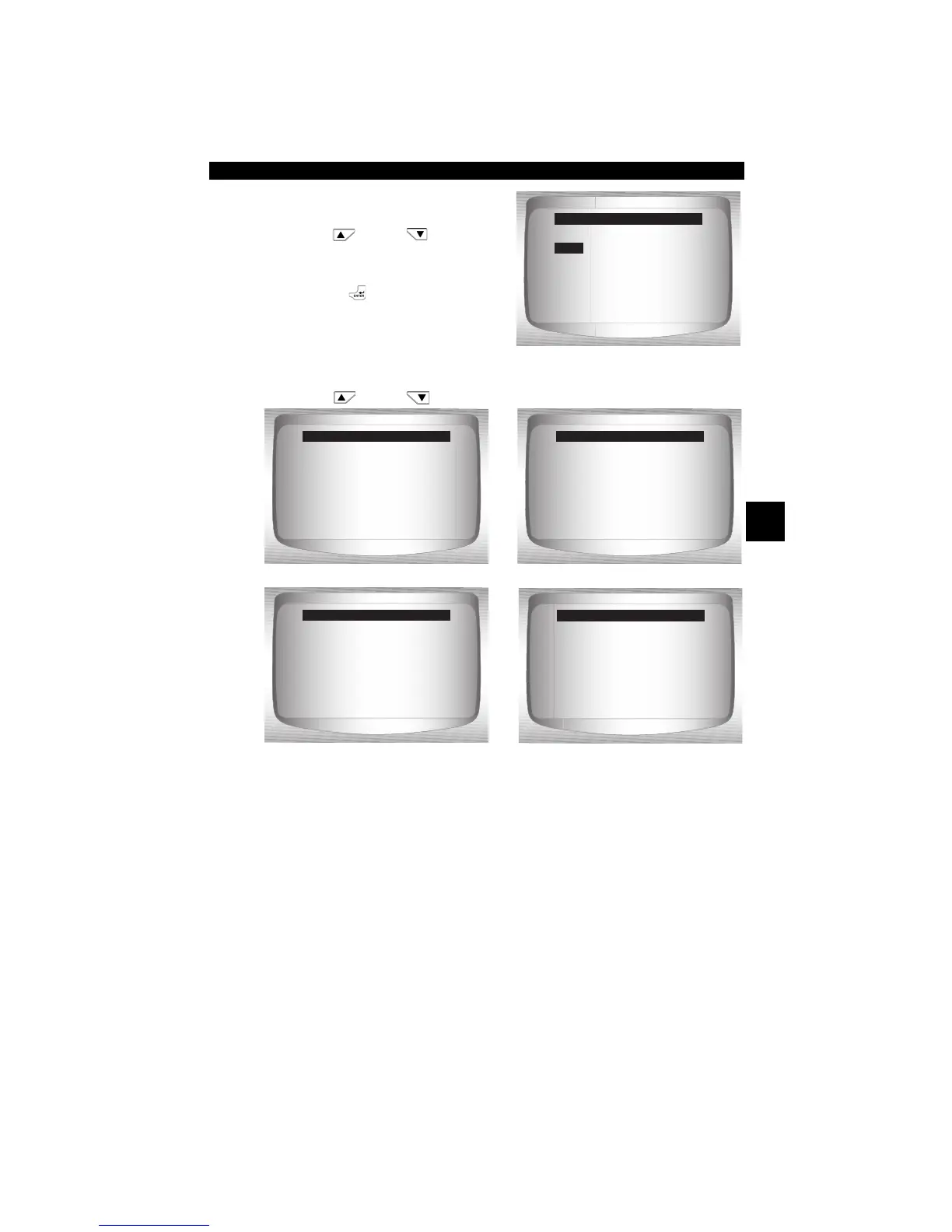
2. Select information to view
from Menu.
•Use
UP
or
DOWN
arrow key to highlight desired
selection.
•Press
ENTER
.
3. View Information Supported
by Vehicle.
•Use
UP
or
DOWN
arrow key (if required).
✓ In the above examples, Module $00 and $04 returned data. Scroll
down to view information. CVNs are shown as hexadecimal numbers.
✓ Abbreviations and names for in-use performance tracking data
supported by Scan Tool are shown below. Not all data is supported
by all vehicles.
=====================
VIN
CVN
CAL ID
IPT
Vehicle Information
VIN
=====================
CVN #1 Mod $04
9D 3B 07 AE
CVN #2 Mod $00
12 08 25 DC
CVN
=====================
CAL ID #1 MOD $04
4F 1910 156 G 0070
CAL ID #2 MOD $00
4F 0910 560 A 0010
CAL ID
=====================
VIN #1 Mod $10
5GZDV03L85D278166
VIN
=====================
AIR Mon Comp $00
14
AIR Mon Cond $00
15
IPT


 To Next Page