Installation and Commissioning Guide
ICUNO-MOD
15
14
Installation and Commissioning Guide ICUNO-MOD
Doc. No. 9590-3013 Ver. 5 200722
ActronAir is constantly seeking ways to improve the design of its products, therefore specifications are subject to change without notice.
Copyright © 2019 Actron Engineering Pty. Ltd.
Troubleshooting Table:
Symptom Probable Cause Suggested Resolution
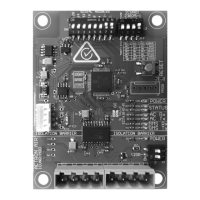
Power LED (Red) is
OFF
No Power to BMS
Card
• Confirm Power to Outdoor Unit and power on the UNO Outdoor Board.
• Check interconnect cable connection between UNO Outdoor Board and BMS
Card. See Section 04 for correct installation procedure.
• Check continuity of interconnect cable.
BMS Card is Faulty • If there is power to the UNO Board, the interconnect cable is secure, then the
BMS card may be faulty.
• Replace the BMS Card.
Status 1 LED (Amber)
Flashing
AC Tx (Blue) LED OFF
BMS Card is Faulty • Replace the BMS Card.
Status 1 LED (Amber)
Flashing
AC Rx (Blue) LED OFF
No Communication
with UNO Board
• Check the interconnect cable connection between UNO Outdoor Board and
BMS Card. One or more cables/connections may be faulty.
• If COM3 LED on the UNO Outdoor Board is flashing and all data harness
connections are secure, then there may be a fault with the UNO Outdoor Board
or BMS Card.
• Replace the BMS Card.
• If this fails to resolve the issue, replace the UNO Outdoor Board.
Status 2 LED (White)
OFF
BMS Rx (Amber) OFF
No Communication
from BMS Master
• Confirm that BMS Master is currently operating.
• Check BMS RS-485 connections from the BMS Master to this BMS Card.
Status 2 LED (White)
OFF
BMS Rx (Amber)
Flashing
Incorrect Serial
Address
• Confirm correct Serial Address Parity as per your installed BMS unit setup and
change DIP switch settings as required. See Section 04.03.01 for Serial Address
DIP switch settings.
• Reset the BMS Card following any DIP Switch changes on the board, by pressing
the RESET button.
Status 2 LED (White)
Flashing Slowly
(once every 2 seconds)
Incorrect Baud Rate
or Data Parity
• Confirm correct Baud Rate and Data Parity as per your installed BMS network
setup and change DIP switch settings as required.
• See Section 04.03.02 for Baud Rate and Parity DIP switch settings.
• Reset the BMS Card following any DIP Switch changes on the board, by pressing
the RESET button.
Status 2 LED (White)
Flashing Rapidly
(twice every second)
BMS Card has
detected RS-485
data corruption
(CRC Cyclic
Redundancy Check
has failed)
• Check for any sources of noise or interruptions on the BMS RS-485 Network.
• Ensure correct RS-485 grounding and shielding throughout BMS RS-485
Network.
• Ensure correct cable specifications throughout BMS RS-485 Network.


 To Next Page