Installation and Commissioning Guide
ICUNO-MOD
19
18
Installation and Commissioning Guide ICUNO-MOD
Doc. No. 9590-3013 Ver. 5 200722
ActronAir is constantly seeking ways to improve the design of its products, therefore specifications are subject to change without notice.
Copyright © 2019 Actron Engineering Pty. Ltd.
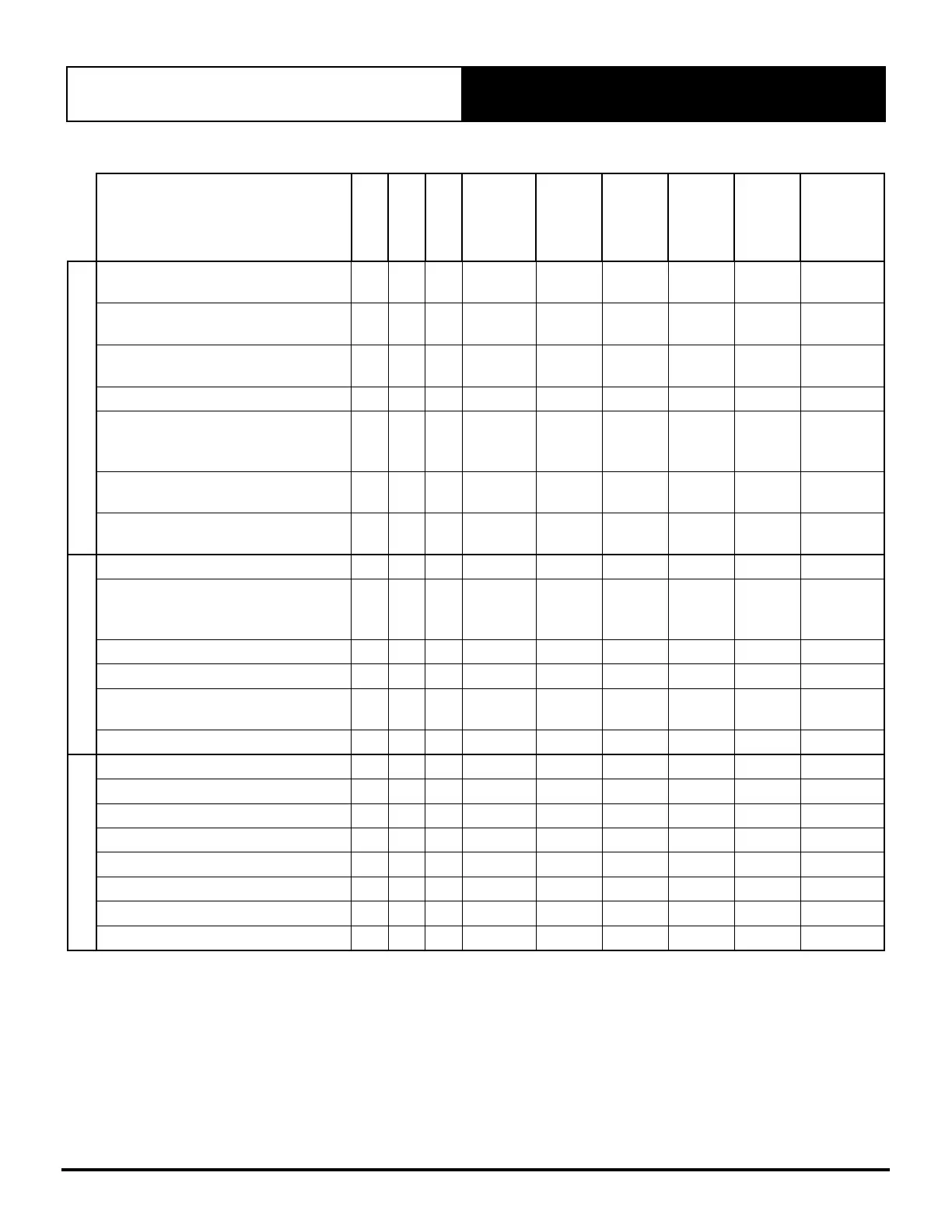
05.01.03. Basic BMS Points Table
Description
Digital
Inverter
Classic II
Type
Modbus
Register
Read/Write
UoM
Min
Max
Basic Unit Control
Turns the AC On/OFF via BMS
(0=Off, 1=On)
l l l
Analog 1 R/W 1 0 1
Set the Supply Fan Mode*
(1=Low, 2=Medium, 3=High, 4=Auto)
l l l
Analog 4 R/W 1 1 4
Reset Air Filter Notification
(0=Off, 1=Reset)
l l l
Analog 6 R/W 1 0 1
Set Air Filter Notification Timer (Hr)
l l l
Analog 7 R/W 1Hr 0Hr 10000Hr
Mode of Operation (1=Heat Only,
2=Cool Only, 3=Auto Changeover,
4=Fan Only)
l l l
Analog 101 R/W 1 1 4
Set Master Setpoint Temperature
(0.1°C)
l l l
Analog 102 R/W 0.1°C 16.0°C 30.0°C
Set Supply Fan Controls
(0 = Standard, 1 = Continuous)
l l l
Analog 105 R/W 1 0 1
Unit Status
Alarm Output (0=Off, 1=On)
l l l
Analog 503 R 1 0 1
BMS Demand Mode
(0=No BMS, 1=Basic BMS,
2=Advanced BMS)
l l l
Analog 505 R 1 0 2
Air Filter Notification (0=Off, 1=On)
l l l
Analog 506 R 1 0 1
Air Filter Run Timer (Hr)
l l l
Analog 509 R 1Hr 0Hr 10000Hr
Actual System Running Capacity
(0.1%)
l l l
Analog 801 R 0.1% 0.0% 100.0%
Room Temperature (0.1°C)
l l l
Analog 851 R 0.1°C -99.9°C 99.9°C
Zone Control
Set zone 1 (0=Off, 1=On)
l l
Analog 5001 R/W 1 0 1
Set zone 2 (0=Off, 1 =On)
l l
Analog 5002 R/W 1 0 1
Set zone 3 (0=Off, 1=On)
l l
Analog 5003 R/W 1 0 1
Set zone 4 (0=Off, 1=On)
l l
Analog 5004 R/W 1 0 1
Set zone 5 (0=Off, 1=On)
l l
Analog 5005 R/W 1 0 1
Set zone 6 (0=Off, 1=On)
l l
Analog 5006 R/W 1 0 1
Set zone 7 (0=Off, 1=On)
l l
Analog 5007 R/W 1 0 1
Set zone 8 (0=Off, 1=On)
l l
Analog 5008 R/W 1 0 1
* Fan speed PWM limits can be set from the ActronAir units service menu. Consult the Air Conditioner units installation
guide for more information. If system has been configured as a single speed indoor fan Register 4 - Supply fan mode can
only be set to MEDIUM speed. “4=Auto” is only available on Advance Units and after a self-learn is successful from the wall
controller.
05.02. Advanced BMS Control
If the Air Conditioning unit is setup for Advanced BMS Demand Mode, then Modbus Register 505 should read a 2. If Register
505 reads any other value, then the unit has not been correctly setup to run in Advanced BMS Control. See Section 05.02 for
instructions on configuring your unit for Advanced BMS Control.


 To Next Page