17
Setting the
Time and Day
LM7
7-DAY PROGRAMMABLE MODEL
AUTO
HEAT / COOL
AUTO
HEAT / COOL
AM
TIME
SET
ON
OFF
PROGRAM
EXIT
SELECT
SET TEMP
REPEAT /
5
3
2
1
6
4
1
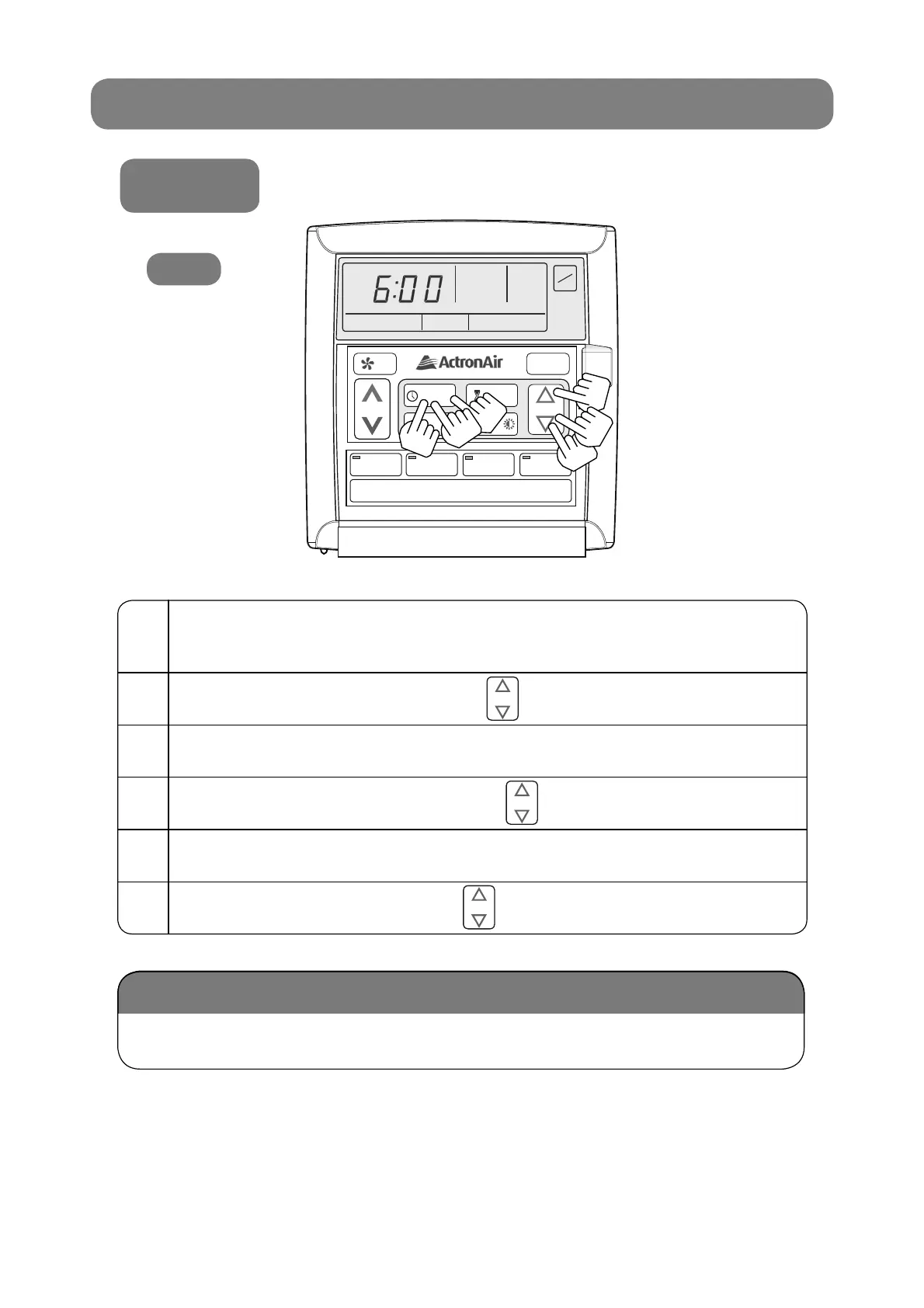
Press the “PROGRAM” button 3 times and “SET” will be
illuminated with “TIME” fl ashing.
2
Adjust the “Hours” by using buttons.
3
Press the “PROGRAM” button.
4
Adjust the “Minutes” by using buttons.
5
Press the “PROGRAM” button.
6
Adjust the “Day” by using buttons.
During a power failure, the clock retains the time and day via the backup battery
inside the system.
Battery Backup
SELECT
SELECT
SELECT



 To Next Page