21
Repeating a Days
Events & Times
7-DAY PROGRAMMABLE MODEL
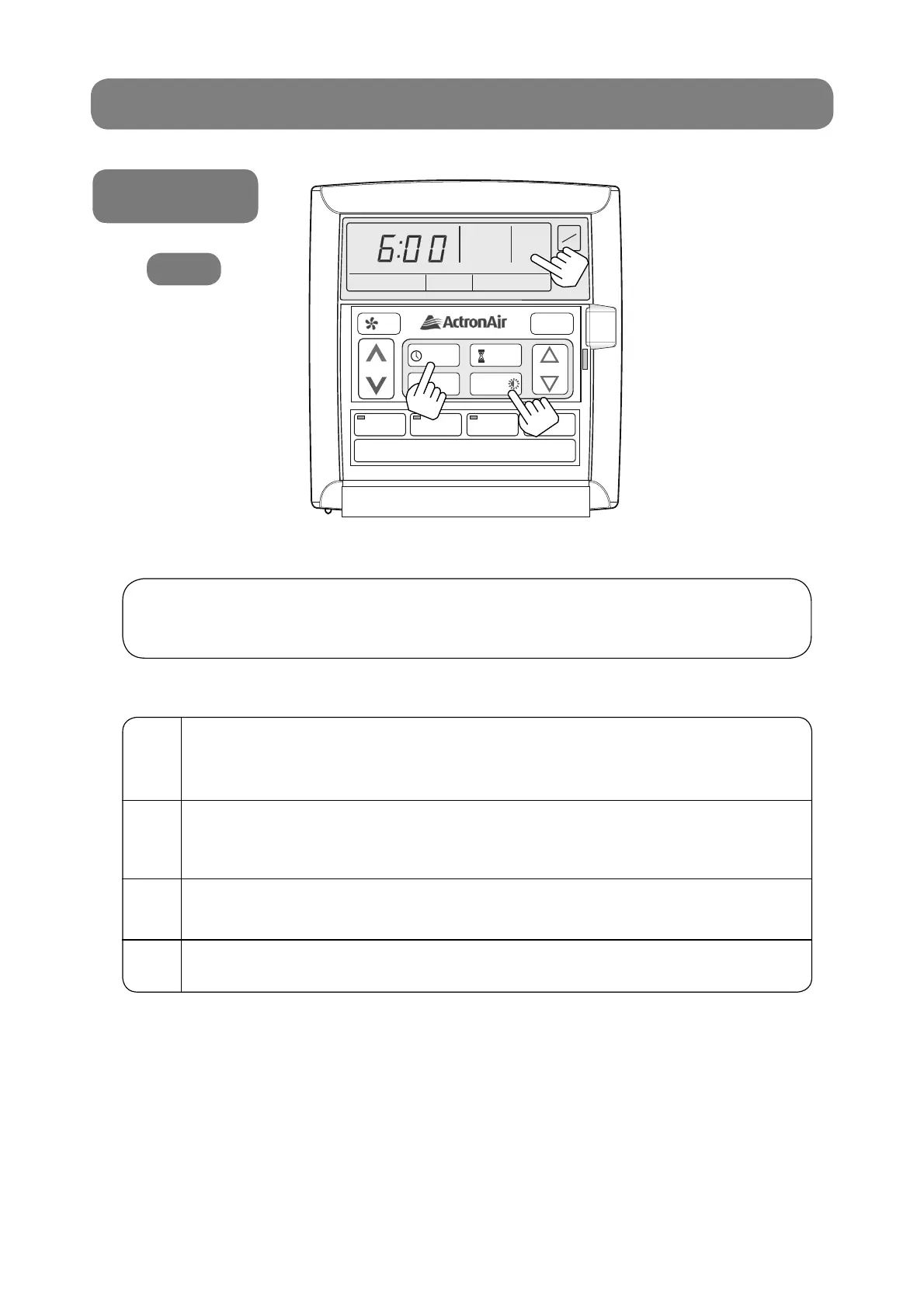
This feature allows you to automatically repeat the previous days, events and times,
therefore eliminating the need to re-enter the events and times.
1
Go to the day you wish to copy and program your events
and times.
See “Programming the Events” page 19.
2
Press PROGRAM button until the following days,
event 1, ON time is displayed.
Display shows “SET”, “EVENT”, “1”, “TIMECLOCK” and “ON”.
3
Press the REPEAT button.
You have now copied the previous days events into the current day displayed.
4
Repeat steps 2 and 3 for the remaining days.
LM7
AUTO
HEAT / COOL
AUTO
HEAT / COOL
THU
AM
TIME CLOCK
ON
EVENT
1
SET
ON
OFF
PROGRAM
EXIT
SELECT
SET TEMP
REPEAT /
2
3
1



 To Next Page