LOCKLOCK
RSQTRSQT
REVREV
SCRSCR
TSQTTSQT
SA / DSA / D
W / NW / N
LAMP KEY
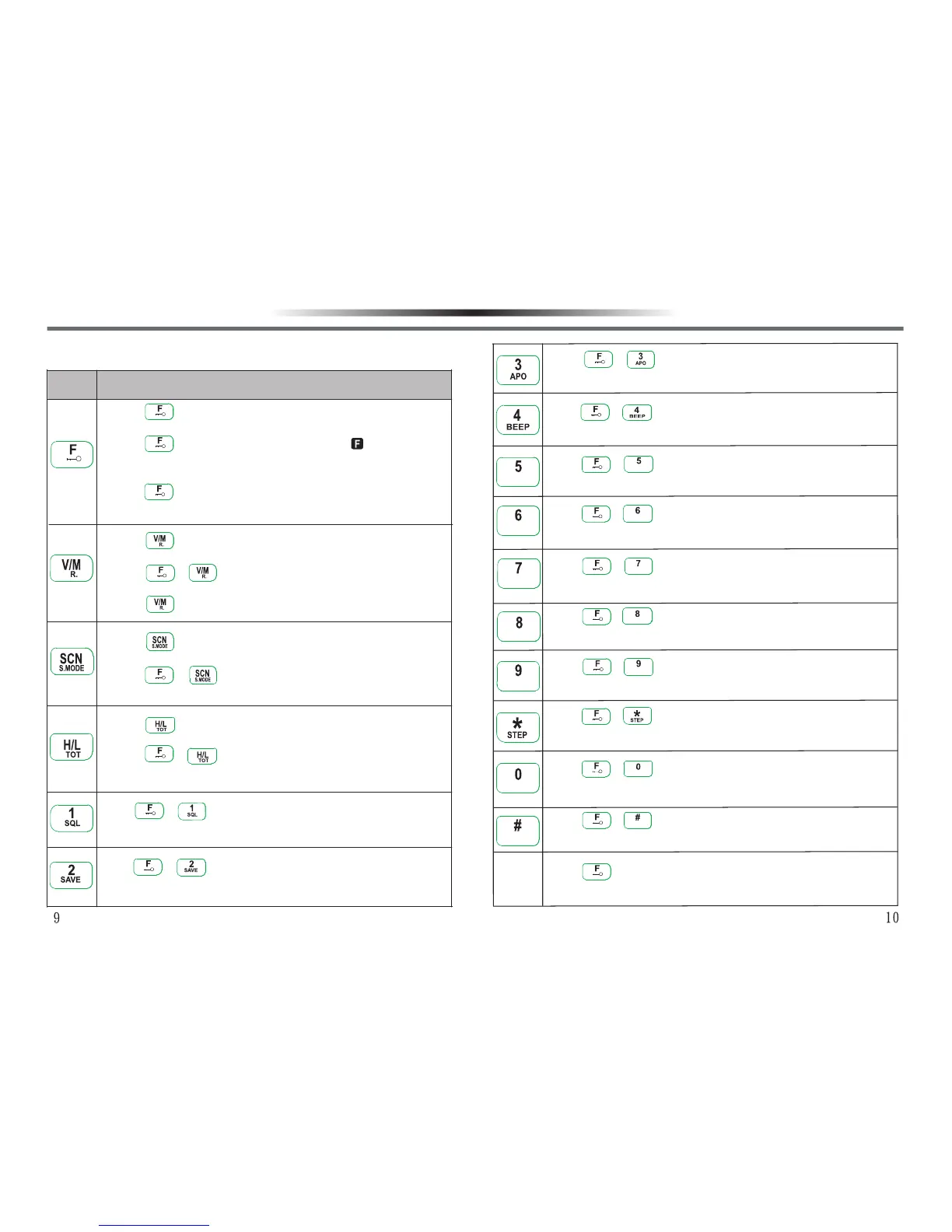
1.Press key for 3 seconds under VFO/MR/CH mode to
unlock/lock the keypad.
2.Press key under VFO/MR/CH mode, will appear
for 7 seconds, press other keys during the period to enter
into the second function selection mode.
3.Press + ‘’Power On’’ to proceed with initialization and
all data clearance, and restore to the default state.
1.Press to switch between VFO/MR modes under VFO
/MR mode.
2.Press + keys under VFO mode to store memory
channels.
3.Press +’’Power On’’ to switch between MR/CH modes.
1.Press key under VFO/MR/CH mode to turn on / off
scan function.
2.Press + keys under VFO/MR/CH mode to select
scan method.
1.Press key under VFO/MR/CH mode to select Hi/Lo
Power.
2.Press + keys under VFO/MR/CH mode to select
Time-out Timer.
Press + keys under VFO/MR/CH mode to adjust
squelch level.
Press + keys under VFO/MR/CH mode to turn on /
off battery saver.
Press + keys under VFO/MR/CH mode to turn on /
off Automatic Power Off.
Press + keys under VFO/MR/CH mode to turn on /
off Keypad Beeper.
Press + keys under VFO/MR/CH mode to turn on /
off Transceiver Lock Mode.
Press + keys under VFO/MR mode to select
Receive with CTCSS/DCS or not.
Press + keys under VFO/MR mode to select
Transmit with CTCSS/DCS or not.
Press + keys under VFO mode to turn on/ off
Offset Direction / Frequency.
Press + keys under VFO mode to turn on/ off Voice
Compander / Scrambler.
Press + keys under VFO mode to set Frequency
Step Setting.
Press + keys under MR mode to select Scan Lock /
Unlock.
Press + keys under VFO mode to select Broad /
Narrow Band.
Press + LAMP keys under VFO/MR/CH mode to turn on
/ off Background Lamp.
W / NW / N
SA / DSA / D
SCRSCR
TSQTTSQT
RSQTRSQT
LOCKLOCK
REVREV
GETTING ACQUAINTEDGETTING ACQUAINTED
KEYPAD OPERATIONKEYPAD OPERATION
Indicator
Function Operation



 To Next Page