Press + .
Press +
to transmit.
Press +
to receive.
Press + .
Slightly press
for 1 second.
Press + .
Press for 3
seconds.
SA / DSA / D
RSQTRSQT
TSQTTSQT
W / NW / N
REVREV
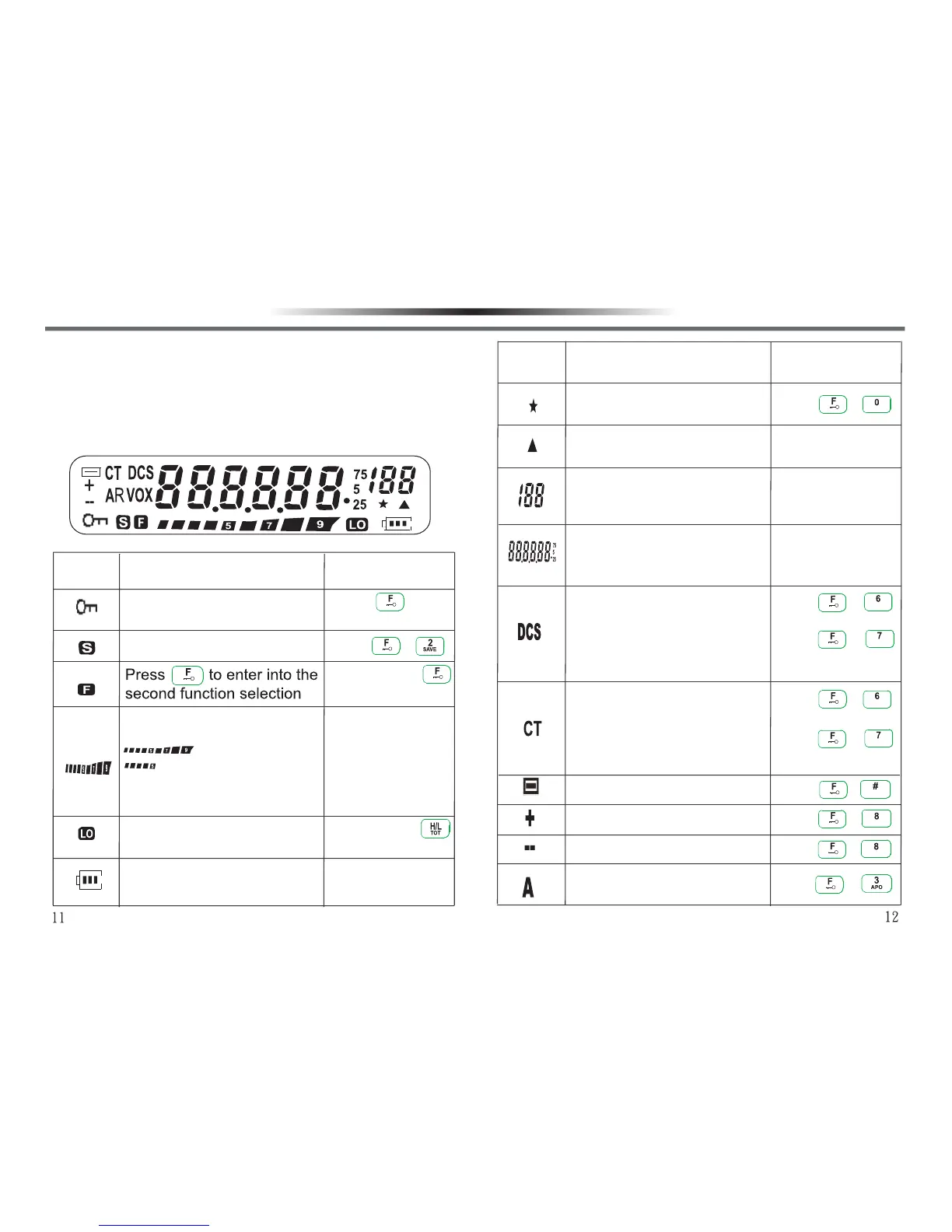
LCD DISPLAY
You can see various indicators with different functions.
Whenever you forget or don’t know their meanings, or
how to cancel the present setting, you will find the
following list useful.
Keypad Lock
Operation
:High power
:Low power
Function DescriptionIndicator
RSQTRSQT
TSQTTSQT
REVREV
Battery Saver
Slightly press
for 1 second.
And indicate receiving signal
strength under receiving state.
Indicate transmitting power output under
transmitting state:
Low power state
Battery power consumption
indicator
Operation
Function Description
Indicator
Appears when memory
channel scan is locked.
Appears when memory
channel contains data.
Display the current memory
channel number under
Memory Recall Mode.
Appears when DCS function
is activated.
Appears when CTCSS
function is activated.
Show Narrow Band.
Positive offset direction.
Negative offset direction.
Appears when Auto Power
Off function is activated.
Press +
to transmit.
Press +
to receive.
Press + .
Press + .
Press + .
GETTING ACQUAINTEDGETTING ACQUAINTED
Display VFO frequency or CH
channel number or vario
us
alphanumeric information.



 To Next Page