ADJ Products, LLC - www.adj.com - KAOS User Manual Page 11ADJ Products, LLC - www.adj.com - KAOS User Manual Page 10
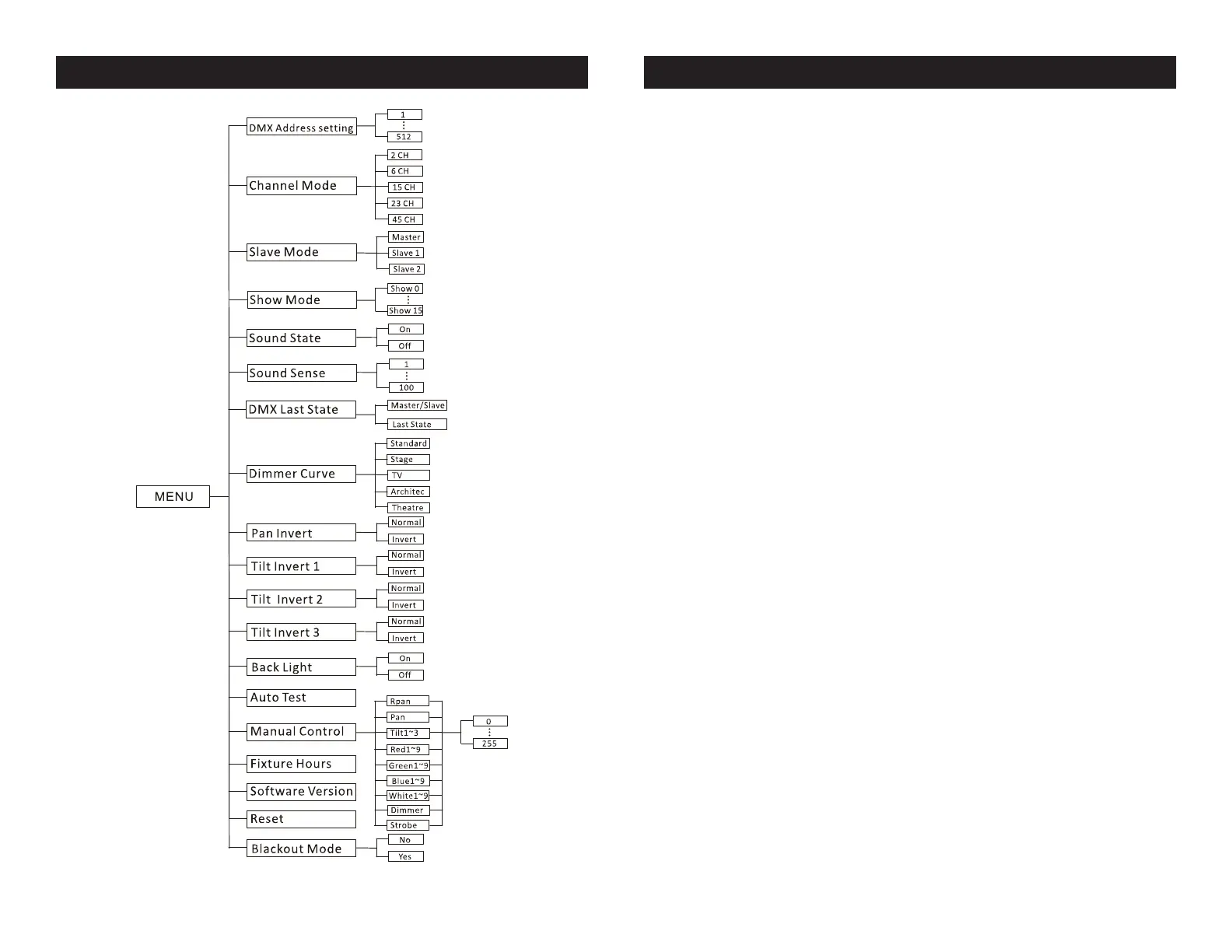
KAOS System Menu
System Menu: When making adjustments press ENTER
to conrm your setup and then press and hold the MENU
button for at least 3 seconds. To exit without making any
adjustments press the MENU button.
DMX Address Setting - DMX Address Setting.
1. Press the either the MENU, UP, or DOWN buttons until “DMX
Address Setting” is displayed, press ENTER.
2. The current address will now be displayed and ashing.
Press the UP or DOWN buttons to nd your desired address.
Press ENTER and then press and hold the MENU button to set
your desired DMX address.
Channel Mode - This will let select your desired
DMX channel mode.
1. Press the either the MENU button until “Channel Mode” is
displayed, press ENTER. Either “2CH”, “6CH”, “15CH”, “23CH”
or “45CH” will be displayed
2. Press the UP or DOWN buttons to choose your desired DMX
mode and press ENTER to conm and exit.
Slave Mode - This will let you set unit as a master or
slave in a master/slave conguration.
1. Press the MENU button until “Slave Mode” is displayed,
press ENTER. Either “Master”, “Slave 1” or “Slave 2” will be
displayed.
2. Press the UP or DOWN buttons until your desired setting is
displayed, press ENTER and then press and hold the MENU
button to conm.
NOTE: In a Master/Slave conguration you can set one xture
to Master and then set the next xture to “Slave 2”, the xtures
will now have contrast movement to each other.
KAOS System Menu



 To Next Page