24
RIGGING BAR
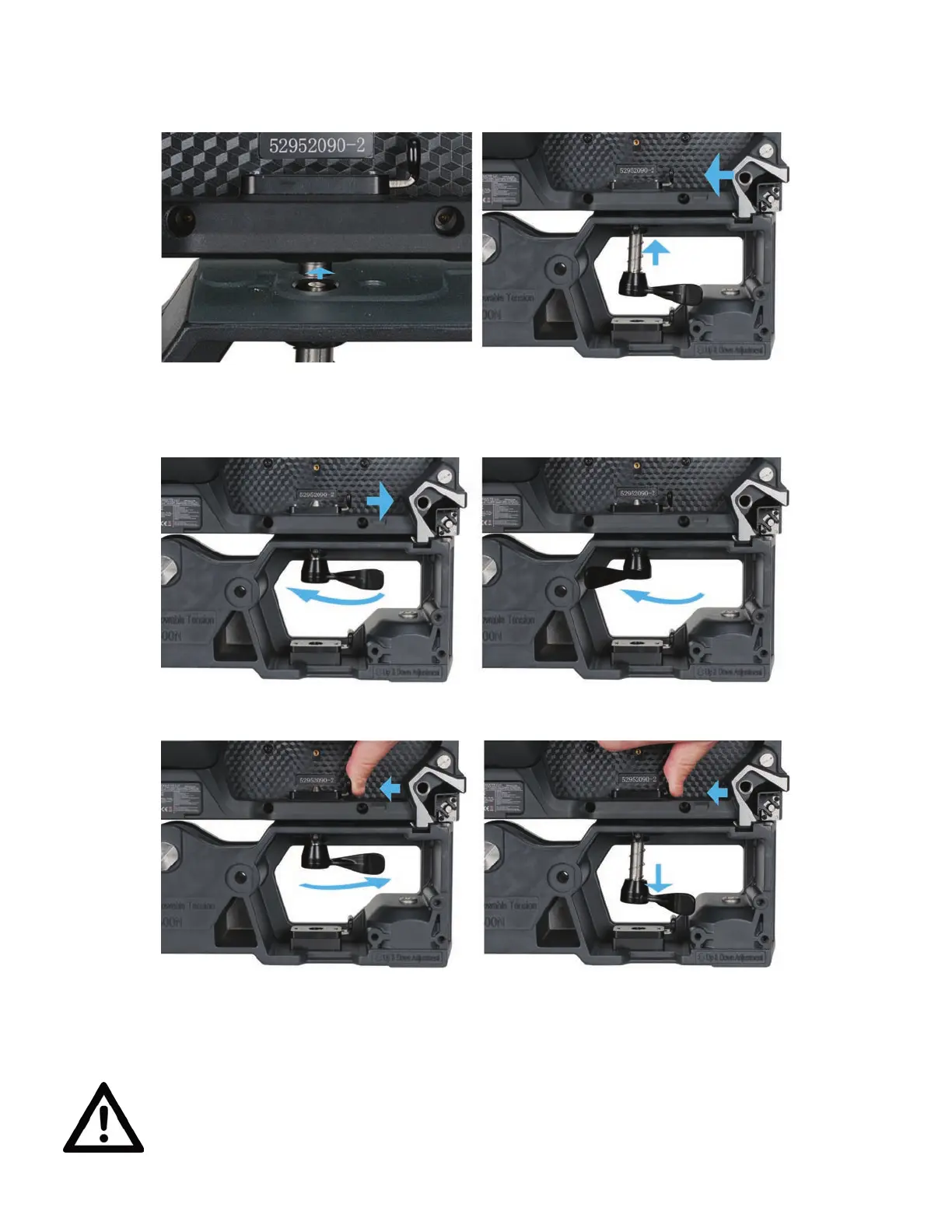
VERTICAL STACK CONFIGURATION
1. Align the vertical positional posts with
their corresponding alignment holes,
then insert the posts into the holes.
2. Press spring-loaded locking latch to
the left while pressing vertical connec-
tor upwards into locking latch.
3. Release latch to hold the vertical connector. Lock in place by twisting the vertical
connector to the left.
USE CAUTIONS WHEN INSTALLING VIDEO PANELS USING THE RIGGING BAR
FOR STACKED ASSEMBLIES. THESE DEVICES ARE NOT INTENDED FOR USE
AS A FREE-STANDING ASSEMBLY, AND ARE INHERENTLY UNSTABLE. STACKED
VIDEO PANEL ASSEMBLIES MUST BE SECURELY INSTALLED BY A QUALIFIED
TECHNICIAN ONLY!
4. To unlock the vertical connector, rotate the lever to the right (counter-clockwise),
then press the spring-loaded locking latch inward. The vertical connector will
drop open.



 To Next Page