15 Chapter 2
2.2.2 Network Connection
There are two ways to use the 10/100Base-T Ethernet connector located
on the ADAM-4570 series:
1. For Local Area Network (LAN) applications using the
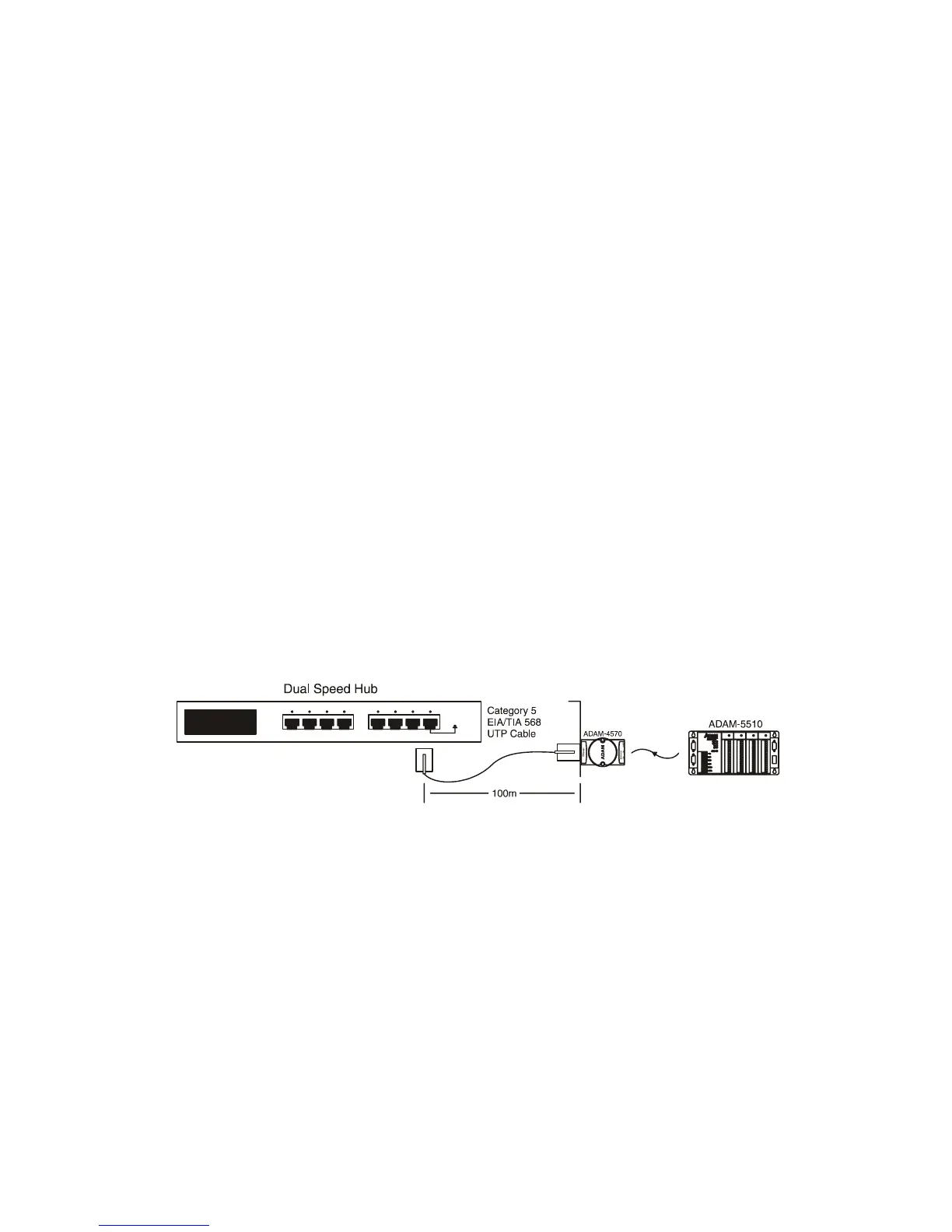
ADAM-4570 series, you will simply plug one end of your Ethernet cable
into the 10/100Base-T connector, and the other end into the hub con-
nected to your network.
2. When installing and configuring, you will find it convenient to hook
the ADAM-4570 Series directly to your computer’s Ethernet card. To do
this you will need to use a “crossed-cable”, such as the one supplied with
your server.
Cabling requirements for the Ethernet side
Use an RJ-45 to connect the Ethernet port of the ADAM-4570 series to
the network hub. The cable for connection should be Category 3 (for
10Mbps data rate) or Category 5 (for 100 Mbps data rate) UTP/STP
cable, which is compliant with EIA/TIA 586 specifications. Maximum
length between the hub and any ADAM-4570 Series is up to 100 meters
(ca.300 ft).
Figure 2.7: Connecting ADAM-4570 Series to a Hub


 To Next Page