ADAM-4570 Series User Manual 36
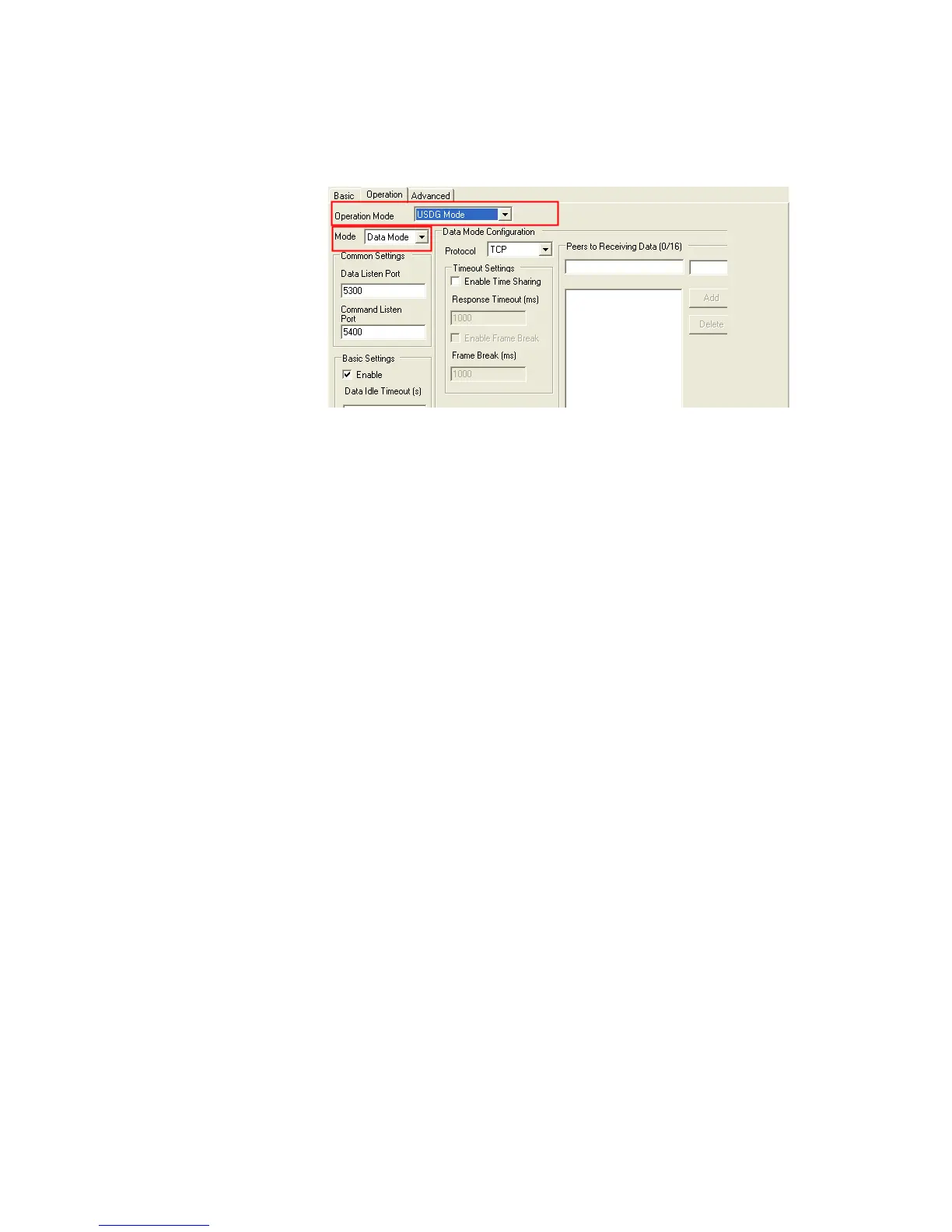
You might select “USDG Mode” as the following figure to change the
mode of the port to TCP server/client or UDP mode.
Protocol
The ADAM-4571/4570 provides TCP/IP and UDP two protocols. In
settings, you can choose either TCP mode or UDP mode according to
your application.
Data Listen Port
The TCP/UDP port number represents the source port number, and the
number is used to identify the channel for remote initiating connections.
Range: 1024-65533. If an unknown caller wants to connect to the system
and asks for some services, they need to define the TCP/UDP port to
carry a long-term conversation.
Each node on a TCP/IP network has an IP address, and each IP address
can allow connections on one or more TCP port. The well known TCP
ports are those that have been defined; for example, port 23 is used for
Telnet connections. There are also custom sockets that users and develop-
ers define for their specific needs. The default TCP/UDP port of the
ADAM-4571/4570 is 5300. The example initial 5300 is System Port, and
5301 is Data Port. But users can adjust them by one's preference or appli-
cation.
Each port has its own data listen port to accept connected request of other
network device. So, the data listen port can’t be set the same value. You
can transmit/receive data to/from device via the data listen port.


 To Next Page