24 / 34
connecting.
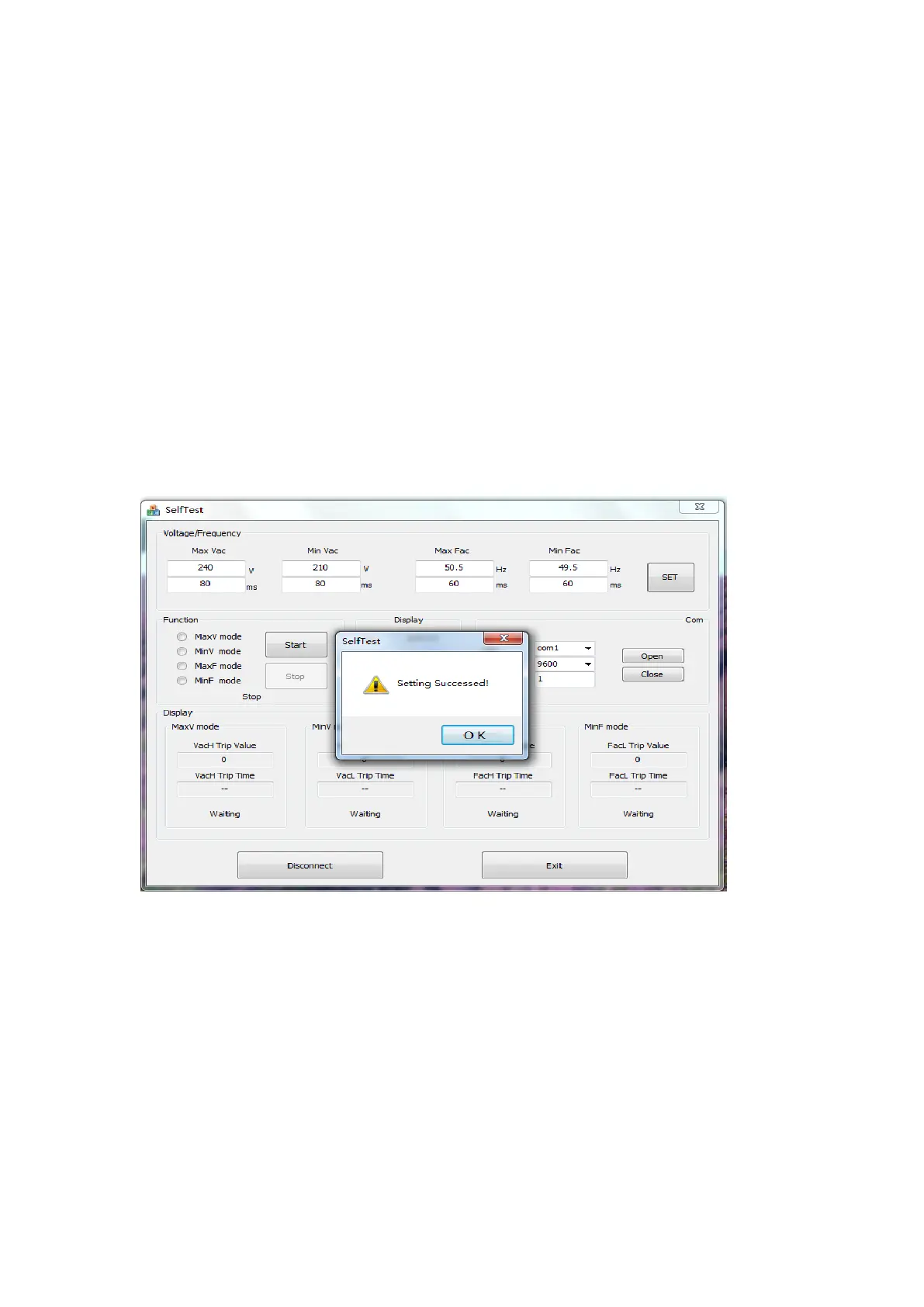
8.8 The values of the thresholds and software trip time for the grid voltage and the
grid frequency related to the auto test can be set. The default parameters are as
follows:
Max Vac (Maximum AC voltage threshold): 264.5V; ≤0.2s
Min Vac (Minimum AC voltage threshold): 92V; ≤0.2s
Max Fac (Maximum AC frequency threshold): 51.5Hz; <0.1s
Min Fac (Minimum AC frequency threshold): 47.5Hz; <0.1s
8.9 If all values are correct then the user can be able to click the “SET” button on the
PC screen to set the auto-test parameters. The interface will be displayed on the PC
screen as followings if successfully set.
8.10 After setting the values of the auto-test, there are four mode selections to test
the auto-test and the user can only select one mode for every time. After selecting
the mode, the user can click the button “Start” to start the auto-test. And if clicking
the “stop” button, the auto-test will stop. For example, if the user selects the MaxV
mode and clicks the button “Start”, the following will be shown on the PC screen.




 To Next Page