22 / 34
To ensure the correct statistical results of ‘day power’, please make sure the system
time is set to local time.
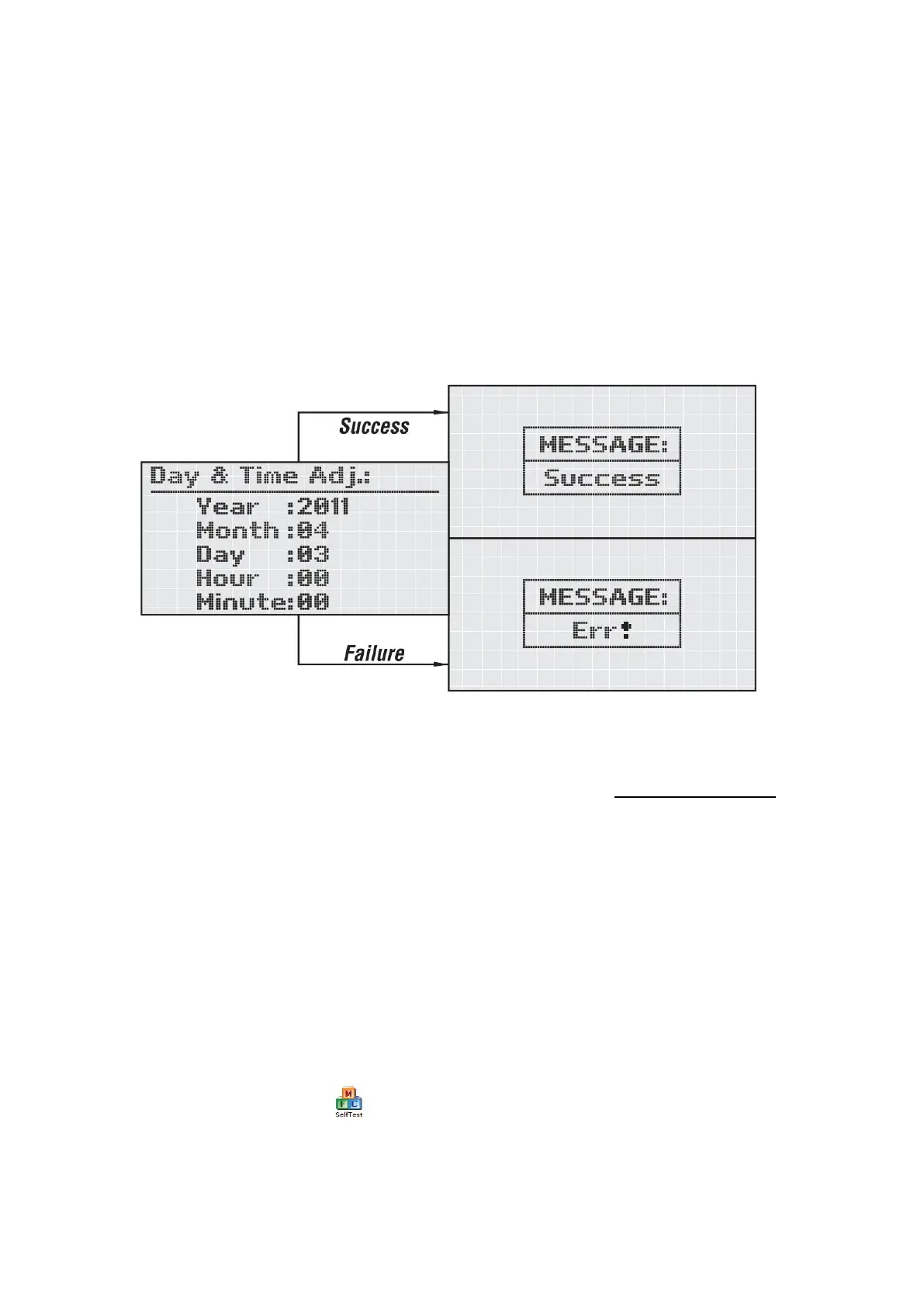
Press ‘Enter’ to get access to the ‘Date/Time Adj.’. Set the time by the procedure
below.
Pressing ‘Down’ to choose the option, and then use ‘Up’ key to set the number. After
adjusting the time and date, pressing ‘Enter’ to confirm and save, the interface will
show the figure as below. Press ‘Enter’ again the interface will return to the previous
main menu. Pressing ‘Esc’ if cancel.
8 Auto Test
The ‘Auto test’ can be download from Afore company’ website www.aforenergy.com.
The auto-test function is stipulated in accordance with the Italian Standard CEI 0-21.
It will enable verification of the voltage and frequency monitoring function.
8.1 The auto-test can be started by any user.
8.2 The auto-test software shall be installed in a PC that will communicate to the PV
grid-connected inverter through the “485 port”. For the overall duration of the
auto-test, the grid-connected inverter doesn’t export power to the AC grid. And
meanwhile make sure the inverter was connected to the PV arrays, and the inverter
was generating.
8.3 After clicking the icon , the interface will be displayed on the PC screen.




 To Next Page