10
A
Installation and Commissioning
SET-UP DEVICE USING AGD TOUCH-SETUP
STEP 2 – SET ZONES
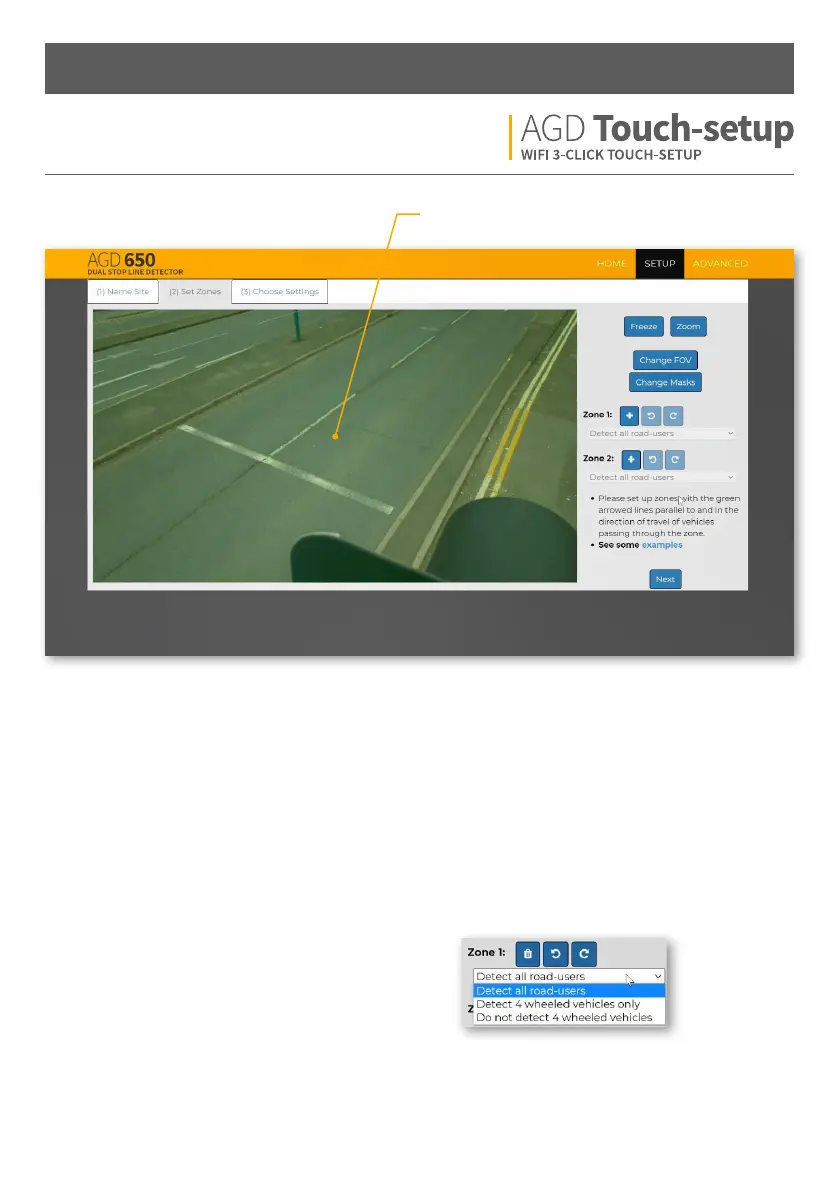
A - Live Traic View
Freeze - Pause the live traic view when the road is clear
of traic to aid set-up.
Zoom - Zoom out to extend zones o the screen.
Change FOV - Full field of view is recommended for most
installations. A reduced field of view may be beneficial
when detection zones are distant from the detector.
Please contact AGD for advice.
Change Masks - Used to mask objects to avoid unwanted
detections. See STEP 2 - SET ZONES CONTINUED section
for further detail.
Zone 1 - Detection area linked to OPTO 1 output.
Add / Undo / Redo buttons for quick set-up.
Zone 2 - Detection area linked to OPTO 2 output.
Add / Undo / Redo buttons for quick set-up.
Drop-down menus
Detect all road users: Detect all forms of vehicle and
pedestrians.
Detect 4 wheeled vehicles only: Detect all types
of vehicles with 4 wheels or more ignoring all
motorbikes, cyclists, scooters and pedestrians.
Do not detect 4 wheeled vehicles: Only detect
motorbikes, cyclists, e-scooters and pedestrians.
Ignore all other vehicles types.


 To Next Page