9
SET-UP DEVICE USING AGD TOUCH-SETUP
When logged in to the device for the first time you are presented with the set-up screen. This is the AGD Touch-
Setup, a three stage process that allows installers to configure the device quickly and eiciently.
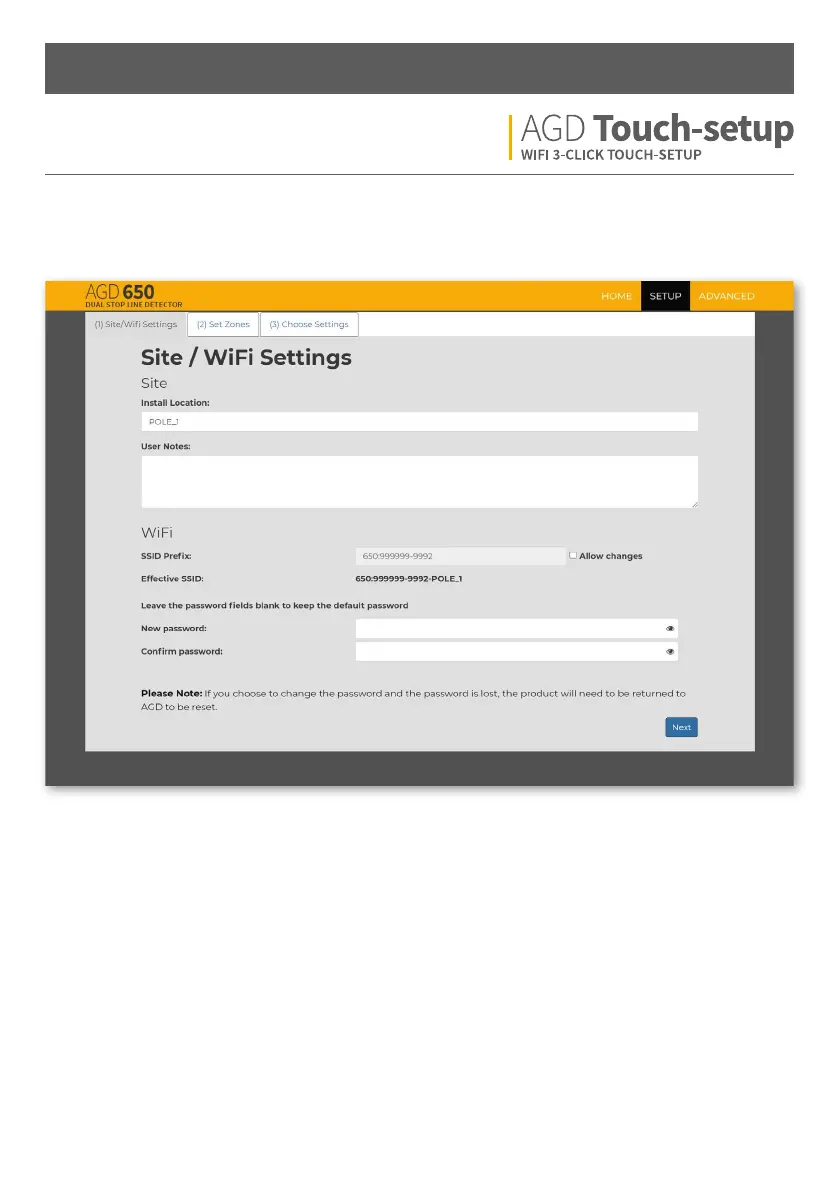
STEP 1 – NAME SITE
Install location - Used to locate the detector when
installed on a site. Entering an install location changes the
detector’s SSID.
You must reconnect to the new SSID aer a change is
made.
E.g. Inserting POLE_1 will change the SSID WiFi name
to 650:999999-9992-POLE_1
The use of a “space” within this field is not
supported; use an underscore “_” in its place.
Please note: If you have entered characters in this
field, you will be notified and have to reconnect to
the new SSID aer clicking “next”
User notes - An editable field to allow engineers to store
notes in the device. Max characters = 64.
SSID prefix - The first part of the SSID can be changed.
To change, you must first tick allow changes. Default is
recommended if using the default password.
Please note: If you have changed characters in this
field, you will be notified and have to reconnect to
the new SSID aer clicking “next”
Eective SSID - Displays what SSID will be shown when
searching for the new WiFi connection.
New password/Confirm password - To keep the default
password, leave these fields blank. To change you must
enter an identical password in both fields. Characters = 8
minimum, 63 maximum.
Installation and Commissioning


 To Next Page